Diet chart software for dietitians in India
Diet chart software with Indian foods in katori and roti.
Trainaq’s diet chart software builds each client’s diet chart to calorie and macro targets from Indian foods and recipes in katori and roti measures. Draft a week with AI, save templates, and give every client their own copy in the free Trainaq app, where they follow it and log what they eat.
- Web dashboard
- Trainaq Coach · Android, iPhone coming soon
- Clients follow the plan in the free Trainaq app
Updated 20 Nov 2026
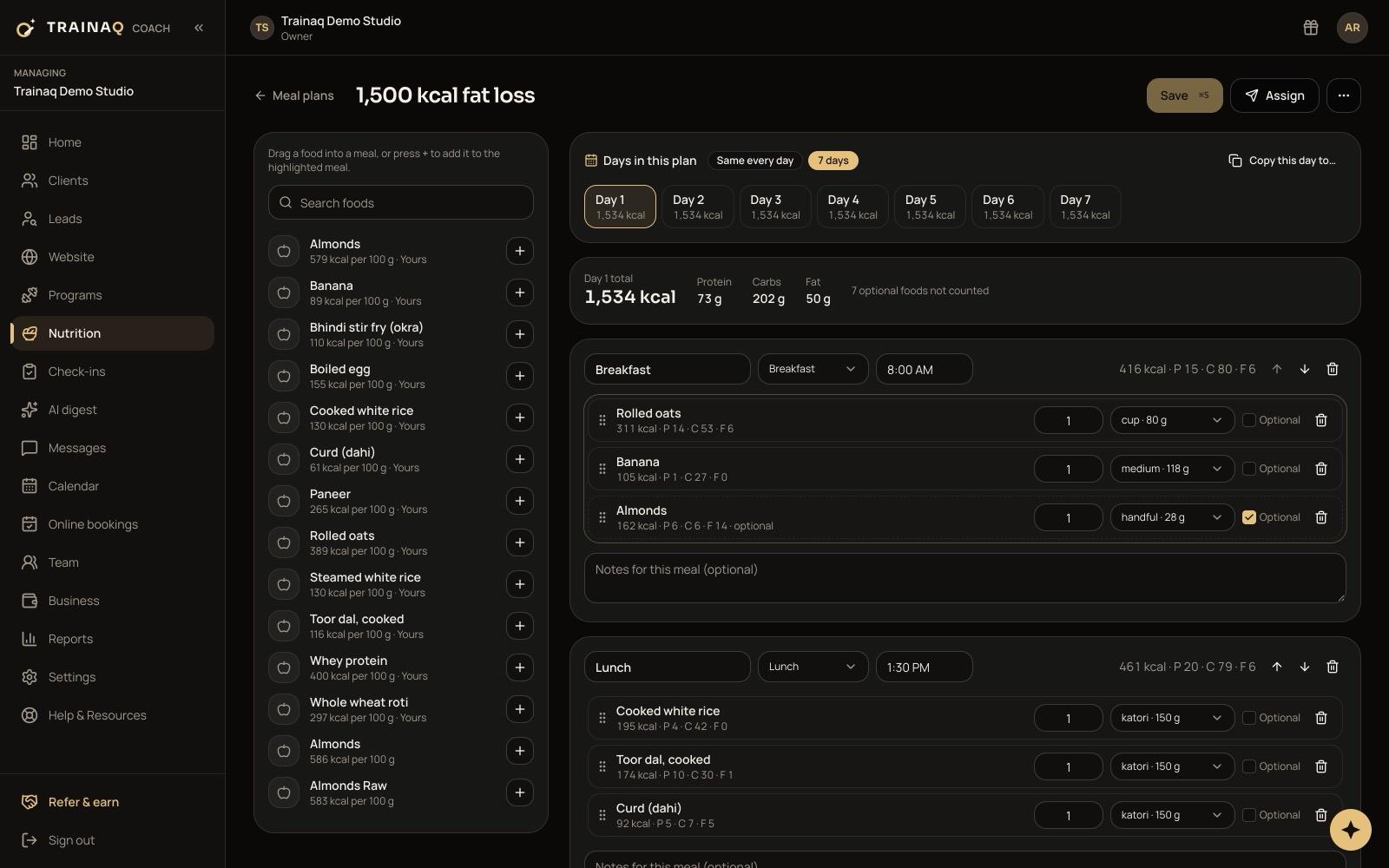
What is diet chart software?
It is where a dietitian or coach builds a client’s diet chart to calorie and macro targets from a food library, then sends it to the client. In Trainaq the totals add up as you build, a plan can be the same every day or seven different days, and each client follows their own copy in the Trainaq app.
- Meal plans are on every paid plan, and AI drafts on Pro and Studio
- Every paid plan starts with a 7-day free trial, and no card is needed.
- Grams, servings or household measures such as 1 katori or 1 roti
- One plan assigned to up to 100 clients, each with their own copy
Why dietitians switch
Why do diet charts made in Word or Excel slow dietitians down?
Because every diet chart is built by hand. You look up each food’s calories, add up the macros on a calculator, retype the diet chart for the next client and send it as a file that gets lost in a chat. A builder that adds up as you go and keeps each client’s copy gives those hours back.
Macros on a calculator
Every food looked up and every day added up by hand, then done again after one swap.
Retyped for every client
The same diet chart copied, renamed and edited for each new client, with mistakes along the way.
A file, not a plan
A PDF or image the client loses in their chats, and no log of what they really ate.
How it works
How do you make a diet chart in Trainaq?
Give the plan its calorie and macro targets, add meals and drag in foods with their portions, and watch each day’s totals against the targets. Make it the same every day or seven different days, save it as a template, then assign it to one client or many from a start date.
Set the targets and add meals
Give the plan its calories, protein, carbs and fat, a goal and a diet type such as vegetarian, eggetarian, non-vegetarian, vegan or Jain. Add meals such as breakfast, mid-morning, lunch, evening snack and dinner, each with a time and your notes.
- Up to 20 meals a day, each with its time and notes
- Work out a starting point with the free calorie and macro calculators
- Build on the web dashboard or in Trainaq Coach
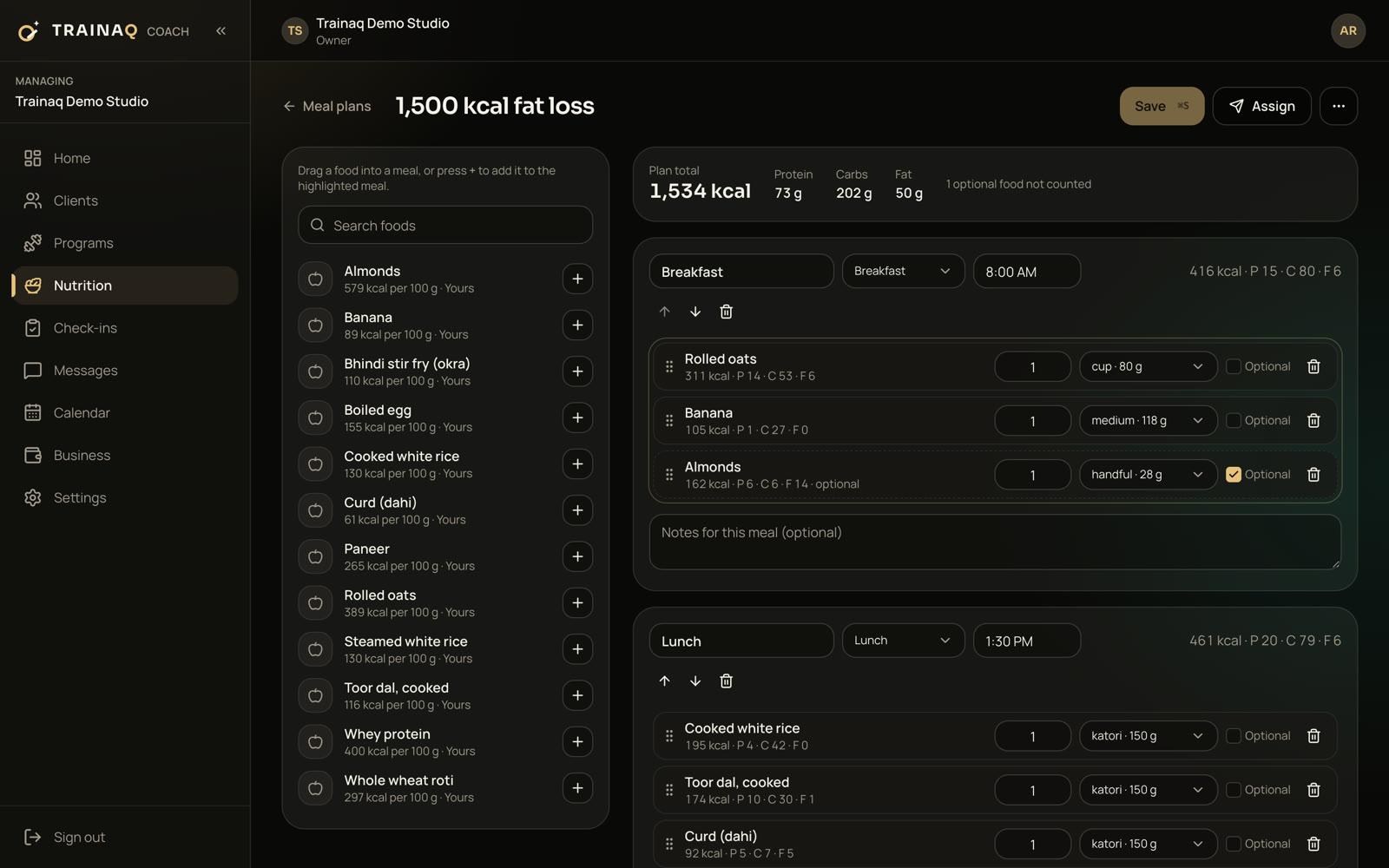
Add foods in the measures clients use
Search the food library and drag a food into a meal, or press its plus. Set each portion in grams, servings or a household measure such as 1 katori or 1 roti; its calories, protein, carbs and fat follow, and each day’s totals move against the plan’s targets as you build.
- Indian and international foods, and Trainaq’s own recipes
- Mark a food optional, such as a fruit to swap in; the client’s day total leaves it out
- Reorder foods by dragging, and meals with their arrows
Make it one day or seven
Choose “Same every day” for one day that repeats, or 7 days for a different plan each day. Day tabs keep each day apart with its own totals against the targets, and you can copy a finished day onto the others and change only what differs.
- Copy Monday onto the rest of the week, then swap a few foods
- On a client’s copy, the tabs read as weekdays from the start date
- A one-day plan shows “Every day” in the client’s app
Save templates, or start from Trainaq’s
Save any plan as a template and reuse it for the next client with the same goal. Start from one of Trainaq’s ready-made plans when you want a head start, or from an AI draft on the web dashboard and in Trainaq Coach. Your templates stay in your library; each client’s copy is separate.
- Each template keeps its goal, calories and diet type
- Edit one client’s copy without touching the template
- AI drafts wait for your review before any client sees them
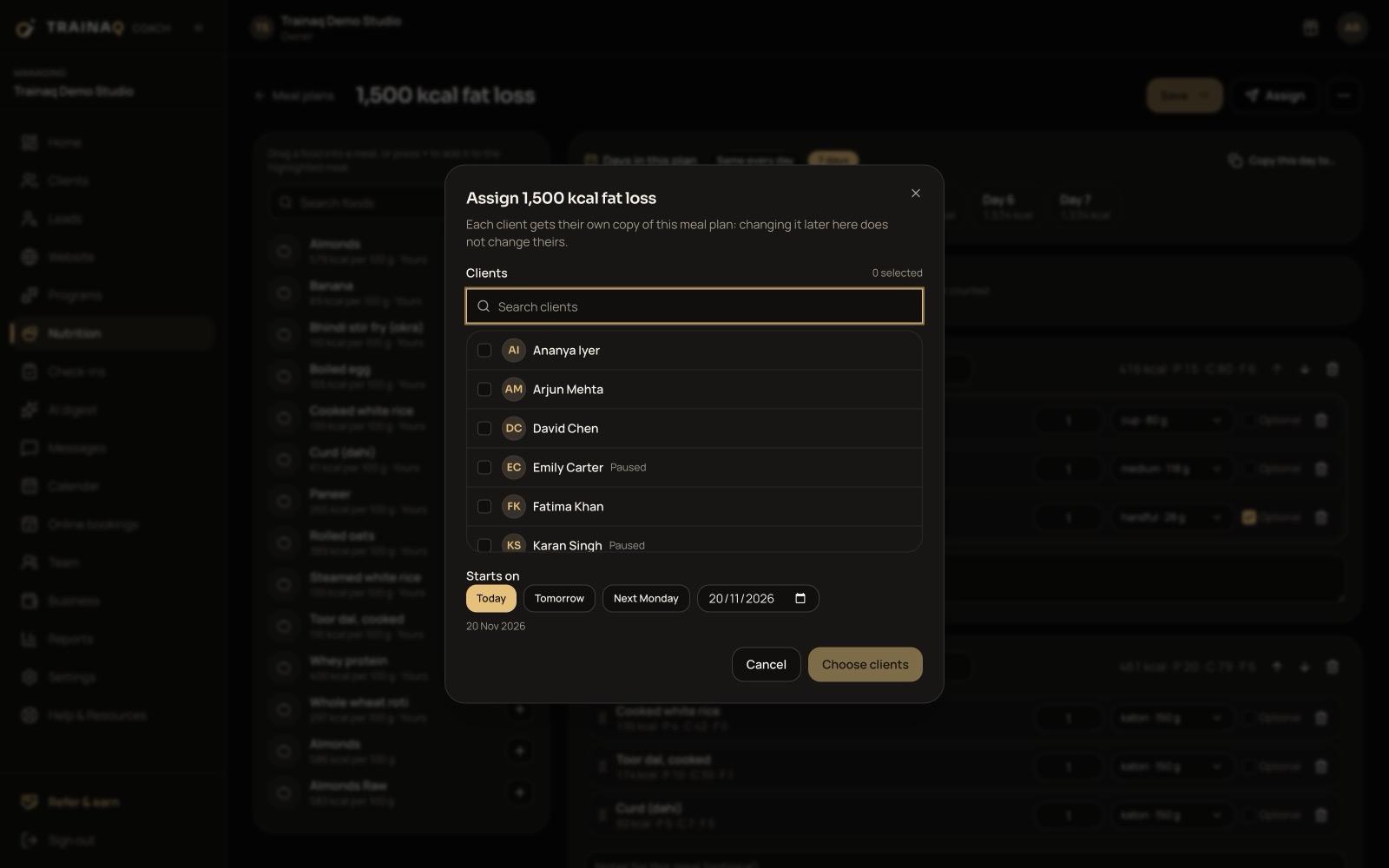
Assign it to one client or many
Assign the plan to one client, or to up to 100 from a start date. Each gets their own copy, and their calorie and macro targets are set from the plan unless you switch that off, so their food log measures against the same numbers you built to.
- A start date in the future: the client sees when it begins
- Change one client’s plan later without affecting anyone else
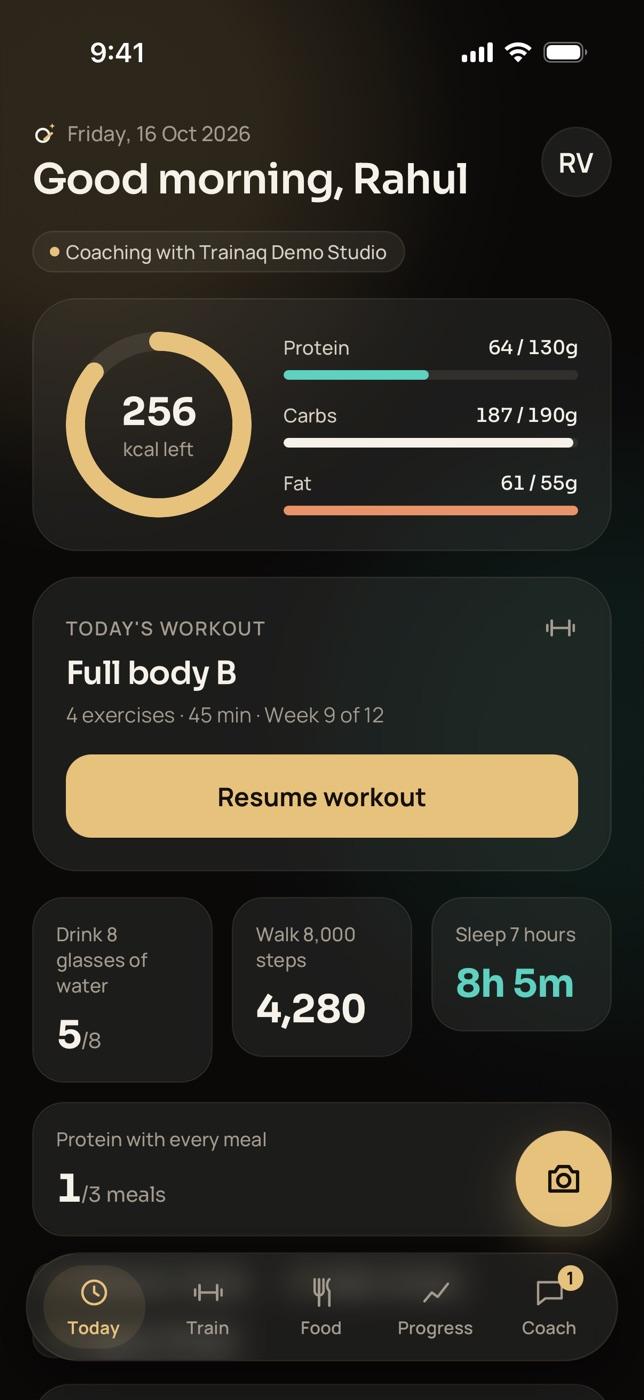
- The plan shows on the client’s Today and Food screens
AI meal plan drafts
Can AI make a meal plan for a client?
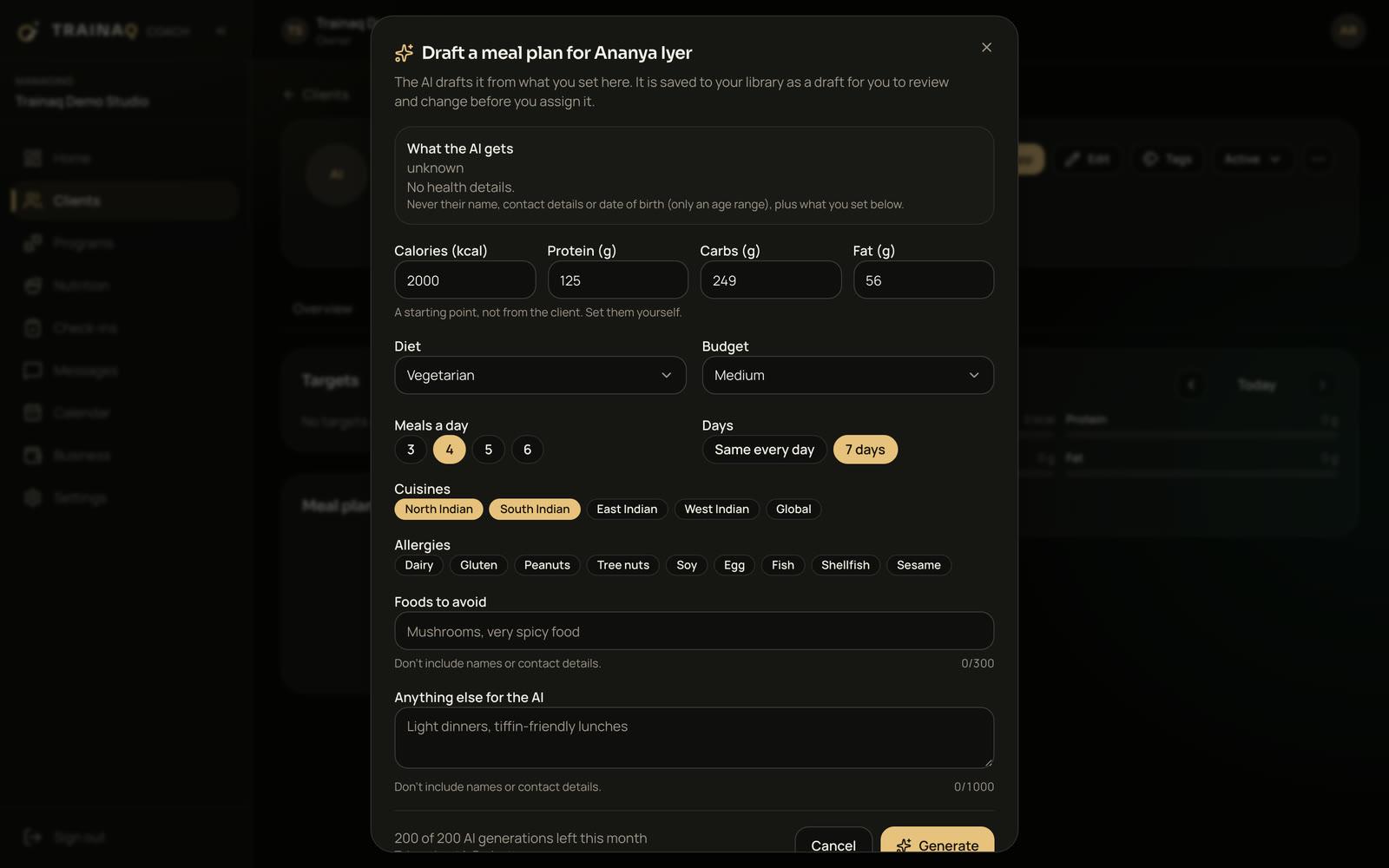
Yes, as a draft you review. On the web dashboard and in Trainaq Coach, AI drafts one day or a week of meals from the client’s intake and targets, in the diet, regional cuisines, budget and meals a day you pick, leaving out their allergens and the foods you list. Each day lands within 5% of the calories and macros.
- AI drafts are on Pro and Studio
- On the web dashboard, ask AI to change a draft in plain words, then accept or reject the change
- Health details go to AI only after you confirm the client agreed, once per client
- Every draft says it is not medical advice, and nothing reaches the client until you assign it
The food library
Which foods can I use in a diet chart?
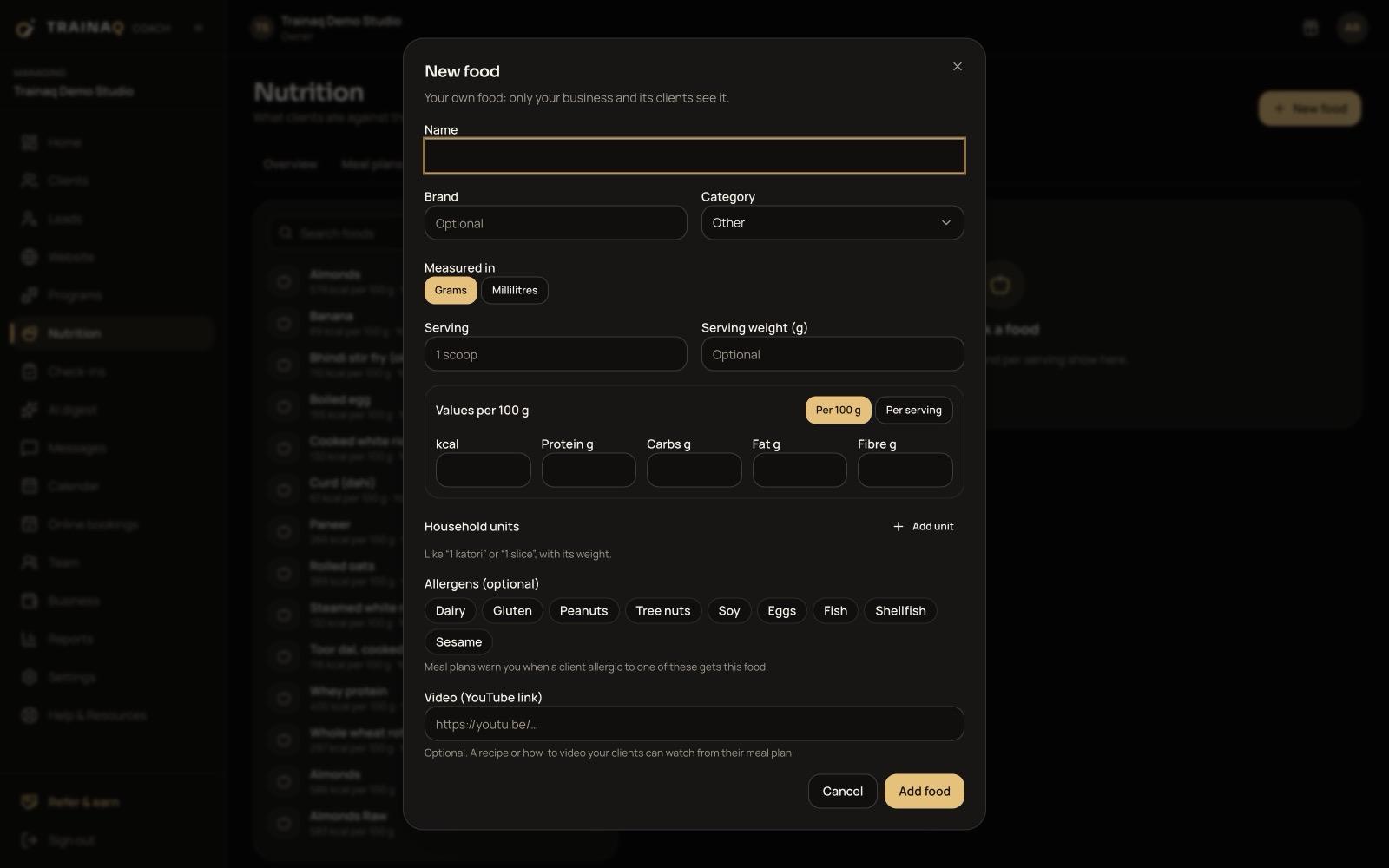
Trainaq’s food library holds Indian and international foods and Trainaq’s own recipes, each with calories, protein, carbs, fat and fibre, and Indian foods carry household measures with their weight in grams. Add your own foods and home recipes with their nutrients per serving, the allergens they contain and a YouTube video.
Indian foods
Everyday Indian dishes and staples with household measures such as 1 katori or 1 roti, and the grams behind each.
Trainaq recipes
Indian and international recipes of our own, each with its nutrients worked out from its ingredients.
Your own foods
A food or a home recipe with its nutrients per serving and the allergens it contains, for your plans only.
Recipe videos
On the web dashboard, add a YouTube link to your own food; clients with the latest Trainaq app open it from their meal plan.
Diet types
Plans for vegetarian, eggetarian, non-vegetarian, vegan and Jain clients.
Macros and fibre
Calories, protein, carbs, fat and fibre for every food, with each day’s calories and macros added up.
Not yet: a recipe builder that adds up your own ingredients, grocery lists, and targets for vitamins, minerals or sodium.
Allergies
Does the builder warn about a client’s food allergies?
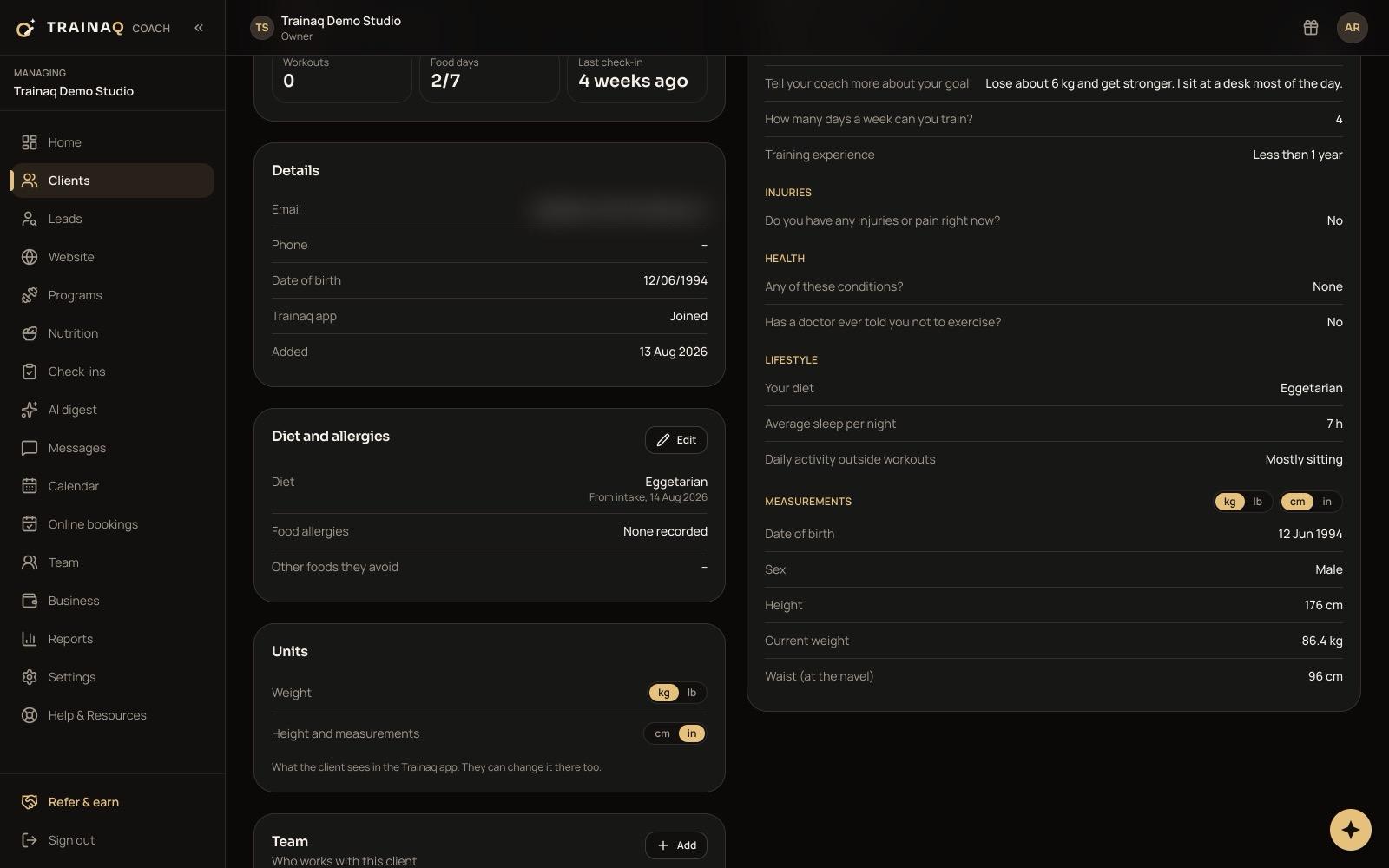
Yes, on the web dashboard. Each client has a Diet and allergies card, filled from their intake: their diet type, food allergies such as dairy, gluten or peanuts, and other foods they avoid. When their meal plan holds a food that clashes, the builder flags it, and AI drafts leave those foods out from the start.
- Nine common allergens, from dairy and gluten to sesame and shellfish
- A newer intake that adds an allergy adds it to the card and tells the client’s coach
- Warnings only: you decide what stays in the plan
In the client’s app
How does the client follow their diet chart?
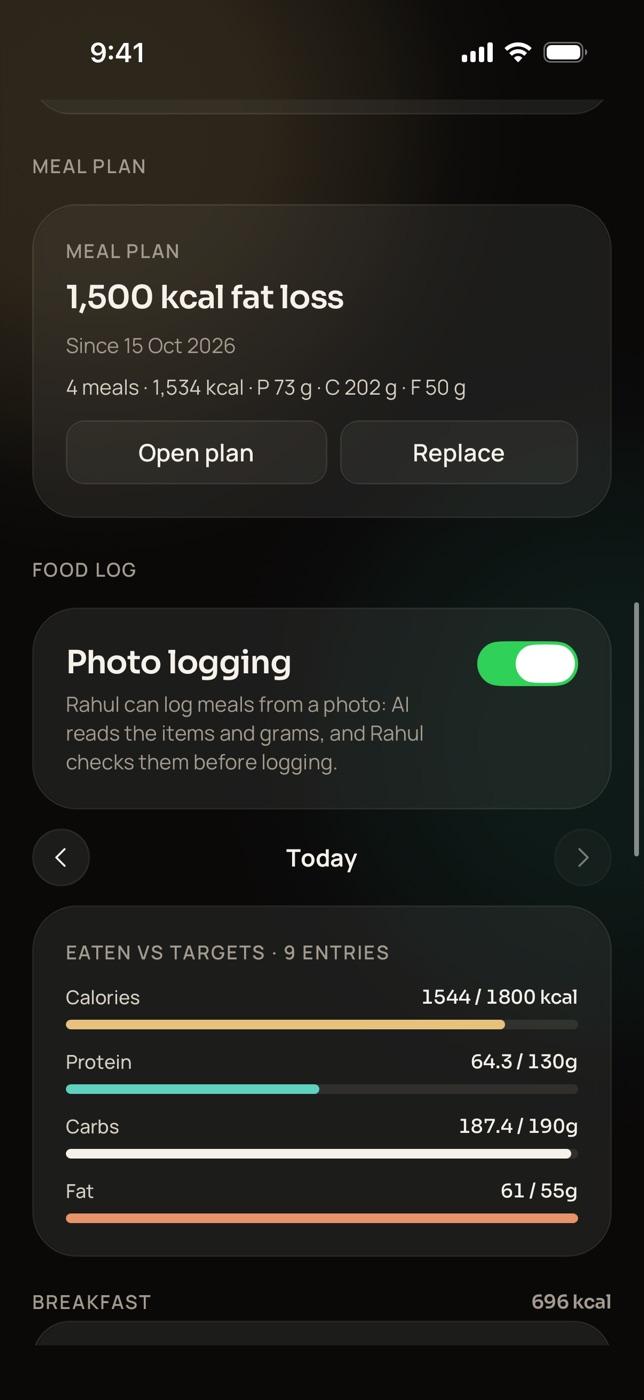
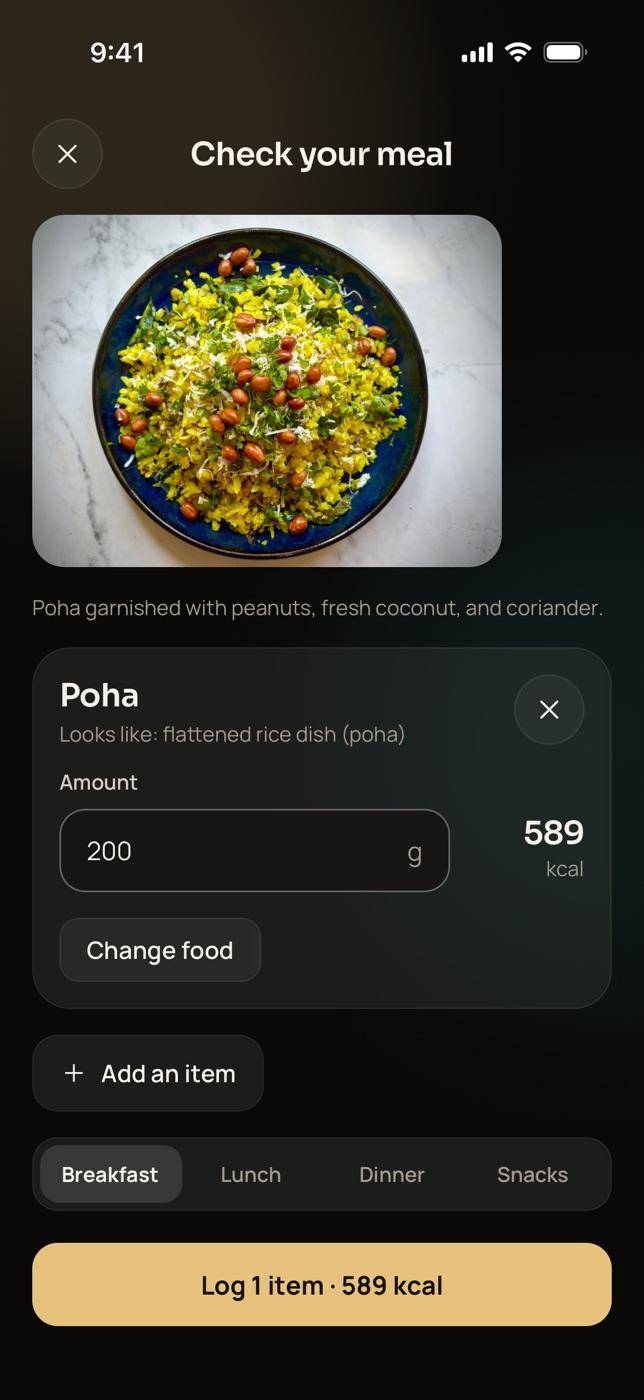
In the free Trainaq app, “Your meal plan” opens on today’s day, with each meal’s time, foods, portions and your notes, and the day’s total next to their targets. Tapping a food opens it in the food log with the planned portion, and they can also log by search, barcode or a photo.
- Other days in tabs by weekday; a one-day plan reads “Every day”
- Optional foods marked as optional and left out of the day’s total
- Clients can’t edit the plan; you change it and they see the new version
Plans
Which Trainaq plans include the diet chart builder?
The meal plan builder, food logs and check-ins are on every paid plan, and AI meal plan drafts are on Pro and Studio. Plans differ by how many active clients you coach and how many coach accounts you need. Every paid plan starts with a 7-day free trial, and no card is needed.
Most dietitians and nutrition coaches start on Pro: ₹899 + GST a month for up to 50 active clients, with 5 coach accounts.
| Plan | Price | Active clients | Coach accounts |
|---|---|---|---|
| Starter | ₹399 + GST a month | Up to 10 | 1 coach account + 1 assistant |
| ProFits most | ₹899 + GST a month | Up to 50 | 5 coach accounts |
| Studio | ₹1,999 + GST a month | Up to 200 | 25 coach accounts |
GST (18%) is added at checkout. Every paid plan starts with a 7-day free trial, and no card is needed. Every feature by plan →
Honest gaps
What can’t the meal plan builder do yet?
It doesn’t yet make a PDF or printable diet chart, a grocery list or a plan longer than seven days, and targets cover calories, macros and fibre, not vitamins, minerals or sodium. It isn’t built for medical nutrition therapy: a plan for a medical condition stays your professional call, and AI drafts are not medical advice.
- Clients follow the plan in the Trainaq app, which shows each day
- For a printable chart today, use our free diet chart template
- AI drafts use Trainaq’s food library, not your own foods yet
FAQ
Meal plan builder FAQ
Can I make a diet chart with Indian foods and household measures?
Yes. The food library holds everyday Indian dishes and staples and Trainaq’s own recipes, with household measures such as 1 katori or 1 roti and the grams behind each. Pick the measure your client cooks and eats in, and the calories and macros follow. Add your own foods and home recipes too.
Does it add up calories and macros for me?
Yes. Each food’s calories, protein, carbs and fat follow the portion you set, and each day’s totals add up as you build, next to the plan’s targets. On a seven-day plan every day has its own totals, so you see at once which day runs over or comes in short on protein.
Can I reuse one plan for many clients?
Yes. Save a plan as a template and assign it to one client or to up to 100 at once from a start date. Each client gets their own copy, so you can change one client’s plan later without touching the template or anyone else’s, and their targets can be set from the plan.
Can I add my own recipes?
Yes, as your own foods. Add a home recipe with its calories, protein, carbs, fat and fibre per serving and the allergens it contains, and on the web dashboard a YouTube link to how it’s made. It then sits in your library beside Trainaq’s foods. There is no builder that adds up your own ingredients yet.
Can clients download their diet chart as a PDF?
Not yet. Clients follow the plan in the free Trainaq app, which shows each day’s meals, portions and your notes and lets them log what they eat from it. If you need a printable chart today, our free diet chart template lays out a day you can fill in and print.
Is the meal plan builder for diets for medical conditions?
No. It is a coaching tool for healthy eating, weight and performance goals. The intake can record conditions, medicines and allergies, but a plan for a medical condition is your professional judgement, and Trainaq makes no medical claims. AI meal plan drafts say they are not medical advice and are reviewed before assigning.
Do I need a paid plan for the meal plan builder?
Yes. The meal plan builder is on every paid plan, and AI meal plan drafts are on Pro and Studio. The Free plan has no meal plans. Every paid plan starts with a 7-day free trial, and no card is needed. Start the trial on Pro to try AI drafts too.
Is there a free diet chart maker?
Yes: our free diet chart template, with no sign-up. Fill in the client and their targets, add three to six meals with foods and portions, type each food’s figures, and it adds them up against the targets; then print it. For plans clients follow in an app, use the meal plan builder.