Habit tracking app for coaches
The client habit tracker your clients keep using.
Trainaq’s habit tracking app lets you set water, steps, sleep and your own habits for each client on the days you choose. Clients log them on their Today screen in the free Trainaq app, keep streaks and get reminders, and you see how well every client keeps them, in Trainaq Coach and on the web dashboard.
- Set habits in Trainaq Coach or on the web dashboard
- Clients log them in the free Trainaq app
- Habit adherence on the web dashboard
What is Trainaq’s habit tracking app for coaches?
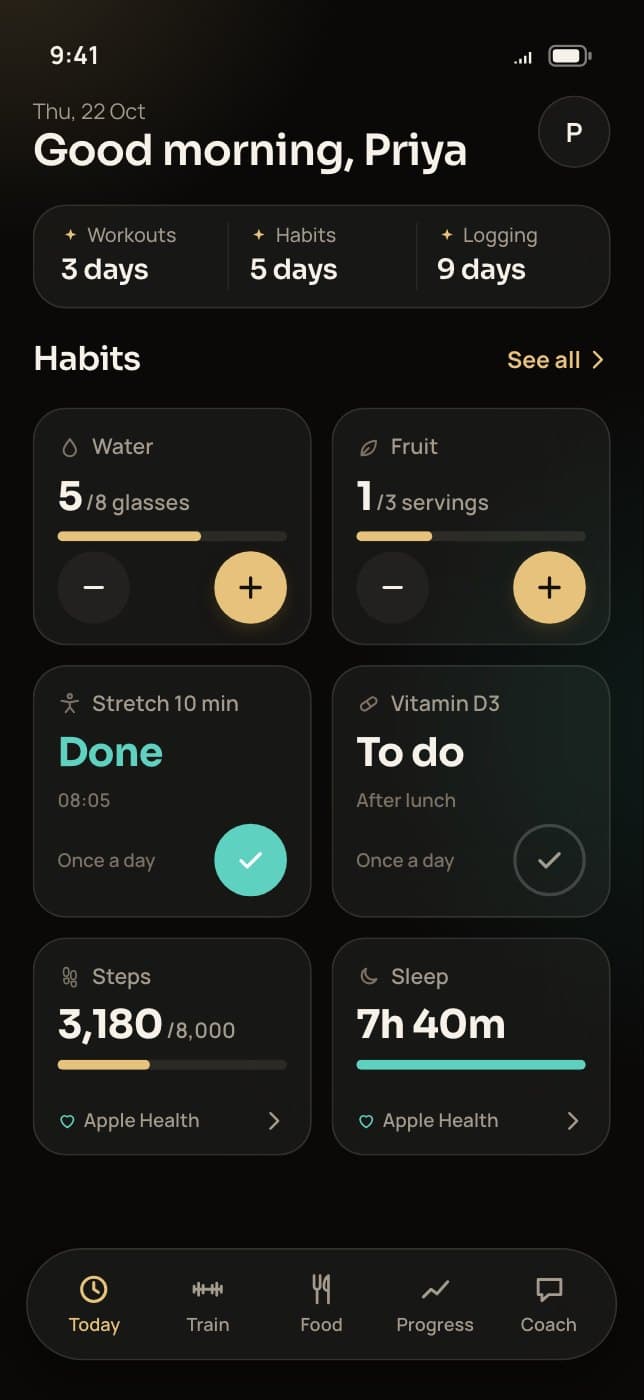
It is the habits part of Trainaq. You set water, steps, sleep and your own habits for each client on the days you choose, in Trainaq Coach or on the web dashboard. Clients log them from Today in the free Trainaq app, keep streaks and get a daily reminder, and you see how well they keep them.
- Habit tracking is on every plan. Every plan starts with a 7-day free trial, and no card is needed.
- Water in glasses or ml, sleep in hours or minutes, custom habits in any unit
- Steps and sleep can fill in from Apple Health or Health Connect, on Pro and Studio
- + and − with Undo and a page per habit: coming with the next app update
Quick logging with undo
How do clients log a habit in one tap, and undo it?
Today, one tap on a habit tile adds a glass of water or ticks a once-a-day habit, and steps, sleep and other amounts open a short form. Coming with the next app update: a separate + and − on every tile, and Undo for six seconds after each add, so a stray tap is never stuck.
- Today: a tap adds a glass of water (or 250 ml) or ticks a once-a-day habit
- Today: values save offline and sync later
- Next app update: + adds one unit, − takes one off, Undo after every add
- Next app update: the tile body opens the habit’s own page
A page per habit
What does a client see when they open a habit?
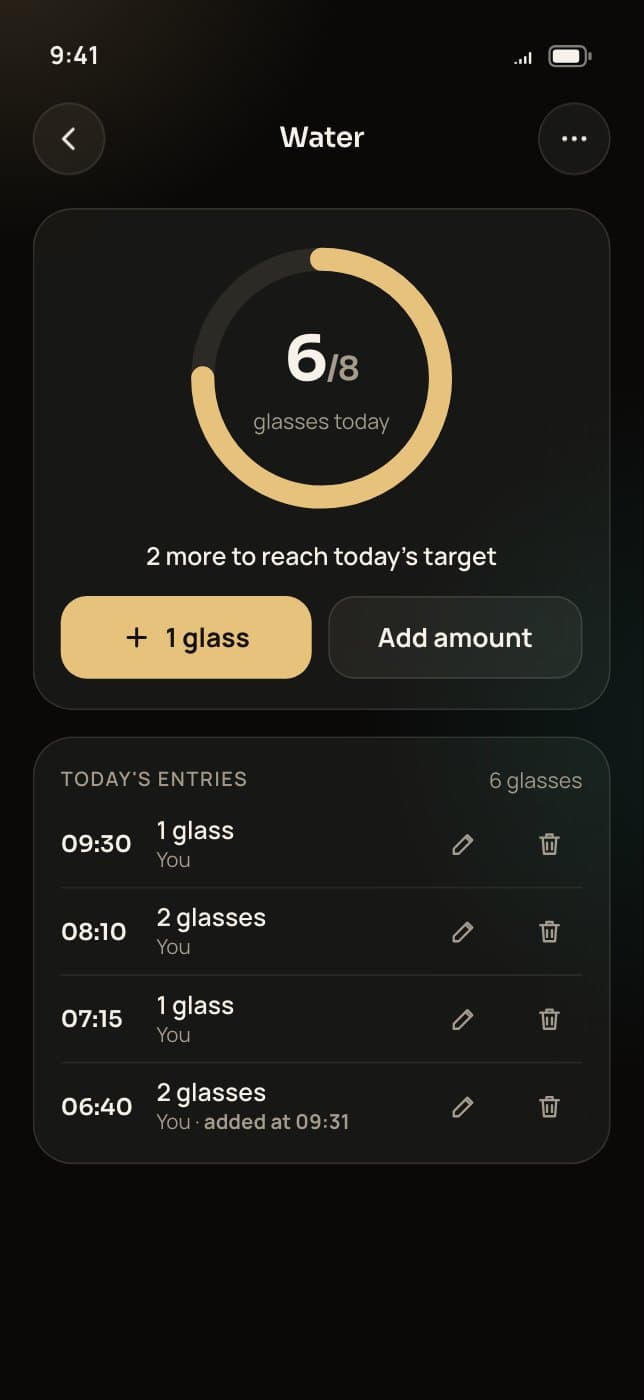
Coming with the next app update: tapping a habit opens its own page, with today’s progress as a ring, every entry of the day to edit or delete, the target, the habit’s reminders and its streak, plus the week and a month calendar shaded by how much of the target was met.
- Today’s entries with their times, each one editable
- Days met, part met and missed in the month calendar; only the full target counts as met
- The current and best streak, in days, or in weeks for a weekly habit
- Entries for the past 7 days can be added later and are marked for the coach
Everything in habit tracking
What can you track with Trainaq’s client habit tracker?
Water, steps, sleep and any habit you can count or tick, on the days that suit each client. Clients log them from their Today screen, offline too, keep streaks and get reminders. You see their adherence over 7 and 28 days, and steps and sleep can fill in from Apple Health or Health Connect.
Water
In glasses or ml, with a daily target for each client.
Steps
A daily step target, typed in by the client or synced.
Sleep
A target in hours or minutes, entered as hours and minutes.
Custom habits
Your own name, target and unit, ticked once or counted.
Chosen weekdays
Daily habits that count only on the days you pick.
Times a week
From once to seven times a week, on any days.
Pause and resume
Take a habit off Today for a while; the history stays.
Streaks and milestones
Current and best streaks, celebrated at 7, 30 and 100 days.
Adherence
Habit days met over the last 7 and 28 days, for you.
Synced from health apps
Steps and sleep fill in from Apple Health or Health Connect, never over a typed value.
Pro and Studio+ and − with Undo
Coming with the next app updateA separate + and − on every tile, and Undo for six seconds after each add.
A page per habit
Coming with the next app updateA progress ring, today’s entries to edit or delete, the week and the month.
Progress map
Coming with the next app updateTwelve weeks of days, each shaded by the share of habits met.
Habits clients add
Coming with the next app updateTheir own habits, labelled Added by client, and their own targets.
Skip a day
Coming with the next app updateSick or travelling: the day is skipped and the streak holds.
Habits on the web dashboard
Add, edit and pause habits on a client’s profile, with every entry.
Not yet: badges, leaderboards or group challenges, giving one habit to many clients at once, or home-screen widgets.
The Progress map
What is the Progress map?
Coming with the next app update: a calendar of the last 12 weeks on the client’s new Habits screen, one square per day, shaded by the share of that day’s habits they met, with the log of every entry under it. It shows at a glance which weeks slipped and which held.
- The Habits screen opens from Today (See all) and from Progress
- The overall habit streak and the best one at the top
- Today’s status for every habit, with + where it applies
- Days with nothing due stay blank, so rest days never look like misses
Apple Health and Health Connect
Do steps and sleep fill in from the phone’s health app?
Yes. Once a client connects Apple Health on iPhone or Health Connect on Android, on Pro and Studio, each day’s steps and sleep fill in their habits and never overwrite a value they typed. Without a connection they type the numbers in. If a client stops sharing, you no longer see what was synced.
- Watches and rings that write to Apple Health or Health Connect count too
- A value typed by hand always wins over a synced one
- After a client stops sharing, met days and streaks still count
- A steps or sleep day with nothing synced while sharing is off shows as No data: sharing off, not as a miss
For coaches
How do coaches see their clients’ habits and adherence?
On each client’s profile in the web dashboard, a Habits section lists every habit with its week, month and entries, and you can add, edit or pause habits there or in Trainaq Coach. Adherence over 7 and 28 days sits on their progress page, and Client adherence in Reports compares clients on Pro and Studio.
- With the next app update, clients can add their own habits; they stay out of your adherence report unless you adopt them
- With the next app update, you see each target a client changes (old and new, with the date) and each day they skip
- Late entries arrive marked with the day they were added, with the same update
- A day or week still running never counts as missed
How it works
How do you set up habits for a client?
Open the client in Trainaq Coach or on the web dashboard, add a habit from a preset or write your own, set its target and the days it counts, and save. It shows on the client’s Today screen on those days, they log it as they go, and their streaks and your adherence numbers update with every value.
Pick a habit
Start from a preset for water, steps or sleep, or write a custom habit with its own name, target and unit.
- Water: 8 glasses to start, counted in glasses or ml
- Steps: 8,000 to start
- Sleep: 7.5 hours to start, in hours or minutes
- Custom: “10 minutes of mobility”, “5 servings of vegetables”, anything
Choose the days
Make it daily on the weekdays you pick, such as Monday to Friday, or a number of days a week, such as 3, on whichever days suit the client.
- Change the target as the client improves
- Pause a habit and resume it later; what they logged stays
- Each client has their own list
Clients log it
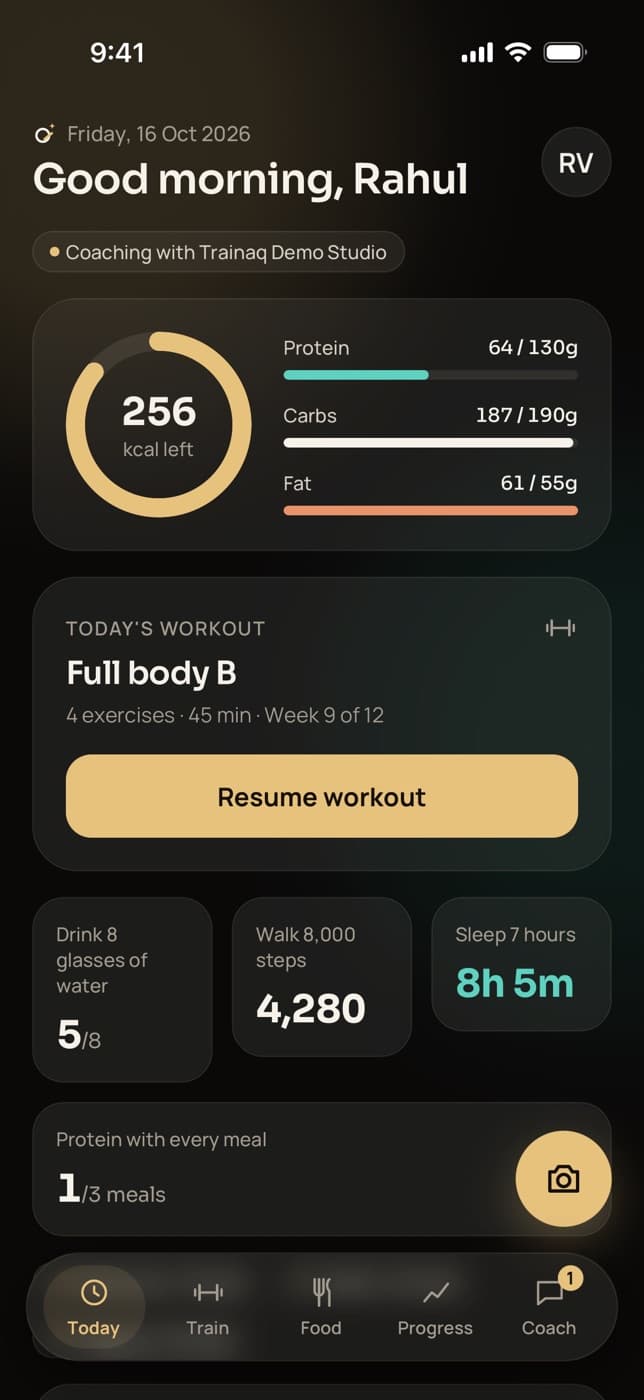
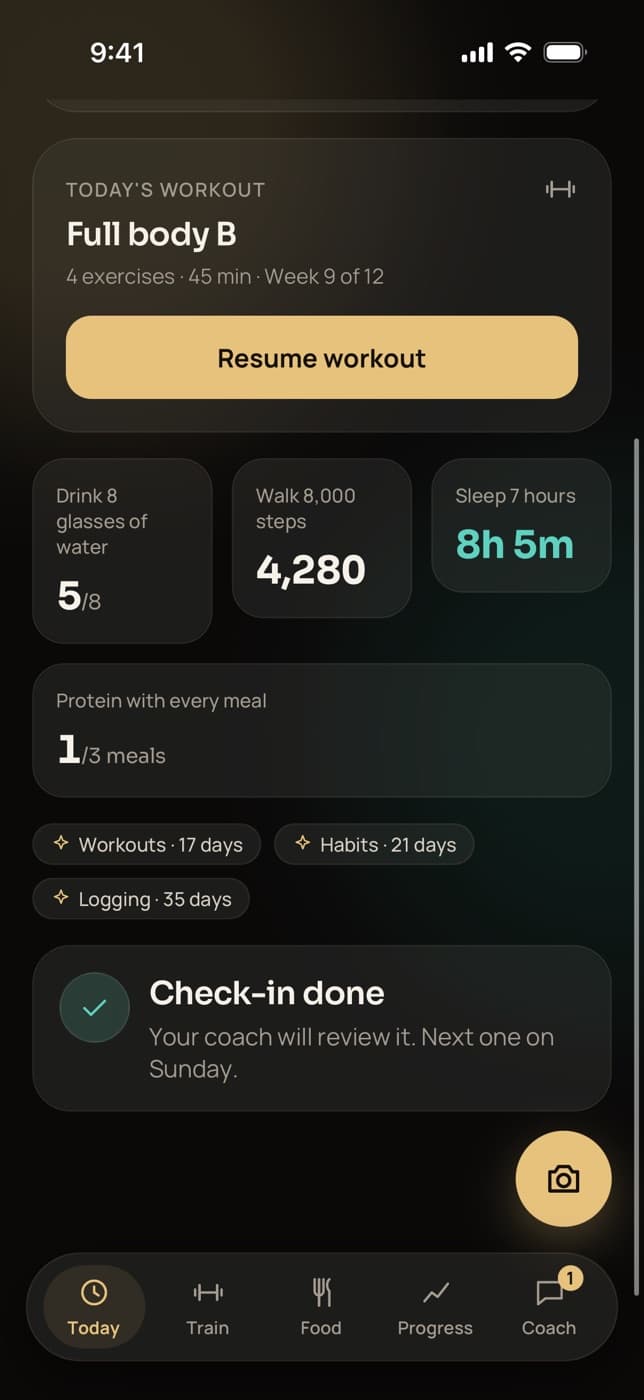
Habits sit on the client’s Today screen as tiles. A tap adds a glass of water or ticks a once-a-day habit; steps, sleep and other amounts open a short form. A met target turns teal.
- Values save offline and sync later
- Steps and sleep can fill in from the phone’s health app
- Coming with the next app update: + and − with Undo, and a page per habit
Streaks and adherence
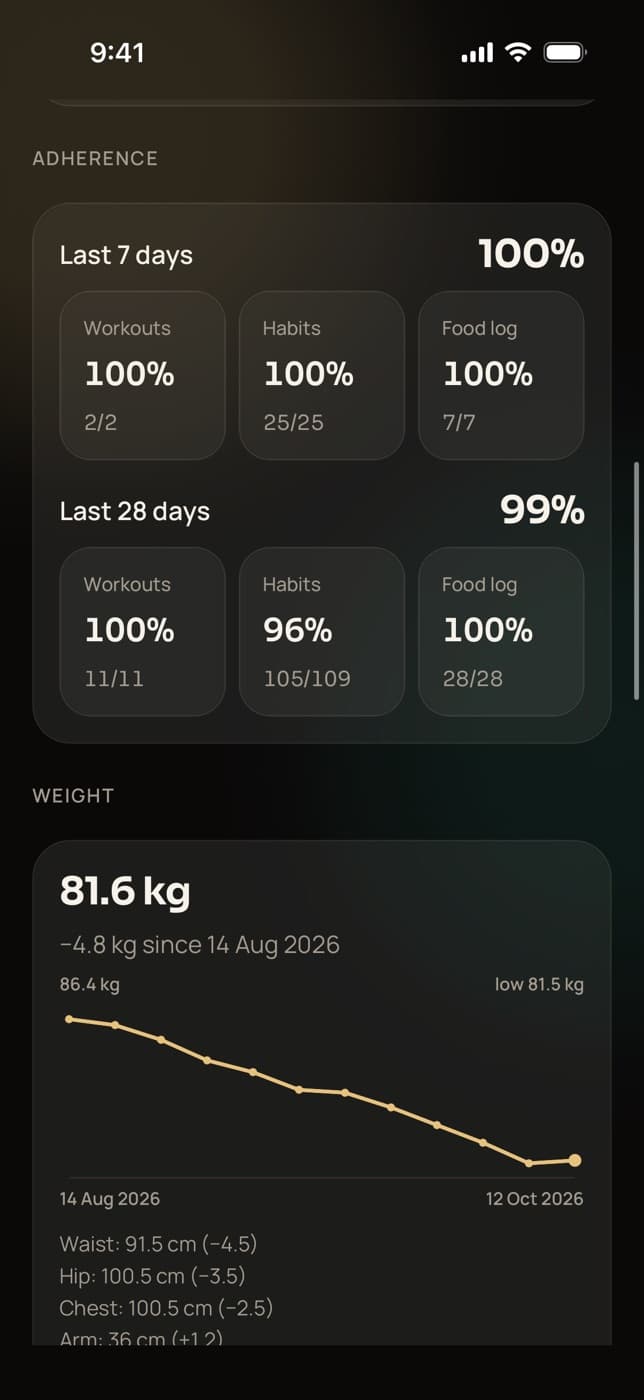
Clients see their current and best streaks for workouts, habits and logging, with a celebration at 7, 30 and 100 days. You see habit adherence over the last 7 and 28 days on their progress page.
- This week’s ticks for each habit in Trainaq Coach
- A paused habit stops counting towards the streak
- Adherence on the web dashboard too
Who uses it
How do coaches use habit tracking with their clients?
Online coaches turn the basics into daily targets they can see. Personal trainers give clients something to do on the days between sessions. Nutritionists track water and the food habits behind the meal plan, and yoga teachers set a daily practice. Clients log every habit in the same free app.
The basics, visible every day
Set water, steps and sleep for every new client, then add the one habit that matters most for them. Their adherence sits next to their workouts and food log on the progress page.
Trainaq for online coaches →- Habit adherence over 7 and 28 days
- Streaks and milestones in the client app
- Steps and sleep synced from the phone
Something for the days in between
Clients see you two or three times a week. A step target and a mobility habit on the other days keep them moving, and you can see on your next session whether they did.
Trainaq for personal trainers →- Habits on chosen weekdays only
- A reminder at the time they pick
- This week’s ticks in Trainaq Coach
Habits behind the meal plan
Water, fruit and vegetable servings, or a walk after dinner: custom habits track the behaviours a meal plan depends on, next to the client’s food log and targets.
Nutrition coaching →- Custom habits in any unit
- Water in glasses or ml
- Food log adherence alongside
A daily practice
Set “15 minutes of practice” or a breathing habit on the days members aren’t in class, and see who keeps it up between sessions.
Trainaq for yoga studios →- Custom habits counted in minutes
- Sleep tracked in hours
- Streak milestones at 7, 30 and 100 days
Reminders
How do habit reminders work?
Today each client gets one push a day at a time they choose, 8 pm unless they change it, only while habits are still open, and quiet hours hold it back. Coming with the next app update: up to three times per habit or a water interval, at most eight a day, skipped once met.
- Skipped on days when every habit is already done
- “2 habits left to tick off today”, never a long message
- Habit reminders are one switch among the client’s notification settings
In India
Habit tracking for coaches in India
- Water in glasses or mlCount in glasses or ml, whichever your clients use; a tap adds a glass or 250 ml.
- Android phonesOn Android, steps and sleep come through Health Connect; on iPhone, through Apple Health.
- Beside the food logWater, fruit and vegetable habits sit beside a food log that searches Indian and global foods.
- Rupees plus GSTTrainaq is billed in rupees plus GST in India. Every plan starts with a 7-day free trial, and no card is needed.
FAQ
Habit tracking FAQ
What habits can I set for clients?
Water in glasses or ml, steps, sleep in hours or minutes, and custom habits with your own name, target and unit, such as minutes of mobility or servings of vegetables. Each client has their own list, and you can change a target or pause a habit at any time without losing what they logged.
Can clients add their own habits or change a target?
Not yet: today you set every habit and target. With the next app update, clients can add their own habits, labelled Added by client, and change any target, including yours; you are notified and see the old and new target with the date. Their habits stay out of your adherence report unless you adopt them.
Does a sick day break a client’s habit streak?
Today you pause a habit for a break, and days with nothing due, such as rest days, never break a streak. With the next app update, a client can also mark a day skipped, for example when sick or travelling, and it neither counts nor breaks the streak; you see Skipped by client.
Do clients get reminded about their habits?
Yes, once a day at a time each client picks in the Trainaq app, 8 pm unless they change it, and only while habits are still open. With the next app update, clients can set up to three times per habit, at most eight reminders a day, skipped once met.
Can I see whether a client keeps their habits?
Yes. Each client’s profile on the web dashboard has a Habits section with every habit’s week, month and entries, and their progress page shows adherence over 7 and 28 days, in Trainaq Coach too. Client adherence in Reports ranks every client, and a day still running never counts as missed.
Do clients need a smartwatch for steps and sleep?
No. Clients can type steps and sleep in themselves. If they connect Apple Health on iPhone or Health Connect on Android, on Pro and Studio, the day’s values fill in on their own, and a watch or ring that writes to those apps counts too. A value typed by hand is never overwritten.
Which plans include habit tracking?
Habits, streaks and habit reminders are on every plan, together with workouts and nutrition tracking in the free client app. Syncing steps and sleep from health apps depends on the plan, and so does Client adherence in Reports. Every plan starts with a 7-day free trial, and no card is needed.