AI calorie counter from food photos
A photo of the plate, logged as calories and macros.
Trainaq’s AI calorie counter reads a meal photo, names each food and estimates its portion, then matches it to the food library. Your client checks every item before it is logged, and you see the result in their food log.
- The free Trainaq app · iPhone and Android
- Switch per client in Trainaq Coach
- Food logs on the web dashboard
How does Trainaq’s AI calorie counter work?
A client takes or picks a photo of a meal in the Trainaq app. AI lists each food with an estimated weight, Trainaq matches it to the food library for calories and macros, and the client changes, removes or adds items before logging. The entries land in their food log, where you see them.
- AI food photos are on every plan. Every plan starts with a 7-day free trial, and no card is needed.
- Up to 20 photos per client a day by default
- The client agrees before the first photo is sent
- The photo is not stored after the estimate comes back
Why photos
Why do clients stop logging food?
Because typing every meal is slow. Search for “aloo paratha”, guess the grams, then do it again for the curd and the pickle, three times a day. Home-cooked meals have no barcode to scan. A photo takes seconds, and checking a list someone else wrote is quicker than building one from scratch.
Search is slow
Every food on the plate is a separate search and a guess at the grams.
Home food has no barcode
Dal, sabzi and rotis made at home can’t be scanned like a packet.
Gaps in the food log
When logging is hard, meals go missing from the log you review.
How it works
What happens when a client logs a meal photo?
The client opens the camera from the Food screen and takes or picks a photo. AI lists the foods with their portions, Trainaq finds each one in the food library, and the client checks the list, picks the meal and logs it. Nothing reaches the food log until the client taps Log.
Take or pick a photo
The camera button sits beside the barcode button on the client’s Food screen. They take a photo or choose one from their library, and the app shrinks it and drops its location data before sending.
- Consent is asked before the first photo
- Hidden for clients whose coach turned photo logging off
- Works on iPhone and Android
AI names the foods and portions
Google’s Gemini model lists up to 15 foods and drinks it sees, each with an estimated weight and, where the dish has one, its local name, such as dal tadka or jeera rice. A thali is split into its parts.
- Portions judged against a katori, a roti or a steel plate
- Drinks such as chai or lassi count too
- Plates and garnish are left out
Matched to the food library
Trainaq looks up each item in the food library, with your business’s own foods first on a tie, and takes the calories and macros of the match for the estimated weight.
- An item with no match is logged as a quick add of the AI’s own estimate
- “Find it in the library” swaps in a food
- Your own foods can be matched as well
The client checks, then logs
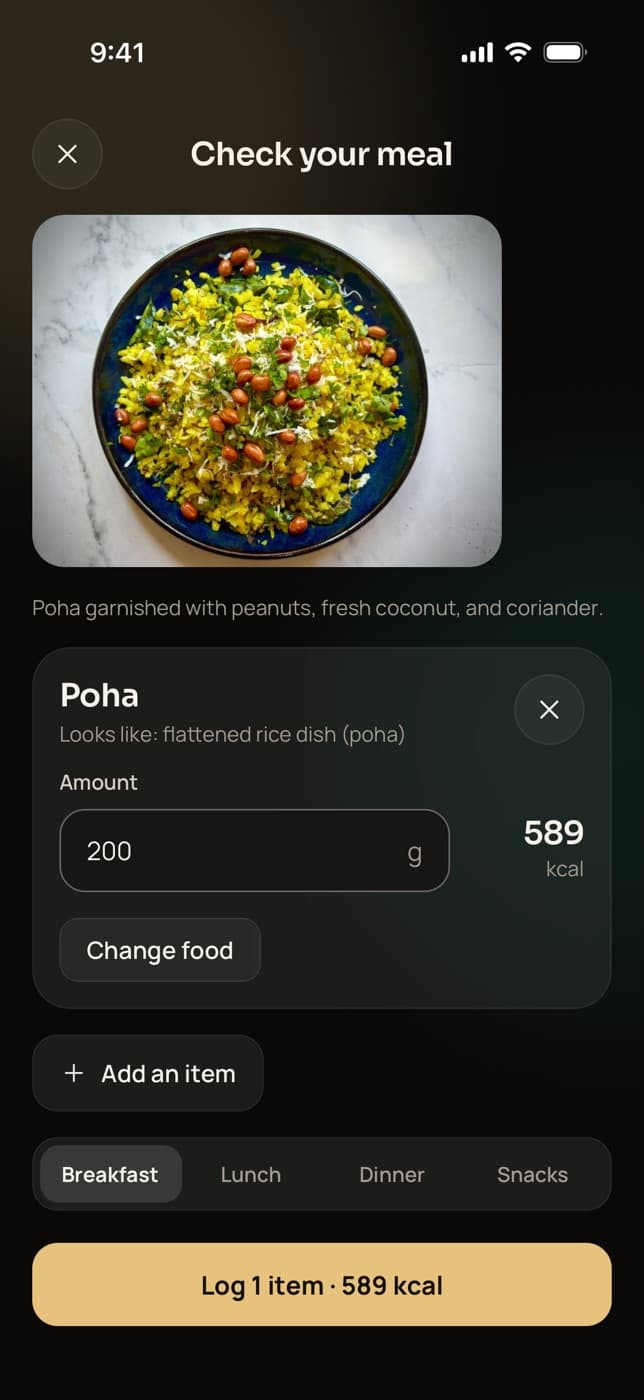
Each item shows the food it will be logged as, its grams and calories. The client changes the food or the grams, removes an item with one tap, adds one, picks the meal and logs them together.
- Over 1,500 kcal or an unlikely weight must be confirmed
- The meal is picked by time of day, and can be changed
- Logged entries queue offline and sync later
You see it in their food log
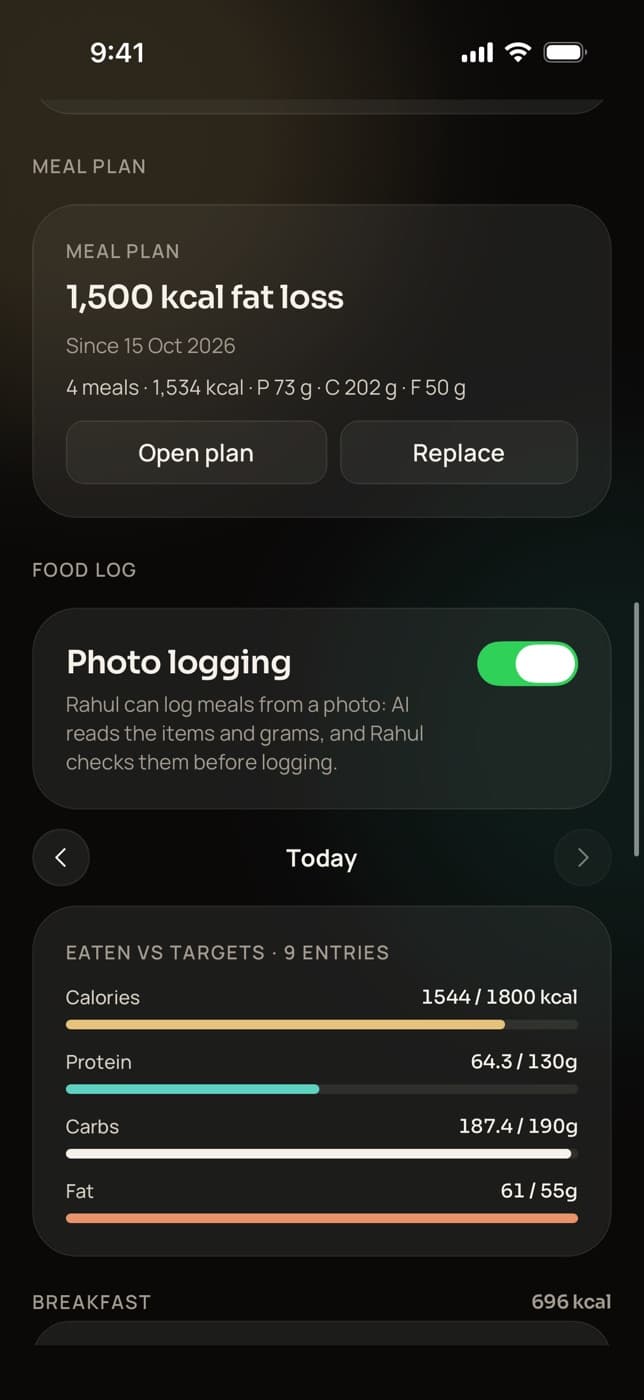
Photo entries land in the client’s food log by meal, next to the day’s totals and your targets, in Trainaq Coach and on the web. In Trainaq Coach, the photo logging switch sits on the same screen.
- Turn photo logging off for any client
- Entries show the food, grams, calories and macros
- The photo itself is not kept
Everything included
What is included in AI food photo logging?
A photo turns into a list of foods with grams, matched to the food library, that the client edits before logging. Large or odd estimates need a second look, unmatched items still count, and each client has a daily limit. Consent comes first, you can switch it off per client, and the photo is not kept.
Up to 15 foods a photo
Each food or drink on the plate becomes its own line with grams.
Indian dish names
AI gives local names like poha, dal tadka or masala chai.
Matched to the library
Calories and macros come from the matched food for the estimated weight.
Edit before logging
Change the food or grams, remove an item in one tap, or add one.
A second look at big numbers
Over 1,500 kcal or an unlikely weight waits for “It’s right” or a fix.
Unmatched items still count
Logged as a quick add of the AI’s estimate, which the client can swap.
Daily limit
20 photos per client a day by default, so costs stay predictable.
Consent first
The app explains what is sent and to whom before the first photo.
Switch per client
On by default; turn it off for any client from their food page.
Photo not stored
Trainaq never saves it, and the app deletes its resized copy when the screen closes.
Not yet: voice logging, recipes, or remembering a client’s usual portions. The coach sees the logged foods, not the photo, since the photo isn’t kept.
Who uses it
Who is AI food photo logging for?
Coaches whose clients find food logging a chore. Online coaches get a fuller food log from clients they never meet, nutritionists see home-cooked Indian meals logged in grams, and personal trainers add nutrition without extra calls. The client snaps the meal; you review the result next to your targets.
A food log clients keep up
A photo is quicker than typing each food on the plate, which makes every meal easier to log. You see the week’s meals against the targets you set before the weekly check-in.
Trainaq for online coaches →- Food log adherence over 7 and 28 days
- Entries by meal next to the targets
- Switch it off for clients who prefer search
Home meals, in grams
A plate of dal, rice, sabzi and rotis comes back as separate items with weights, matched to the food library. The client fixes what AI got wrong, and you review the day.
Nutrition coaching →- Thalis split into their parts
- Your own foods can be matched
- Very large estimates need a second look
Nutrition without extra calls
Your clients train with you, and eat on their own. A photo log shows you what they ate between sessions, so the talk about results covers food as well as training.
Trainaq Coach, the app →- Calories left on the client’s Today screen
- Food logs next to their workouts
- One free app for clients
Privacy
What happens to the meal photo?
The app shrinks the photo and drops its location data on the phone, then sends only the image and a fixed instruction to Google’s Gemini API through Trainaq’s servers. No name, phone number or email goes with it. The photo is not stored, and Google does not train its models on data sent through its paid API.
- The client agrees first, in a screen that names Google Gemini and says what is sent
- Clients can turn it off any time in More → AI food photos
- Trainaq keeps a usage record (model, cost, outcome) with no photo or food names
The daily limit
How many meal photos can a client log a day?
Twenty a day per client by default, counted on the business’s local day. Trainaq sets the limit, not the coach, and a failed read that nobody was charged for doesn’t count. When a client reaches it, the app says so and they log the rest by search, barcode or quick add.
Indian food
Made for Indian plates
- Dish namesPoha, dal tadka, jeera rice and masala chai, by name.
- Thalis split upRice, dal, sabzi, curd and salad as separate items.
- Katori and roti sizesPortions judged against a katori, a roti and a steel plate.
- Android and iPhoneThe same camera button in the free app on both.
FAQ
AI food photos FAQ
Can AI count calories from a photo of Indian food?
Yes. Trainaq’s AI names Indian dishes such as dal, sabzi, roti and rice, splits a thali into its parts and estimates each portion against a katori or a roti. Calories come from the matched food in the library for that weight, and the client corrects anything before it is logged.
How accurate is a photo calorie count?
It is an estimate. In our own tests, portion size was the biggest source of error, especially for big serving dishes and mixed plates, followed by foods that look alike. That is why the client sees every item with its grams before logging, can change the food or amount, and must confirm very large estimates.
Can the coach see the food photos?
No, because the photo isn’t kept. You see what the client logged from it: each food with its grams, calories and macros, by meal, against their targets for the day. If a client wants you to see the plate itself, they can send the photo in chat.
Can I turn AI food photos off for a client?
Yes. Open the client in Trainaq Coach, go to their food page and switch photo logging off. The camera button disappears from their Food screen and their photos are refused until you switch it back on. It is on for every client by default.
What does the client agree to before the first photo?
A screen in the Trainaq app explains that only the meal photo is sent, never their name, email or phone, that it goes to Google Gemini through Trainaq’s servers, and why. Nothing is sent until they allow it. They can withdraw consent any time in More → AI food photos.
Which plans include AI food photos?
AI food photo logging is on every plan, together with nutrition targets, meal plans and the free client app. Plans differ by how many active clients you coach and how many coach accounts you need. Every plan starts with a 7-day free trial, and no card is needed.