Membership management software for coaches and studios
Every membership, allowance and freeze in one place. From the first sale to the renewal.
Trainaq’s membership management software lets coaches, studios and small gyms sell memberships with class and PT allowances, couple plans and monthly auto-pay, then freeze, extend, upgrade or transfer them in a few taps. Clients see their membership, sessions left and dues in the free Trainaq app.
- Trainaq Coach · iPhone and Android
- Web dashboard · Business
- Clients see their membership in the free Trainaq app
What is Trainaq’s membership management?
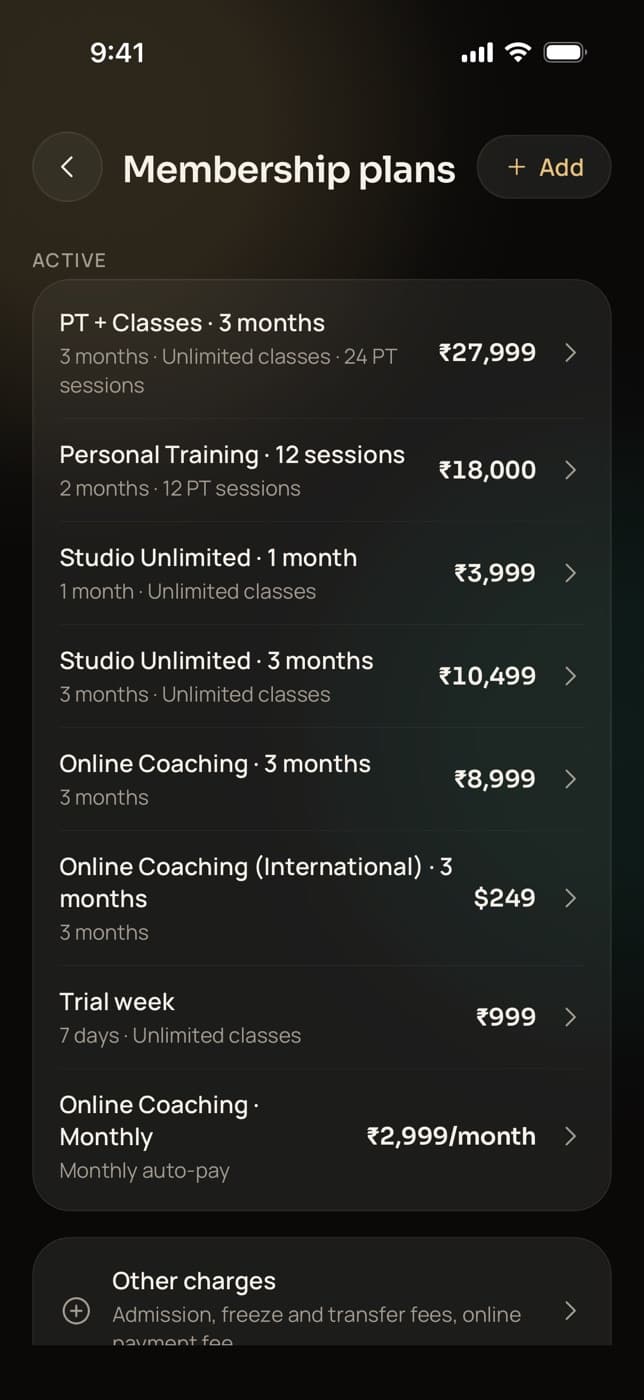
It is how you sell and run memberships in Trainaq. A plan has a price in rupees or US dollars, a length or monthly auto-pay, and class and PT allowances. You sell it online or at the desk, then freeze, extend, upgrade or transfer it, with fees, discounts and dues tracked for each client.
- Memberships are on every plan. Every plan starts with a 7-day free trial, and no card is needed.
- Couple plans: two members, one payment, one shared pool of sessions
- Clients ask for a freeze from their own app
- Rupee prices show “+ GST” when you are GST-registered
Why studios switch
Why do memberships get messy in a register or a spreadsheet?
Because a membership keeps changing after it is sold. Clients travel and freeze, couples share sessions, someone upgrades halfway, and a week closed for Diwali has to move every end date. A register records the sale, but each change after it means recounting days and sessions by hand, for every member.
End dates that drift
Two freezes and an extension later, nobody is sure when a membership really ends.
Sessions counted on paper
A couple shares 24 PT sessions. Who used the last three, and how many are left?
Fees that get forgotten
Admission, freeze and transfer fees are agreed at the desk and then never charged.
How it works
How do you set up and sell memberships in Trainaq?
Create your plans once with a price, a length and allowances. Sell one to a client with a payment link or at the desk, in full or in part. From then on the membership counts days and sessions by itself, and you freeze, extend, upgrade or transfer it from the client’s membership screen in Trainaq Coach or on the web.
Create your plans
Give each plan a name, a price before GST in rupees or US dollars, and a length in days or months, up to 36 months, or monthly auto-pay. Then set class and PT allowances: off, unlimited or a set number.
- A set number covers the whole plan, or each month on a monthly plan
- Couple plans for two members with one shared pool
- Archive a plan to stop selling it; running memberships carry on
Sell it online or at the desk
Send a payment link, let the client pay in the Trainaq app, or record a desk sale in cash, UPI, card machine or bank transfer. Take it in full or in part, with the rest due on a date you pick.
- Discounts by amount or percentage, with a reason
- Bonus days on any sale
- An admission fee, charged once per client
Clients see their membership
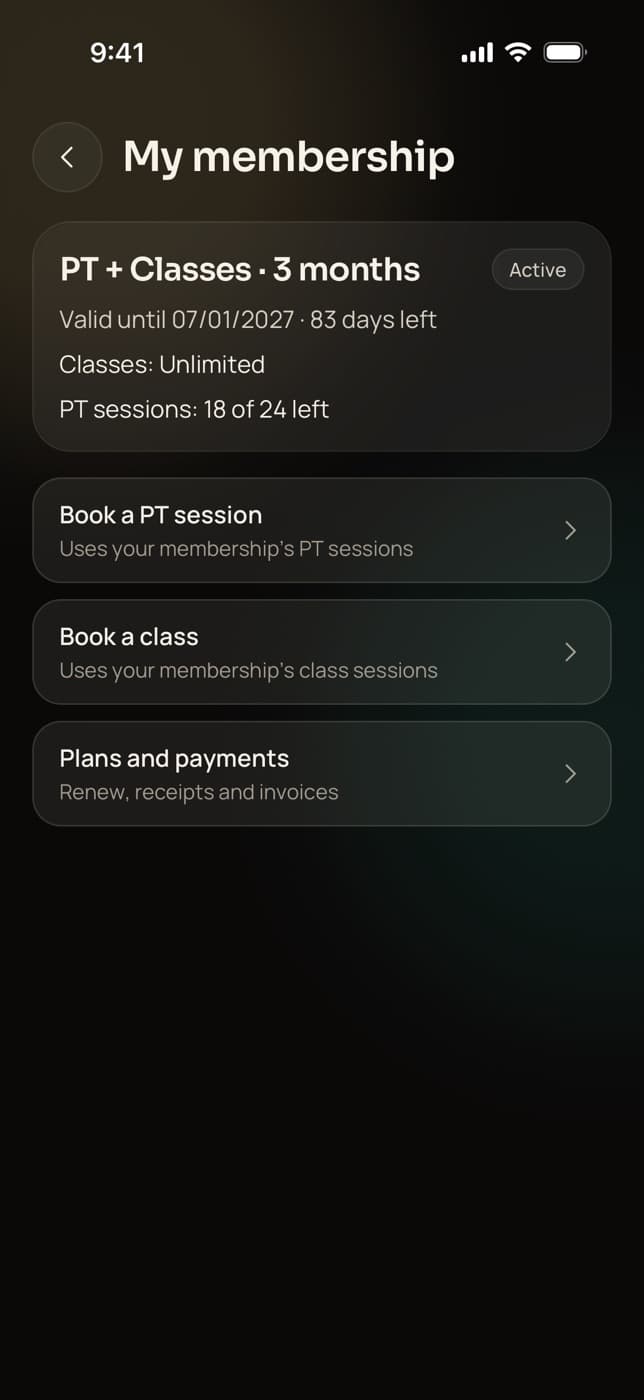
In the Trainaq app, clients see how many days are left, their class and PT sessions left, what they owe and links to book or pay. They can ask for a freeze from the same screen.
- Each booking takes a session; an in-time cancel gives it back
- A freeze request with a reason, and the fee if you charge one
- Withdraw a request, or unfreeze today
Change it when life changes
Freeze for travel or illness, extend by a few days, add sessions, upgrade to a bigger plan with credit for what is left, or transfer what remains to another client. Each change keeps the dates and sessions right.
- Extend every running membership at once
- Close the business for a holiday, and every membership freezes for those days
- Change the partner on a couple membership
Everything in memberships
What can you do with Trainaq’s membership management?
Everything from the plan to the last day of a membership: one simple plan type with allowances, couple plans, monthly auto-pay, freezes with your own rules and client requests, extensions, extra sessions, upgrades, transfers, bulk changes and closures, plus admission, freeze, transfer and online-payment fees, with discounts capped for coaches.
One plan type
Name, price in INR or USD, length or monthly auto-pay, and allowances.
Class and PT allowances
Off, unlimited or a set number, kept separately on each membership.
Couple plans
Two members, one payment, one shared pool of sessions.
Monthly auto-pay
UPI AutoPay or a card mandate for monthly plans in India.
Freeze
Within your rules, with a reason, back-dating and a fee now, later or waived.
Freeze requests
Clients ask in their app; approve, or decline with a reason.
Extend and add sessions
Extend by up to a year, even a lapsed membership; top up sessions.
Upgrade
Credit the unused value, the full amount paid or a figure you choose.
Transfer
Move what is left to another client, with a transfer fee.
Bulk extend and closures
Extend every membership, or freeze them all for days you are closed.
Other charges
Admission, freeze, transfer and online-payment fees, each one waivable.
Multiple branchesComing soon
One business with several locations, each with its own members.
StudioNot yet: Not yet: charge types beyond those four, picking a start date for a renewal (it starts when the current membership ends), upgrading to a monthly auto-pay plan, and transferring a couple or frozen membership.
Who uses it
How do different businesses use memberships?
Small gyms sell quarterly and yearly memberships with an admission fee and freezes for travel. PT studios sell PT allowances and couple plans. Yoga and Pilates studios sell class counts, and online coaches sell monthly coaching on auto-pay in rupees or US dollars. Each client sees their own membership in the free Trainaq app.
Quarterly plans, freezes and closures
Sell 3, 6 and 12-month memberships with a one-time admission fee. Members freeze for travel within your rules, and when you close for a festival week, every membership freezes for those days in one step.
Trainaq for gyms →- Admission fee charged once per client
- Freeze rules: length, count and days a year
- Close the business; end dates move out
PT allowances and couple plans
A 3-month plan with 24 PT sessions, or a couple plan where two partners share one pool. Each booking takes a session, upgrades credit what is left, and a transfer moves the remaining sessions to someone else.
Trainaq for gyms →- Book for both of us: one session from the pool
- Add sessions when a client buys extra
- Transfer with a fee, now or later
Class counts for each member
Sell a month with 12 classes, or unlimited. Each class booking takes one, a cancel in time gives it back, and members see how many they have left before they book the next one.
Trainaq for yoga and Pilates studios →- Class allowance per plan
- Freeze requests from the member’s app
- Monthly plans on UPI AutoPay
Monthly coaching on auto-pay
Sell monthly coaching with two video calls a month, paid by UPI AutoPay or a card mandate in India. Clients abroad can be sold a plan priced in US dollars, paid at the desk or by bank transfer you record.
Trainaq for online coaches →- Monthly plans with a PT allowance each month
- Prices in rupees or US dollars
- Auto-pay status on each membership
Freezes
How do membership freezes work in Trainaq?
You set the rules once: the shortest and longest freeze, how many freezes a year and how many frozen days a year. A freeze moves the end date out by its length, cancels bookings inside it and gives those sessions back. Staff can back-date a freeze, and clients can ask for one from their app.
- Defaults: 7 to 30 days a freeze, 2 freezes and 60 days a year
- Reasons such as travel, medical, work or family, with a note
- A freeze fee, flat or per day, paid now, later or waived
- Turn on approval to review client requests first
Fees and discounts
Which fees and discounts can you add to a membership?
Four other charges: an admission fee once per client, a freeze fee, a transfer fee and an online-payment surcharge of a flat amount or a percentage. Any of them can be waived with a reason. Discounts at sale are an amount or a percentage with a reason, and coaches can discount only up to the cap the owner sets.
- The owner has no cap; by default coaches can’t discount at all
- The database checks the cap, on upgrades too
- Unpaid charges show in the client’s dues
Studios in India
Built for how Indian gyms and studios sell
- Prices “+ GST”Rupee plans show GST on top when you are registered.
- UPI AutoPayMonthly memberships renew on their own.
- Cash and UPI at the deskFull, part or nothing paid, with the rest due on a date.
- Festival closuresClose for Diwali week and every end date moves out.
FAQ
Memberships FAQ
Can two people share one membership?
Yes. Make it a couple plan: two members, one payment, the same dates and one shared pool of classes and PT sessions. Either partner can book alone, or “book for both of us”, which uses one session for the two of them. Staff can change the partner later if needed.
Can I sell a membership with a set number of sessions?
Yes. Set the PT or class allowance to a number, from 1 to 1,000. On a one-time plan it covers the whole membership; on a monthly plan it applies each month. Each booking uses one, and you can add sessions later when a client buys more.
What happens to bookings when a membership is frozen?
Classes and 1:1 sessions booked inside the freeze are cancelled, and the sessions go back to the membership. The end date moves out by the length of the freeze. When the client comes back early, unfreeze on the day they return and only the days used count.
Can clients freeze their own membership?
They can ask. In the Trainaq app a client picks the dates and a reason. If you require approval, you and your coaches get a push and an email to approve or decline. If not, it applies at once, after the client pays the freeze fee when you charge one.
How does upgrading a membership work?
Pick the new plan and the credit for the old one: the unused value, the full amount paid or a figure you choose. The client pays the difference now, later as a balance due, or through a payment link. Upgrades go to another one-time plan in the same currency.
Can coaches on my team give discounts?
Only up to the cap you set in Membership rules. By default the cap is zero, so only the owner can discount. Raise it to a percentage you trust, or leave it empty for no cap. Every discount needs a reason, and the database checks the cap, upgrades included.
What happens when I close for a holiday?
Use Close the business, pick the first closed day and the day you reopen, and every running membership is frozen for those days. Their end dates move out, bookings inside are cancelled, there is no fee and it doesn’t count toward anyone’s yearly freeze limit. Only the owner can do it.
Which plans include memberships?
Memberships, desk sales and dues are on every plan. 1:1 booking with PT allowances is on every plan, and group classes with waitlists are on Pro and Studio. Every plan starts with a 7-day free trial, and no card is needed.