Exercise library with 3D demo videos
Show clients how each exercise is done. With our own 3D demos.
Trainaq’s exercise library gives you 450+ exercise demo videos that we render ourselves, each with the muscles it works and the equipment it needs. Search it by name, muscle or equipment, add your own exercises with a video, and clients see the demo in every workout.
- Trainaq Coach · iPhone and Android
- Web dashboard
- Demos play in the free Trainaq app
What is Trainaq’s exercise library?
It is the list of exercises you build workouts from: 450+ exercise demo videos of our own, rendered in 3D, plus the exercises your business adds with its own video. Each shows the muscles it works and the equipment. Search by name, filter by muscle or equipment, and clients see the demo as they train.
- The exercise library is on every plan. Every plan starts with a 7-day free trial, and no card is needed.
- Our own 3D clips, rendered in-house; the count grows as we add more
- Your own exercises: upload a video of up to 60 seconds or paste a YouTube link
- The same library in Trainaq Coach and on the web dashboard
Why a demo matters
Why does an exercise name alone confuse clients?
Because one name covers many movements. A new client reads “RDL” or “split squat” and guesses, or searches YouTube and copies a different version. You end up explaining form in chat. A short demo on each exercise in the plan shows the movement you meant, right where the client trains.
Names mean different things
“Split squat” to you may be a lunge to them. Without a demo, clients pick their own version.
YouTube is a detour
Clients leave the workout to search, then follow someone else’s cues and someone else’s setup.
Your own moves have no home
Signature drills and the machines in your gym aren’t in any stock list, so they end up as plain text.
How it works
How does the exercise library work in Trainaq?
Search the library by name, muscle or equipment, open an exercise to see its demo and details, and add it to a workout. When you need a move the library doesn’t have, add your own with a video. Clients then see each demo in the free Trainaq app while they log their sets.
Search the library
Type part of a name, or filter by muscle group and by equipment. Switch between the whole library and only your business’s own exercises.
- Muscle filters from chest and back to glutes, calves and abs, plus cardio
- 15 kinds of equipment, from body weight and dumbbells to a pull-up bar
- All or Mine: the Trainaq library with yours, or yours alone
Barbell back squat Goblet squat Lat pulldown Dumbbell bench press Open an exercise
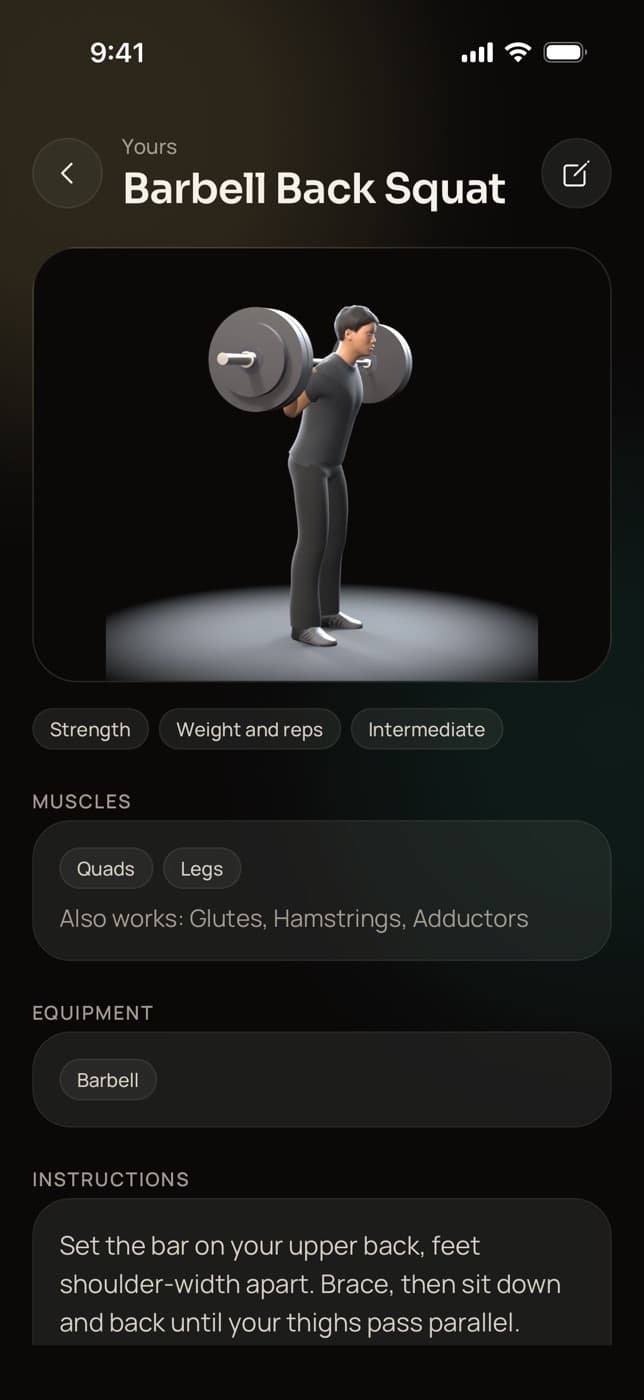
Each exercise shows its demo, the muscles it works, the equipment and how it is tracked. Most also carry written instructions. Library exercises are read-only, so they stay the same for every coach.
- Main and secondary muscles
- Tracked by weight × reps, reps only, time, or distance and time
- Copy one into your library to change its name, text or defaults
Add your own exercises
Give it a name, a category, the target and other muscles, the equipment, a tracking type and your instructions. Then upload a video from your phone or computer, or paste a YouTube link.
- MP4 or MOV, up to 60 seconds and 50 MB
- A YouTube link opens in the YouTube app for your clients
- Everyone on your team builds with your exercises
Clients see the demo as they train
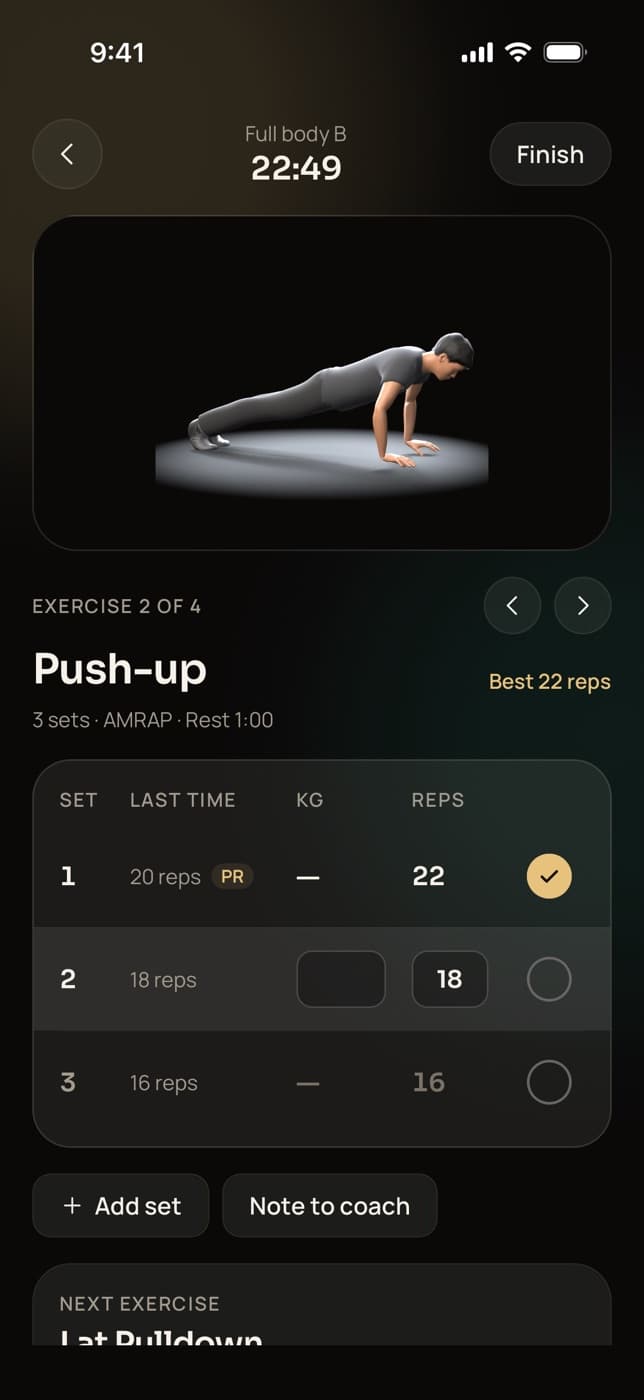
Add the exercise to a workout and assign it. In the Trainaq app the demo loops without sound above the set table, with your note on the exercise and the client’s numbers from last time.
- The same demo on iPhone and Android
- Your note on each exercise, in the workout player
- Clients log weight, reps or time on every set
Push-up
Everything in the library
What does Trainaq’s exercise library include?
Our own 3D demo clips, search by name, filters for muscle and equipment, and the muscles, equipment and tracking of each exercise. Add your own exercises with an uploaded video or a YouTube link, copy a library exercise to change it, and share it all with your team, in the app and on the web.
450+ exercise demo videos
Rendered by us in 3D on a plain studio backdrop. The count on this page is live.
Search by name
Type part of a name and the list narrows as you type.
Muscle filters
Chest, back, shoulders, arms, legs, glutes, calves, abs and cardio.
Equipment filters
Body weight, dumbbell, barbell, kettlebell, cable, machine, bands and more.
Muscles and tracking
Each exercise says what it trains and how clients log it.
Your own exercises
Upload an MP4 or MOV of up to 60 seconds and 50 MB, or paste a YouTube link.
Copy and change
Copy a library exercise to your library, edit it, then add your own video.
Shared by your team
Your exercises belong to the business, so every coach builds from one list.
Four tracking types
Weight × reps, reps only, time, or distance and time.
Drag and drop on the web
Search the library at app.trainaq.com and drag an exercise into a workout.
Demos in the client app
The demo loops in the workout player, above the sets the client logs.
Not yet: written instructions on some of the newest exercises, and a choice of camera angle in the app (each exercise plays one view). Copy an exercise and add your own instructions if you need them now.
Who uses it
How do different coaches use the exercise library?
Online coaches put a demo on every exercise for clients who train alone. Personal trainers send homework for the days between sessions. Studios and gyms film their own machines once for every trainer, and yoga and Pilates teachers time holds. In each case clients watch the same demo in the free Trainaq app.
A demo for clients who train alone
Your clients train in gyms you have never seen. A demo on each exercise in their plan shows the movement you meant, and your note on the exercise covers the cue that matters for them.
Trainaq for online coaches →- Your note on every exercise
- Your own video for your signature drills
- Every logged set comes back to you
Homework between sessions
You teach the movement in the session. The demo reminds the client how it looked on the days you aren’t there, so the extra sessions you program follow what you taught.
Trainaq Coach, the app →- Demos for the library’s exercises
- Your own clip of a client’s variation
- Last time’s numbers on every set
Film your own machines once
Record the machines and setups in your own gym, add them as exercises, and every trainer on your team builds with them. Members see your floor, your kit and your cues.
Trainaq for gyms →- Exercises belong to the business
- One library for every coach account
- Built on the phone or on the web
Holds and poses, timed
Track poses and holds by time, use the library’s yoga demos as they grow, and add your own videos for the sequences you teach in class.
Trainaq for yoga and Pilates studios →- Time-based tracking for holds
- Our yoga demos, with more as we render them
- Your own videos for your own flows
Our own demos
Where do Trainaq’s exercise demo videos come from?
We make them. Each demo is a 3D animation that Trainaq builds and renders in-house, then checks exercise by exercise before it goes live. There is no licensed stock footage, gym branding or music in them. The clips are short loops of a few seconds, and the count on this page updates as new demos go live.
- Built and checked one exercise at a time
- Square clips on a plain studio backdrop
- The clips on this page come from the same renders
FAQ
Exercise library FAQ
Can I upload my own exercise videos?
Yes. Add your own exercise in Trainaq Coach or on the web dashboard and either upload a video (MP4 or MOV, up to 60 seconds and 50 MB) or paste a YouTube link. Your exercises sit next to the library’s demos, and everyone on your team can use them.
Can I edit an exercise from the library?
Library exercises are read-only, so they stay the same for every coach. Copy one into your library instead: the copy takes its name, muscles, equipment, tracking, instructions and defaults, and you change what you like. The 3D demo stays with the original, so add your own video or YouTube link to the copy.
How do clients see the exercise demos?
In the workout player of the free Trainaq app. The demo loops without sound above the set table while the client logs weight, reps or time, with your note on the exercise. An exercise with a YouTube link shows its thumbnail, and a tap opens the video in YouTube.
Can I search the library by muscle or equipment?
Yes. Type part of a name, then filter by muscle group (chest, back, shoulders, biceps, triceps, quads, hamstrings, glutes, calves, abs or cardio) and by one or more of 15 kinds of equipment. Switch to Mine to see only the exercises your business added.
Can I use the exercise library on a computer?
Yes. The web dashboard at app.trainaq.com has the same library under Programs, with the same search and filters. In the workout builder you drag an exercise from the library into the workout, and everything you add shows up in Trainaq Coach on your phone.
Which plans include the exercise library?
The exercise video library, your own exercises and the workout builder are on every plan, together with the free client app. Plans differ by how many active clients you coach and how many coach accounts you need. Every plan starts with a 7-day free trial, and no card is needed.