Class scheduling software for studios and coaches
Run your class timetable from your phone. The waitlist fills empty spots.
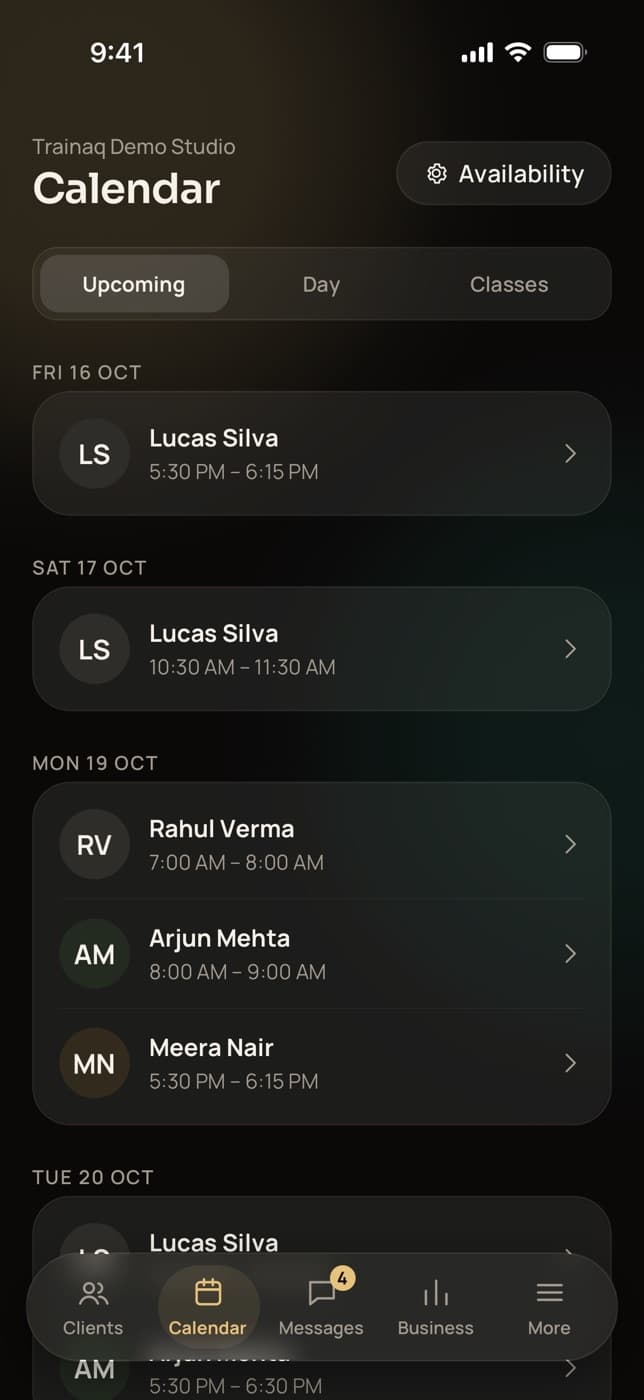
Trainaq’s class scheduling software lets you set up class types, publish a weekly timetable and let clients book from the free Trainaq app. When someone cancels, the next client on the waitlist is booked and told, and you mark attendance in Trainaq Coach.
- Trainaq Coach · iPhone and Android
- Web dashboard · Calendar
- Clients book in the free Trainaq app
What is Trainaq’s class scheduling?
It is how studios and coaches run group classes in Trainaq. You set class types with seats, booking and cancellation windows, schedule one-off classes or weekly series, and clients book or join a waitlist in the free Trainaq app. A freed seat goes to the next client automatically, and staff mark attendance in the coach app.
- Group classes, booking and waitlists are on Pro and Studio. Every plan starts with a 7-day free trial, and no card is needed.
- Each booking uses a class from the client’s membership; unlimited plans use none
- Online classes get a Join button for your Zoom or Google Meet link
- Couple memberships book both partners in one tap
Why studios switch
Why do class bookings over WhatsApp go wrong?
Because a group chat can’t count. Two people take the last spot, someone drops out an hour before and nobody else hears, and at the end of the month you tally classes by hand against what each member paid. A booking system with a seat limit, a waitlist and class allowances settles all three.
Full one week, half empty the next
Without a seat limit, popular slots overflow. Without a waitlist, a cancelled spot stays empty.
Late drop-outs cost you a spot
A message an hour before class reaches you. The member who wanted that place never hears.
Counting classes by hand
Who has used 8 of their 12 classes? A notebook or a spreadsheet only knows if you update it.
How it works
How do you set up group classes in Trainaq?
Create a class type with its length, seats and booking rules, schedule it once or every week, and sell memberships with a class allowance. Clients book from their app, the waitlist fills cancelled seats, and you mark who came. Every class shows on your calendar in Trainaq Coach and on the web dashboard.
Create a class type
Name the class, set its length and seats, and pick who coaches it. Add a place, or a Zoom or Google Meet link for an online class, and choose whether it has a waitlist.
- Lengths from 20 minutes to 2 hours
- Booking opens from 1 day to 30 days before each class
- Free cancellation up to a cut-off, any time, or no cancellation once booked
Kettlebell swing Downward dog Schedule it once or every week
Pick a date for a one-off class, or the weekdays and a start time for a weekly series. Extend a series when it runs low, or stop it from any class onward.
- Weekly series of 4 to 52 weeks
- Change the seats on a single class
- Cancel a class and every booked client gets a push and their class back
Clients book from their app
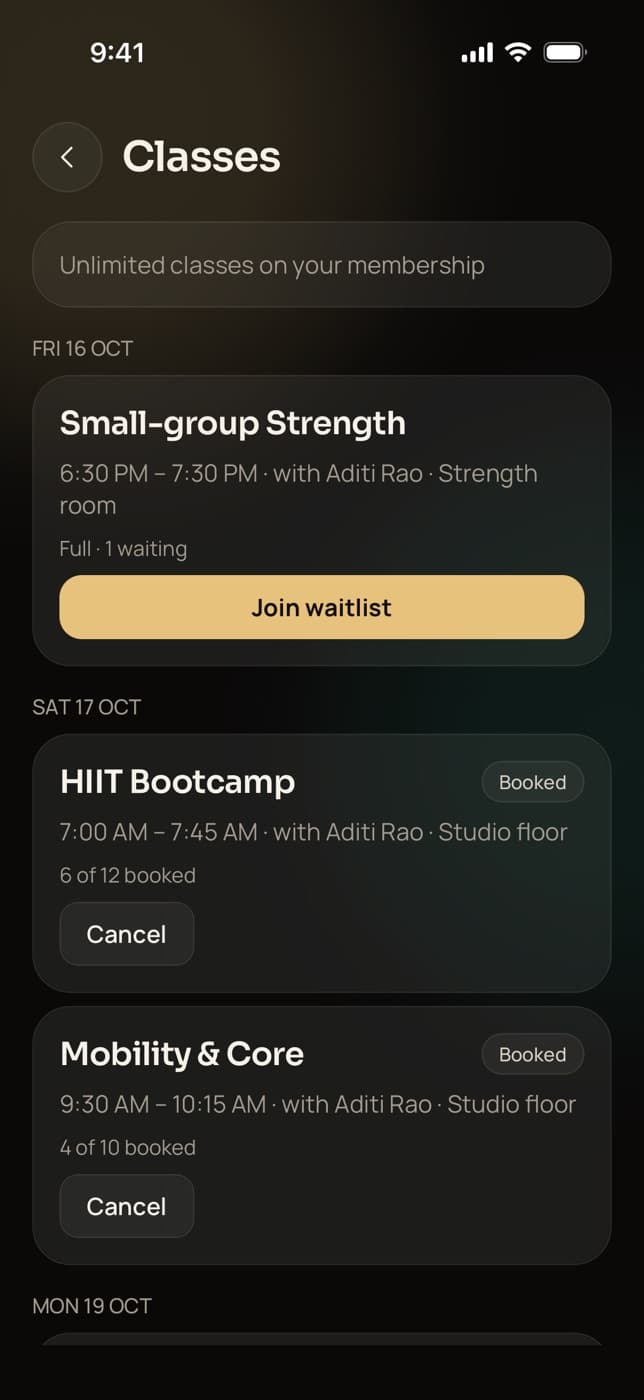
Clients see the next 14 days of classes with the coach, the place and how many seats are taken. They book, join the waitlist when a class is full, or cancel inside your window.
- Before booking opens, they see when it will
- Each booking uses one class from their membership
- On a couple membership, “Book for both of us”
The waitlist moves up, you mark attendance
When a booked client cancels, the first client on the waitlist with classes left is booked and gets a push. From an hour before the start, staff mark each client here or no-show, in Trainaq Coach or on the web.
- The waitlist keeps moving up until the class starts
- A no-show keeps the class used
- Book a client in yourself, even before booking opens
Goblet squat Plank
Everything in group classes
What can you do with Trainaq’s class scheduling?
Everything a small studio needs to run a timetable without a group chat: class types with their own rules, weekly series, seat limits, booking and cancellation windows, a waitlist that promotes on its own, couple bookings, rosters and attendance, online classes with a Join button, and class allowances that come from each client’s membership.
Class types
Length, seats, coach, place or meeting link, and booking rules for each kind of class.
Weekly series
Pick weekdays and a time; extend the series or stop it later.
Seat limits
Clients see how many seats are taken, or “Full” with the waitlist count.
Booking window
Booking opens a set time before each class, from a day to a month.
Cancellation window
Free cancellation up to a cut-off, or none at all once booked.
Automatic waitlist
The next client with classes left is booked and told by push.
Late-cancel rule
A late cancel or a no-show keeps the class used. Switch it off if you prefer.
Couple booking
Two seats, one class from the couple’s shared pool, one tap.
Roster and attendance
Booked, waitlist and cancelled lists; mark here or no-show.
Online classes
A Join button for Zoom or Google Meet from 15 minutes before.
Allowances from memberships
Unlimited, or a set number of classes on each membership.
Multiple branchesComing soon
One business with several locations, each with its own classes.
StudioNot yet: Not yet: reminder pushes before a class, an add-to-calendar file for classes, moving a scheduled class to a new time (cancel it and add a new one), drop-in classes without a membership, and member self check-in, QR codes or door access. Staff mark attendance in the app.
Who uses it
Which businesses run group classes on Trainaq?
Yoga and Pilates studios run a weekly timetable with class counts on each membership. Small gyms and PT studios add bootcamps and small-group strength. Personal trainers fill a few group slots around their 1:1s, and online coaches run live classes on Zoom or Google Meet. Every client books in the same free app.
A weekly timetable with class counts
Set up Hatha, Vinyasa or mat Pilates as class types, schedule them every week, and sell memberships with 8 or 12 classes or unlimited. Members book, cancel inside your window and join the waitlist for the full evening slot.
Trainaq for yoga and Pilates studios →- Weekly series with a waitlist on each class
- Class counts that come off the membership
- Online classes with a Join button
Bootcamps and small-group strength
Run a 6 am bootcamp with 12 seats and a small-group strength class with 6. Each class has its coach, the roster shows who is booked and waiting, and staff mark attendance on the floor.
Trainaq for gyms →- A coach set on each class type
- Roster with booked, waitlist and cancelled
- Here or no-show from an hour before
Group slots around your 1:1s
Add a weekend small-group session next to your personal training. Clients book the group class and their 1:1s in the same app, and each comes off the right allowance on their membership.
Trainaq Coach, the app →- Class and PT allowances on one membership
- Group classes and 1:1s on one calendar
- Couples book together
Live classes on Zoom or Google Meet
Schedule a live mobility class for clients in different cities. Booked clients see the meeting link, with a Join button from 15 minutes before the start, and the class shows in their own time zone.
Trainaq for online coaches →- The link shows only to booked clients
- Seat limits for small live groups
- Waitlist for popular times
Cancellations
What happens when a client cancels late or doesn’t show up?
A cancel inside the class type’s window, or a no-show, keeps the class used on the client’s membership. A cancel before the window gives it back, and the waitlist moves up. You can switch the late-cancel rule off for the whole business, and staff can waive it when they cancel a booking for a client.
- Set the window per class type: any time, 1 to 48 hours, or no cancellation once booked
- On a “No cancellation” class, clients can still leave the waitlist
- If you cancel a class, every booked client gets their class back
Plans
Which Trainaq plans include group classes?
Group classes, booking and waitlists are on Pro and Studio. 1:1 session booking is on every plan, and memberships are on every plan. Every plan starts with a 7-day free trial, and no card is needed. Clients never pay for the Trainaq app; they pay you.
Studios in India
Built for how Indian studios sell classes
- Class memberships in rupeesClients pay by UPI, card or netbanking through Razorpay.
- UPI AutoPayMonthly memberships renew on their own.
- Invites over WhatsAppSend each member their invite link in one tap.
- Android and iPhoneMembers book in the free Trainaq app on either.
FAQ
Group classes FAQ
Can a class have a waitlist that fills automatically when someone cancels?
Yes. Turn the waitlist on for a class type, and when a booked client cancels, the first client on the waitlist who still has classes left is booked and gets a push. Promotion keeps running until the class starts. Joining the waitlist uses nothing; a class is used only when the client gets the seat.
Do clients need a membership to book a class?
Yes. Each booking uses one class from an active membership, and an unlimited membership uses none. A client without a membership, with no classes left or with a frozen membership can’t book, and the app shows them your membership plans. Classes open to anyone without a membership are not available yet.
Can I run online classes on Zoom or Google Meet?
Yes. Paste a Zoom or Google Meet link on the class type. Only booked clients see it, and the Trainaq app shows a Join button from 15 minutes before the start until the class ends. Trainaq doesn’t create meetings for you; you use your own Zoom or Google Meet account.
Can clients check themselves in at the studio?
Not today. Staff mark each booked client as here or no-show in Trainaq Coach or on the web dashboard, from an hour before the class starts. Trainaq has no self check-in, QR codes, door access or biometric attendance, so it suits studios where a coach is in the room.
Can I book a client into a class myself?
Yes. From the class roster in Trainaq Coach, staff can book a client in any time before the start, even before booking opens for everyone else, and can remove a booking. Inside the cancellation window the class counts as used unless you waive it for that client.
Do clients get reminders before a class?
Not yet. Clients get a push when they are booked, put on the waitlist, moved up from it or when a class is cancelled. Reminder pushes before a class start exist for 1:1 sessions, 24 hours and 1 hour before, and are not built for group classes yet.
Which plans include group classes?
Group classes, booking and waitlists are on Pro and Studio. Plans differ by how many active clients you coach, how many coach accounts you need and business features like this one. Every plan starts with a 7-day free trial, and no card is needed.