Free client app for personal training clients
Your clients train, eat and check in in one free app.
Trainaq is the free client app for your personal training and coaching clients, on iPhone and Android. They join with your invite link and find today’s workout, their targets, habits, check-ins, chat, bookings and payments in one place, and everything they log comes back to you.
- Trainaq · iPhone and Android
- Free for clients, who join by their coach’s invite
- You coach from Trainaq Coach and the web dashboard
What is the Trainaq client app?
Trainaq is the free app your clients use on iPhone and Android. They join with your invite link and see today’s workout with demos, their calorie and macro targets, habits and check-ins. They log food by search, barcode or photo, chat with you, book classes and sessions, and pay you online in India.
- Free for clients; the client app comes with Trainaq on every plan. Every plan starts with a 7-day free trial, and no card is needed.
- Clients join only through their coach’s invite link
- Workout sets, food logs and habit ticks save offline and sync later
- Dark and light themes, or follow the phone
Why clients need their own app
Why do clients drift when their plan lives in PDFs and chats?
Because a PDF or a chat thread never asks them to start today’s session, log lunch or send this week’s update. The plan, the demos, the targets and the conversation sit in different places, so clients guess or give up. One app that holds all of it, and sends their logs back to you, keeps them going.
The plan is buried
Last week’s workout is somewhere up the chat, and the targets are in a file nobody can find at the gym.
No demo, no confidence
An exercise name means little to a new client. Without a demo they skip it or guess at the form.
Nothing comes back
You learn what they ate and lifted only when they remember to tell you, usually at the check-in call.
Inside the app
What do clients see in the Trainaq app?
Five tabs: Today, Train, Food, Progress and Coach, plus a More screen for their membership, payments, bookings and settings. Each stop below is a real screen from the app on iPhone, filled with demo data. Clients see your business’s name and their own plan, never your coach screens or other clients’ logs.
Today: the day at a glance
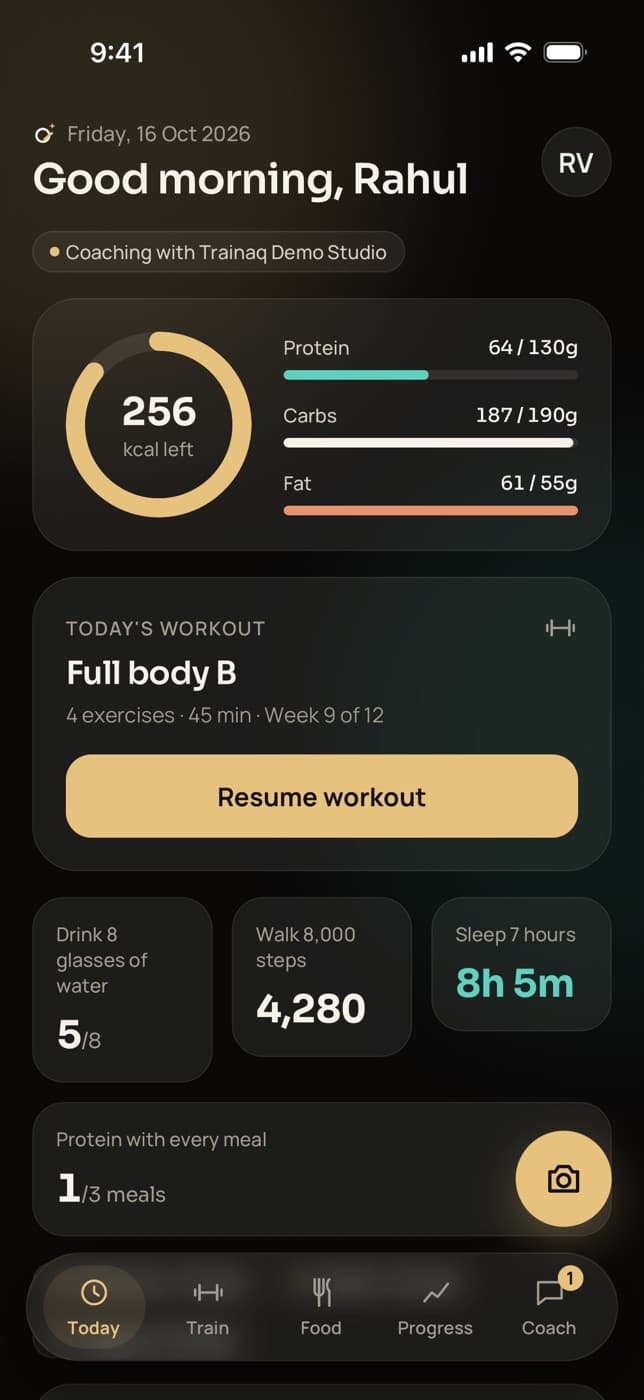
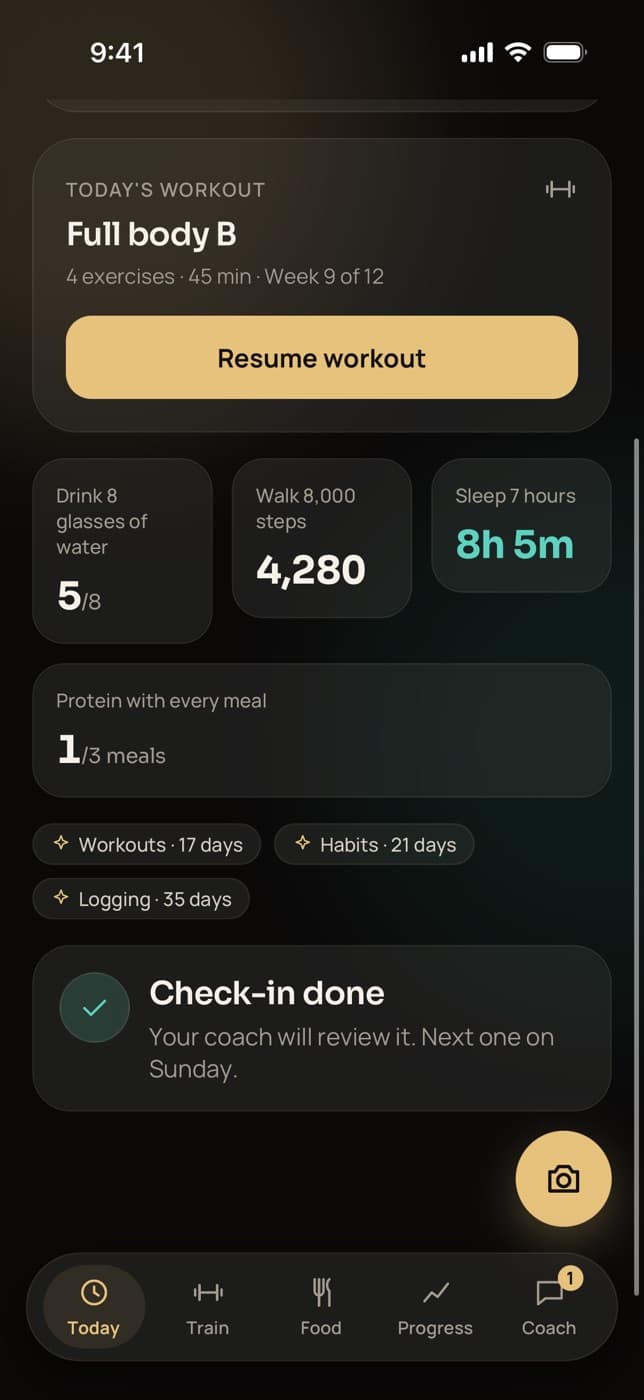
Today opens with the calories left for the day, protein, carbs and fat against the targets you set, today’s workout with a Start button and the day’s habits. When the weekly check-in is due, its card sits here too.
- A calories-left ring and macro bars against your targets
- Streaks for workouts, habits and logging
- A camera button that opens the barcode scanner
Train: the workout player
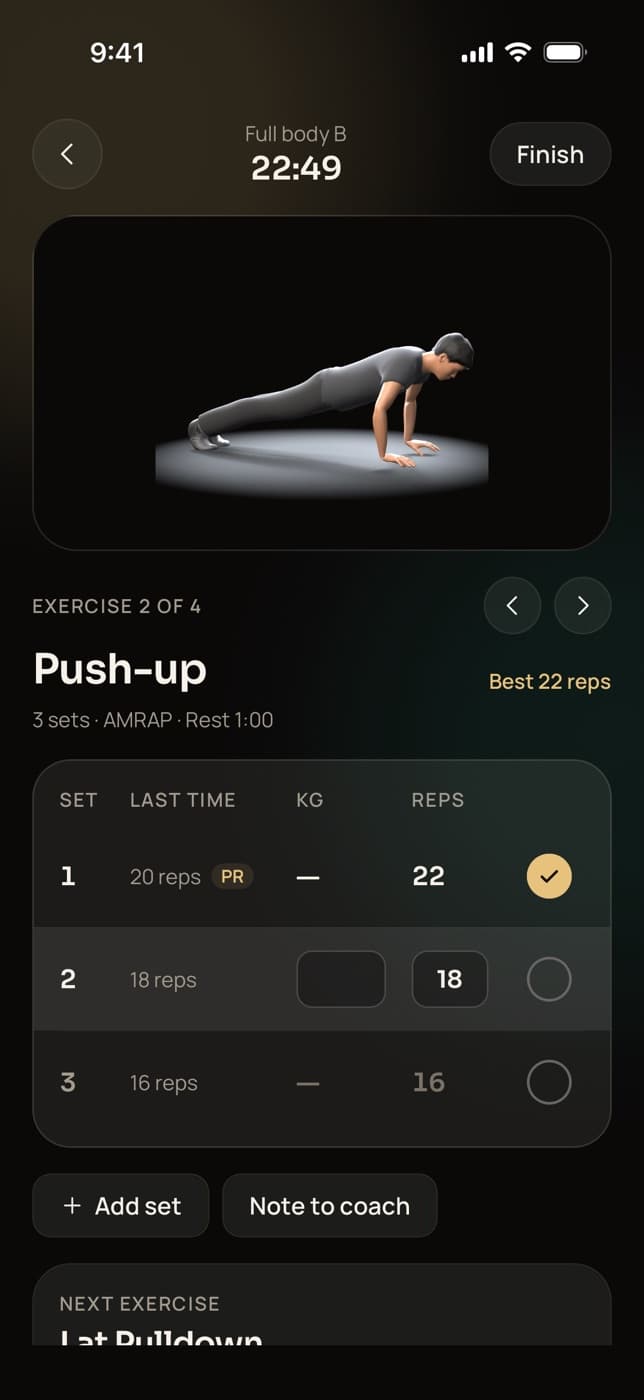
Clients start today’s workout and follow it exercise by exercise, with the exercise demo, last time’s numbers and a set table in kg or lb. A rest countdown starts after each set, and a personal record shows up the moment they hit it.
- Rest timer with +30 seconds and Skip rest
- PR alerts for weight, estimated 1RM, reps and duration
- A note to you on any exercise, and sets that save offline
- A finish summary with duration, volume and PRs, then history and a PR list
Food: log by search, barcode or photo
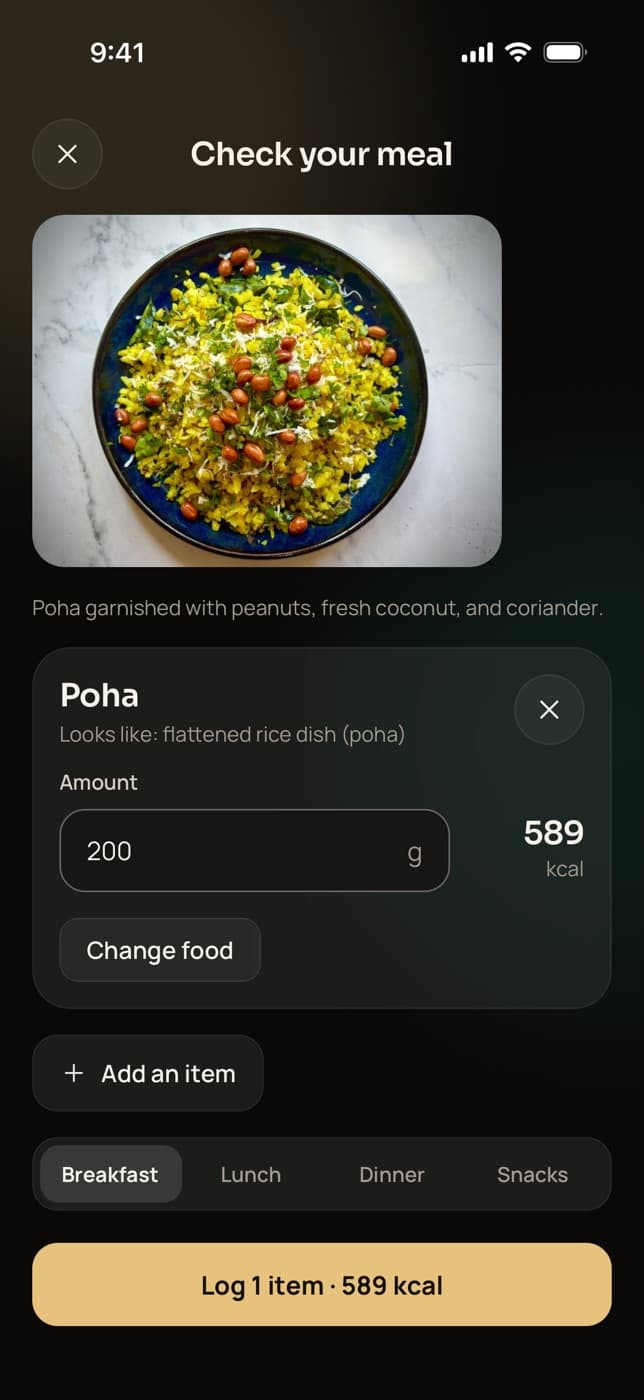
The Food tab shows the day’s totals against your targets, with a date switcher and meals for breakfast, lunch, dinner and snacks. Clients search foods, scan a barcode, snap a meal for AI to read or quick-add calories, and set portions in grams, servings or household measures.
- Recent foods and favourites first, then your foods and the library
- AI photos only after the client agrees, and they check every item before it is logged
- Your assigned meal plan in the app is coming soon; today it sets their targets
Progress: check-ins, charts and photos
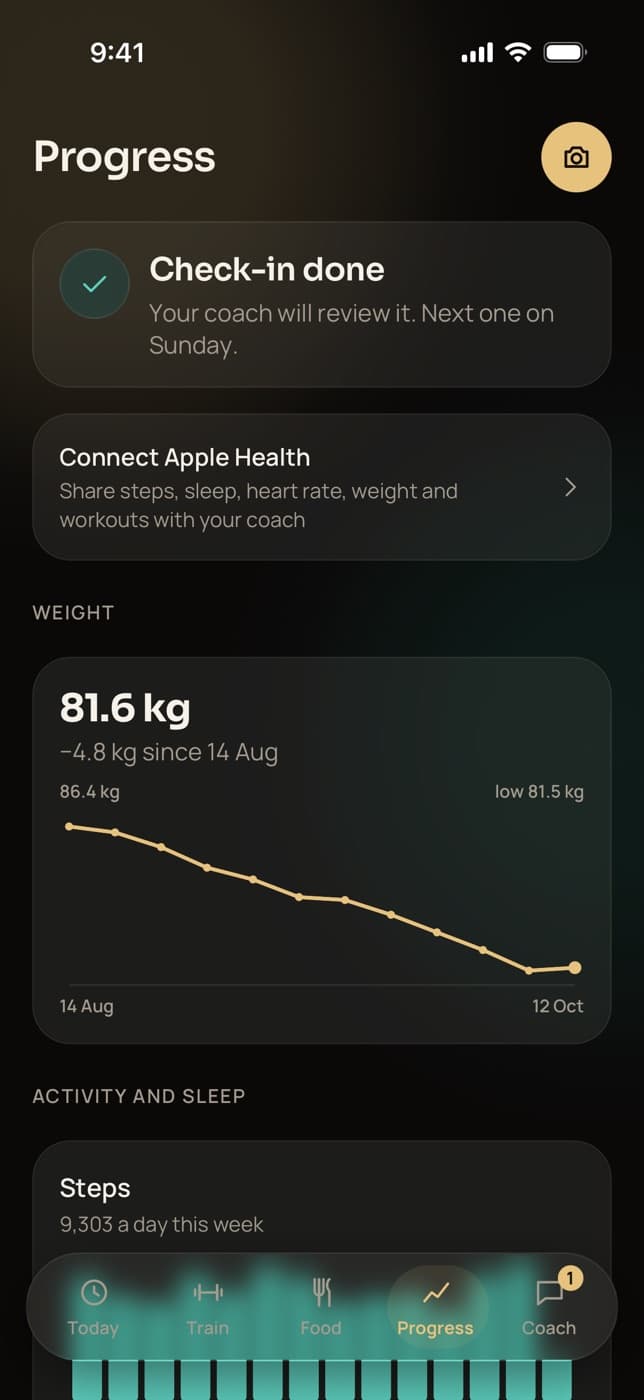
Each week clients answer your check-in questions, add their weight and measurements and, if they like, front, side and back photos. Progress also holds their weight, steps and sleep charts, past check-ins with your reply, and private progress photos by pose.
- Your one-tap reaction and note arrive as a push
- Apple Health or Health Connect sync, on Pro and Studio
- Photos are private to the client and their coach
Coach: chat with you and your team
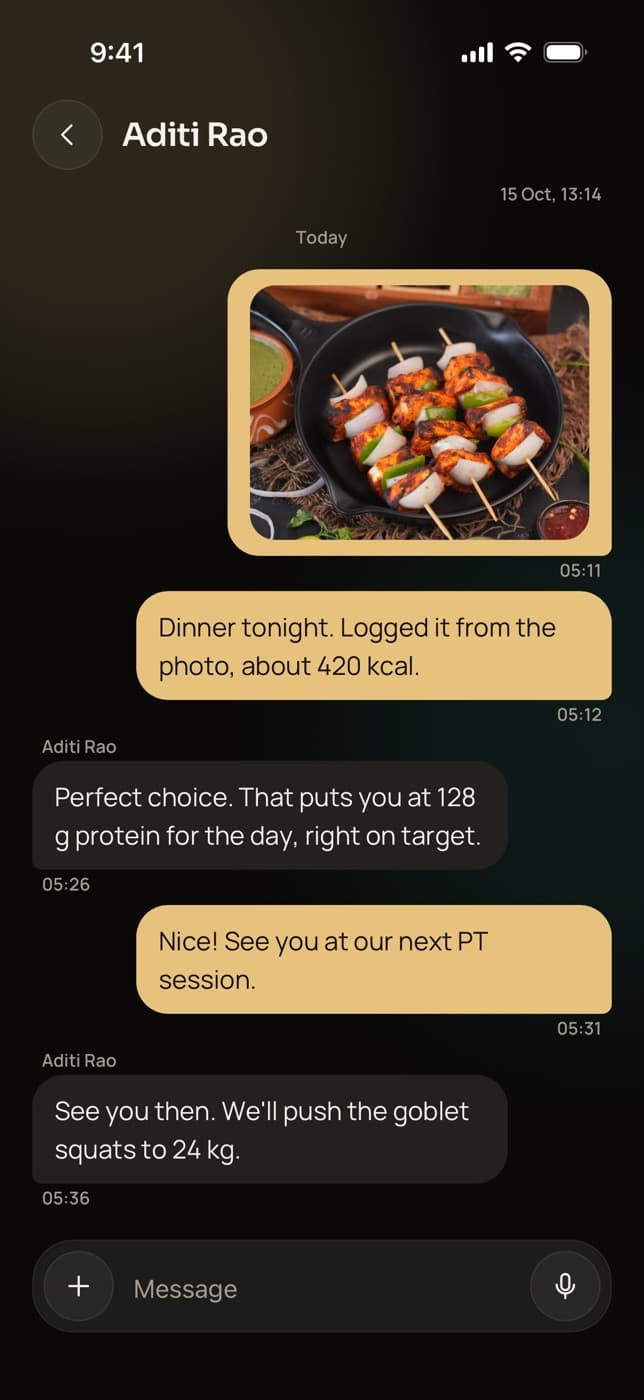
The Coach tab holds the client’s chat with your coaching team and any group chats you add them to. They send text, photos, videos and voice notes, and you answer from Trainaq Coach or the web. A push tells them when you reply.
- Voice notes for quick questions from the gym floor
- Videos of up to 3 minutes for form checks
- Group chats show other members by first name and initial
Bookings: group classes and 1:1 sessions
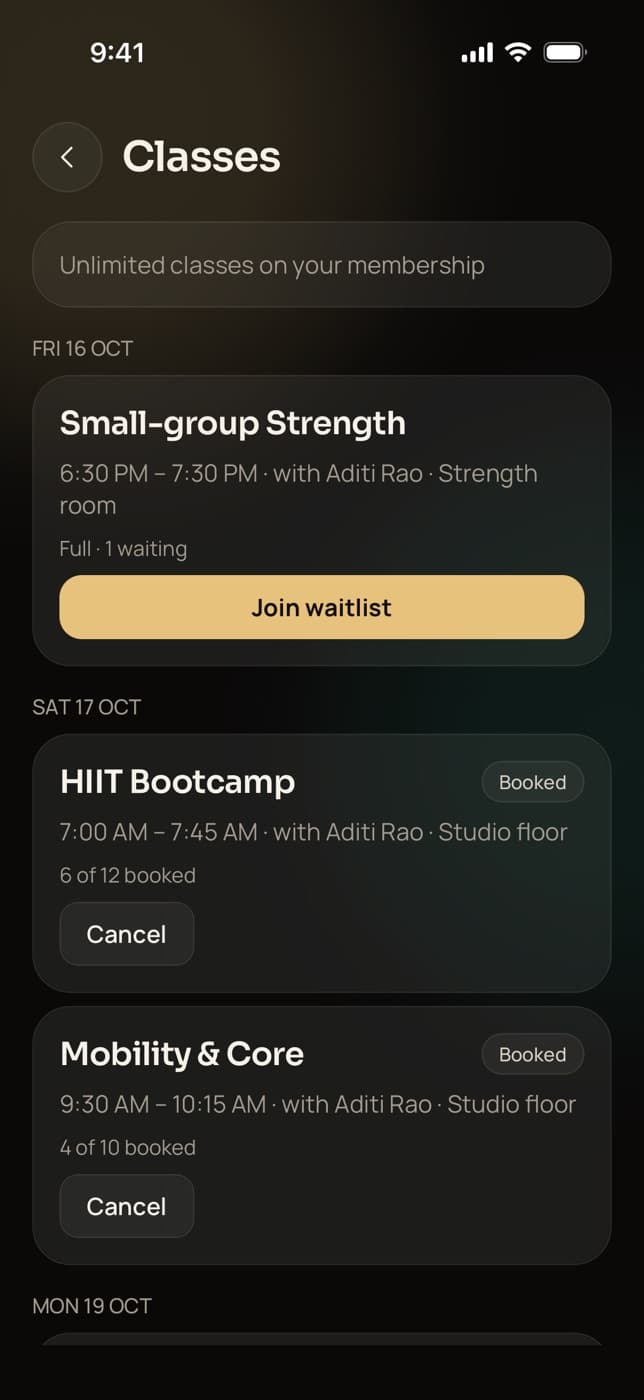
Clients book your group classes for the next two weeks and join the waitlist when one is full; a freed place books them in on its own. They book 1:1 sessions in your open slots, shown in their own time zone, and move or cancel within your notice rules.
- A Join button for Zoom or Google Meet sessions
- Add to calendar on every 1:1 session
- “Book for both of us” on couple memberships
- Group classes and waitlists on Pro and Studio
Habits: small daily wins
Clients tick off the habits you set, such as water, steps, sleep or your own, on the days you choose. They pick the time of their habit reminder, and streaks for workouts, habits and logging grow on Today, with a celebration at 7, 30 and 100 days.
- Water in glasses or ml, steps, and sleep in hours
- The current and best streak for each
- Habit ticks save offline too
Membership: sessions left, freezes and payments
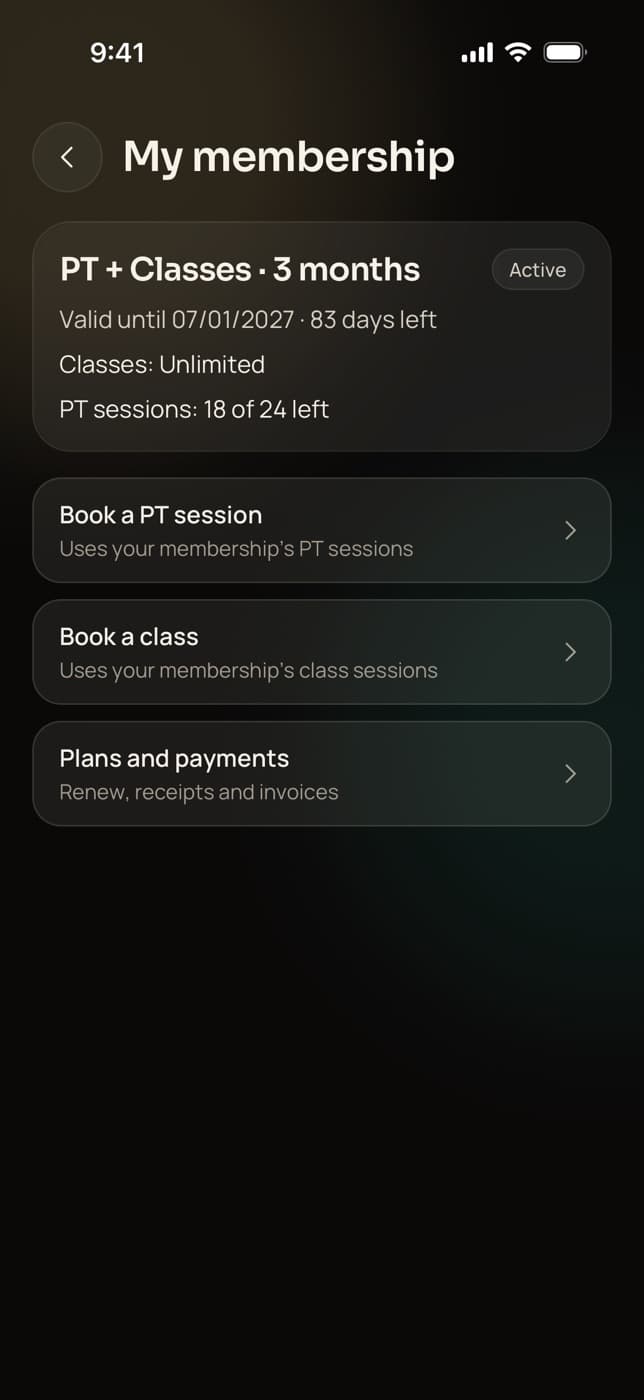
My membership shows how long it runs, the class and PT sessions left and any freeze. Clients ask you for a freeze, renew and pay what they owe. Businesses in India take UPI, cards and netbanking through Razorpay, and every payment has a receipt or invoice to share as a PDF.
- Monthly plans renew by UPI AutoPay or a card mandate, which clients can turn off
- GST invoices split CGST and SGST or IGST by the client’s state
- Outside India you record cash and bank transfers; online payments there are coming soon
Everything in the app
What else can clients do in the Trainaq app?
Beyond the five tabs, the app covers the moments around coaching: joining by invite, the intake form, offline logging, the barcode scanner, AI meal photos, reminders, health data, voice notes, invoices, themes and deleting the account. Each of these works on iPhone and Android, and none of it costs your client anything.
Join by invite
Clients join only through your link, sent on WhatsApp or from any app.
Intake on joining
Goals, injuries, health, measurements and photos, with save and finish later.
Offline logging
Sets, food and habit ticks save with no signal and sync when the phone reconnects.
Barcode scanner
Packaged foods from Open Food Facts, or type the barcode in.
AI meal photos
AI names the foods and grams; the client checks them before logging.
Every planReminders
Pushes for sessions, check-ins, habits and payments, with quiet hours.
Apple Health and Health Connect
Steps, sleep, heart rate, weight and workouts, read only.
Pro and StudioVoice notes and video
Clients record a voice note or send a video of a set.
Receipts and invoices
Every payment’s receipt or GST invoice, and any credit note, as a PDF.
Dark and light themes
Dark, light, or follow the phone’s setting.
Delete account in the app
More, Delete account, type DELETE and confirm. No email needed.
Meal plan in the appComing soon
Clients will see the meal plan you assign, meal by meal. Today they see the targets set from it.
Not yet: voice food logging, recipes, badges beyond streak milestones, and a web version of the client app. Clients use Trainaq on their phone.
Joining
How do clients join the Trainaq app?
You add the client in Trainaq Coach or on the web and share their invite link on WhatsApp, by text or by copying it. They install Trainaq, open the link, sign in with a code sent to their email and confirm they want to join your business. The intake form opens next, then Today.
- Without the app yet, the invite page offers it; after installing, the client taps the link again
- Nothing is accepted automatically: the client sees your business name and confirms
- Someone who signs in without an invite is asked to get one from their coach
- You can see and revoke pending invites, and send the intake form again later
Privacy
Who can see a client’s data in the Trainaq app?
Only the coaching business the client joined. The owner sees every client, and each coach sees the clients they lead. Other clients never see anyone’s logs, photos or check-ins. Meal photos reach the AI only after the client agrees, and clients can delete their account in the app at any time.
- Progress and check-in photos are private, and the app strips location data from them
- A meal photo is never stored; it goes to the AI only to read the meal, with no name, email or phone
- Clients can withdraw AI consent in More; search and barcode still work
- Deleting the account removes their logs, photos, messages and health data; the coach keeps only anonymous totals, and payment records stay as tax law requires
Who it suits
How do different coaching businesses use the client app?
Online coaches run the whole relationship through it: programs, targets, check-ins and chat. Personal trainers give clients the sessions between their 1:1s and let them book the next one. Studios and gyms add classes, memberships and payments. In every case the client opens one free app instead of five.
Coaching clients you never meet
Clients train from your program, log food against your targets and send a weekly check-in with photos. You see it all before you reply in the same app.
Trainaq for online coaches →- Weekly check-ins with front, side and back photos
- Voice notes and video for form checks
- Apple Health or Health Connect steps and sleep
The days between sessions
Your clients see you twice a week. The app gives them the other sessions with demos, logs their food, and books the next 1:1 in your open slots.
Trainaq Coach, the app →- Book, move and cancel 1:1 sessions
- PT sessions left on their membership
- A Join button for online sessions
Members who book and pay in the app
Members book classes, join waitlists, see the sessions left on their membership, ask for a freeze and pay what they owe, without calling the front desk.
Trainaq for gyms →- Class booking with an automatic waitlist
- Freeze requests you approve or decline
- Receipts and GST invoices in the app
Classes plus a home practice
Students book your classes, including online ones with a Join button, and follow the practice you set between them, with habits for the days in between.
Trainaq for yoga and Pilates studios →- Online classes with Zoom or Google Meet links
- Couple memberships book for both partners
- Daily habits with reminders
Plans
Which Trainaq plans include the client app?
The client app is free for clients and comes with Trainaq on every plan. Apple Health and Health Connect sync is on Pro and Studio, and group classes are on Pro and Studio. Every plan starts with a 7-day free trial, and no card is needed.
Clients in India
Built for how Indian clients train and pay
- Invites over WhatsAppCoaches send the invite link to a client’s WhatsApp in one tap.
- UPI, cards and netbankingThrough Razorpay, with UPI AutoPay for monthly memberships.
- GST invoicesCGST and SGST or IGST by the client’s state, shared as a PDF.
- Indian meals from a photoAI names dishes like poha and estimates the grams for the client to check.
FAQ
Trainaq client app FAQ
Do my clients pay for the Trainaq app?
No. Clients get Trainaq free on iPhone or Android and join with your invite link. You pay for your Trainaq plan, which is priced by how many active clients you coach and how many coach accounts you need. Clients pay only you, for your coaching, memberships or sessions.
Can clients sign up without a coach?
No. Trainaq is the app for clients of a coach on Trainaq, so a client joins only through their coach’s invite link. Someone who installs the app without an invite sees a short note asking them to get one from their coach, and a way to switch accounts.
Is the meal plan I assign shown in the client app?
Not yet; that is coming soon. Today, assigning a meal plan sets the client’s calorie and macro targets, and the app shows the day’s totals against them. Clients log what they eat by search, barcode or photo, and you see each day’s log against the targets in Trainaq Coach or on the web.
Does the Trainaq app work offline?
For logging, yes. Workout sets, food entries and habit ticks save on the phone with no signal and sync in order when it reconnects, so nothing logged in a basement gym is lost. Chat, bookings, check-ins and payments need a connection; a message that fails shows Not sent with a tap to retry.
Can a client have more than one coach?
Yes, within one business. The More screen lists the client’s coaching team with the lead coach first, the Coach tab holds one chat with that team, and when several coaches take sessions the client picks who to book. The app shows one business at a time: the one the client joined most recently.
Which phones does the Trainaq app run on?
iPhone and Android phones, with the same features on both. Health data comes from Apple Health on iPhone and from Health Connect on Android, which also brings in Samsung Health and Fitbit data. There is no web version of the client app; clients open payment links in their browser.
How do clients delete their account?
In the app: More, then Delete account, type DELETE and confirm. Their logs, photos, messages and health data are deleted, and the coach keeps only anonymous totals. Payment and invoice records stay, with the name removed, as tax law requires. A client who can’t open the app can ask us by email.