Personal training scheduling software
Clients book your open slots. You stop texting to find a time.
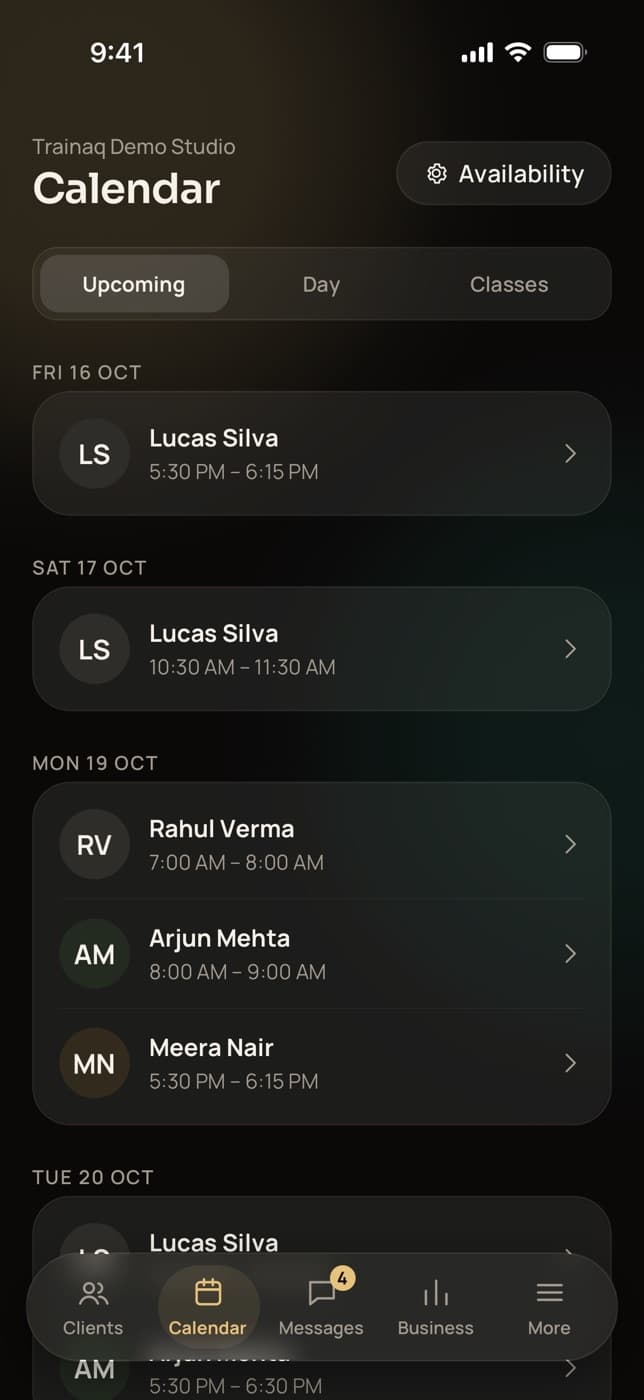
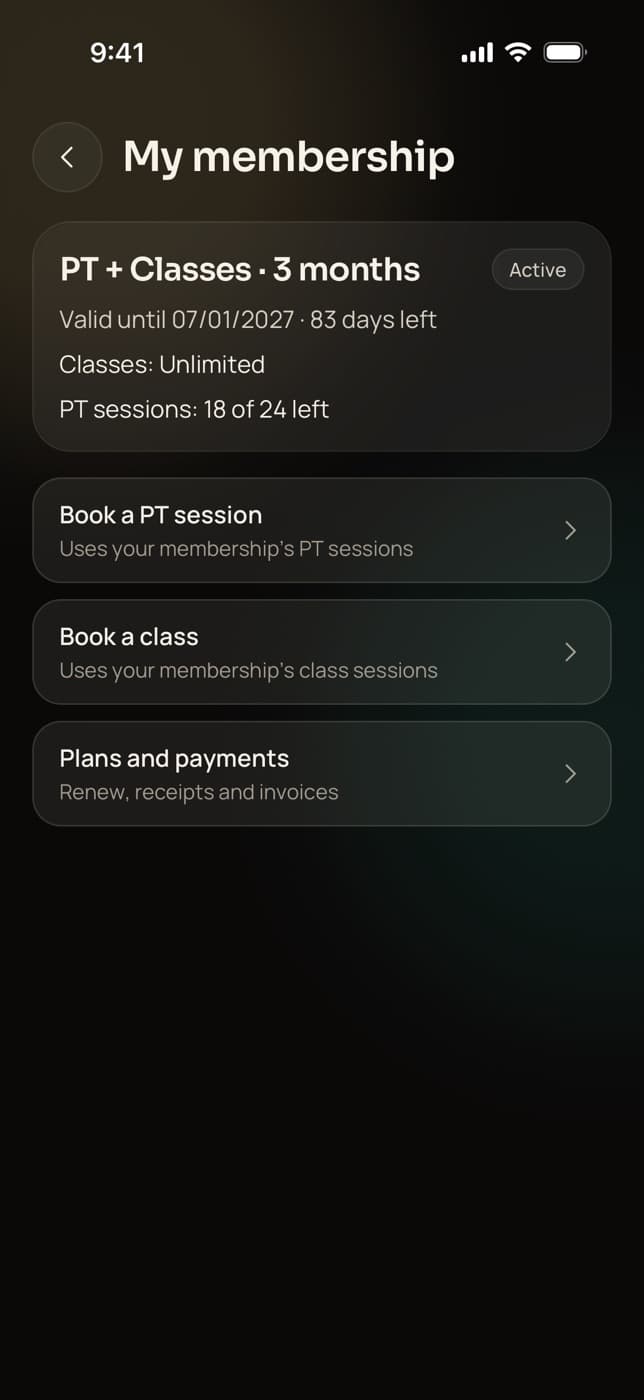
Trainaq’s personal training scheduling software turns your weekly hours into open slots that clients book from the free Trainaq app, in their own time zone. Each booking uses a PT session from their membership and comes with reminders, a Zoom or Meet link and an add-to-calendar file.
- Trainaq Coach · iPhone and Android
- Web dashboard · Calendar
- Clients book in the free Trainaq app
What is Trainaq’s session booking?
It is the 1:1 booking side of Trainaq. You set weekly hours, days off, notice and buffers; clients book open slots in their own time zone from the free Trainaq app, and no slot can be booked twice. Each booking uses a PT session from their membership, with push reminders 24 hours and 1 hour before.
- PT session booking is on every plan. Every plan starts with a 7-day free trial, and no card is needed.
- Clients reschedule or cancel themselves inside your notice period
- Online sessions open with a Join button for your Zoom or Google Meet link
- Couples on a shared membership book one session together
Why trainers switch
Why does booking personal training by text eat your week?
Because every booking is a conversation. You send three times, the client picks the one you just gave away, someone forgets the session, and at the end of the month you count sessions against what each client paid. Open slots, a session count on each membership and automatic reminders take those conversations off your phone.
Back and forth for every slot
“Is 7 free?” “Taken, how about 8?” Multiply that by every client, every week.
Forgotten sessions
Without a reminder, a 6 am session is easy to sleep through, and your hour is gone.
Counting sessions by hand
Who has 3 sessions left and who is already over? Only your notebook knows.
How it works
How do clients book personal training sessions online?
You set your weekly hours and booking rules once. Clients open the Trainaq app, pick a length and an open time shown in their own time zone, and book; the session comes off their membership. You both get reminders, and online sessions open with a Join button for your Zoom or Google Meet link.
Set your availability
Add your hours for each weekday, with as many time ranges as you need, then mark days off or special hours on single dates. Do it in Trainaq Coach or on the web dashboard.
- Minimum notice from none to 48 hours
- A buffer of up to an hour between sessions
- Session lengths from 15 minutes to 2 hours, up to four at once
Clients book an open slot
Clients see only the times you are free, in their own time zone, and pick a length when you offer more than one. Two bookings can never take the same time.
- Each booking uses a PT session from their membership
- Or let clients book without sessions on their plan, if 1:1s are part of your coaching
- Booking up to 90 days ahead, as you choose
Move, cancel or book for a client
Clients reschedule or cancel inside your notice period, and the session goes back to their membership. You can move or cancel any session at any time, and book one for a client from the web dashboard.
- Cancel notice from none to 48 hours, 24 by default
- A late cancel keeps the session used, unless you waive it
- Switch the late-cancel rule off for the whole business
Meet in person or online
Paste your Zoom or Google Meet link once in your availability, or a different one on a single session. From 15 minutes before the start, the client gets a Join button.
- A push when a session is booked, moved or cancelled
- Reminders 24 hours and 1 hour before, to you and the client
- Add to calendar with an .ics file, in both apps and on the web
Dumbbell bench press Barbell hip thrust
Everything in session booking
What can you do with Trainaq’s session booking?
Everything a personal trainer needs to fill a diary without messages: weekly hours and days off, notice and buffers, several session lengths, slots in each client’s own time zone, no double booking, PT allowances from memberships, a cancel window with a late-cancel rule, meeting links with a Join button, reminders and add-to-calendar files.
Weekly hours
Several time ranges a day, on quarter hours.
Days off and special hours
Block a date, or open different hours on it, up to a year ahead.
Notice and buffers
No last-minute bookings, and time to reset between clients.
Several session lengths
Offer 30, 45 and 60 minutes; the client picks.
The client’s time zone
Slots show in the client’s own time, wherever they live.
No double booking
The database refuses a second booking for the same time.
PT allowances
Each booking uses a session from the membership; an in-time cancel gives it back.
Late-cancel rule
Inside your notice, the session counts. Waive it, or switch it off.
Zoom or Meet link
One default link, or one per session, with a Join button.
Reminders
Pushes 24 hours and 1 hour before, to you, the client and a couple partner.
Add to calendar
An .ics file that updates the same event after a move.
Couple sessions
One booking for two partners, one session from their shared pool.
Not yet: Not yet: two-way calendar sync, creating Zoom or Google Meet meetings for you (you paste your own link), a location or notes field on a session, and a public booking page for people who are not your clients yet. Clients join through your invite first.
Who uses it
How do different coaches use session booking?
Personal trainers fill their gym hours without a single “what time works?” message. Online coaches run video calls across time zones. PT studios give each coach their own availability, and nutritionists book consultation calls. In each case the client books in the same free app, and the session comes off their membership.
A full diary, no back and forth
Open your 6 to 10 am and 5 to 9 pm hours with a 12-hour notice and a 15-minute buffer. Clients with PT sessions left book themselves, and you see the week fill up in Trainaq Coach.
Trainaq Coach, the app →- Sessions left show on the client’s membership
- Reminders the day before and an hour before
- Late cancels count, unless you waive them
Video calls across time zones
Your client in Dubai sees your Mumbai evening slots in their own time. The session opens with a Join button for your Zoom or Google Meet link, and both of you get a reminder an hour before.
Trainaq for online coaches →- Slots in the client’s time zone
- One default meeting link, or one per session
- An .ics file for the client’s calendar
Each coach with their own hours
Every coach on your team sets their own availability. Clients book the coaches who look after them, and the web dashboard’s calendar shows every coach’s week, with a filter by coach.
Trainaq for gyms →- Availability per coach
- Book on a client’s behalf from the web
- Couple memberships share one pool of sessions
Consultation calls on a schedule
Offer 30-minute follow-ups and 60-minute first consultations. Clients book the length they need, and if calls are part of your package, let them book without a session count.
Trainaq for online coaches →- Several lengths at once
- Booking without sessions, if you choose
- Google Meet or Zoom links you paste
Sessions and memberships
How do PT sessions connect to memberships?
A membership plan can include 1:1 sessions: none, unlimited or a set number. Each booking uses one, an in-time cancel gives it back, and a late cancel keeps it used unless you waive it. When a client runs out, the booking screen shows your membership plans, so they can buy more before they book again.
- Add sessions to a client’s membership by hand when you agree to it
- Couple memberships share one pool between two partners
- Or let clients book without sessions, when 1:1s are part of your coaching
FAQ
Session booking FAQ
Can clients book sessions in their own time zone?
Yes. The Trainaq app shows your open slots in the client’s own time zone, so a client abroad never converts times. The session details show your time as well when the two differ, and your calendar in Trainaq Coach and on the web shows every session in your business’s time zone.
Does Trainaq sync with my phone’s calendar?
Not as a live sync. Every session has an add-to-calendar (.ics) file in the client app, the coach app and on the web, and after a move the file updates the same event. Two-way calendar sync is not built, so your availability lives in Trainaq.
Does Trainaq create Zoom or Google Meet links for me?
No. You paste your own Zoom or Google Meet link once as the default in your availability, or a different link on a single session. Trainaq doesn’t connect to Zoom or Google accounts. Clients see a Join button from 15 minutes before the session starts.
Can I stop clients booking at the last minute?
Yes. Set a minimum notice, from none to 48 hours, and clients only see slots after it. A buffer of up to an hour keeps time free between sessions, and a cancel notice decides how late a client can cancel or move a session and still get it back.
Can clients reschedule a session themselves?
Yes, while a cancel would still be free, that is, before your cancel notice begins. They pick a new open slot in the app, and you both get a push. Inside the notice they can still cancel, but the session counts as used unless you waive it.
Can a client book without a membership?
Only if you allow it. By default a booking needs a PT session left on an active membership, and the app offers your plans when there are none. Turn on booking without sessions in your availability settings when 1:1s are already included in your coaching fee.
Which plans include 1:1 session booking?
PT and 1:1 session booking is on every plan, with weekly availability, reminders, meeting links and add-to-calendar files. Clients book in the free Trainaq app. Group classes with waitlists are on Pro and Studio. Every plan starts with a 7-day free trial, and no card is needed.