Body measurement tracker and client progress
See every client’s progress in one view, without asking for it.
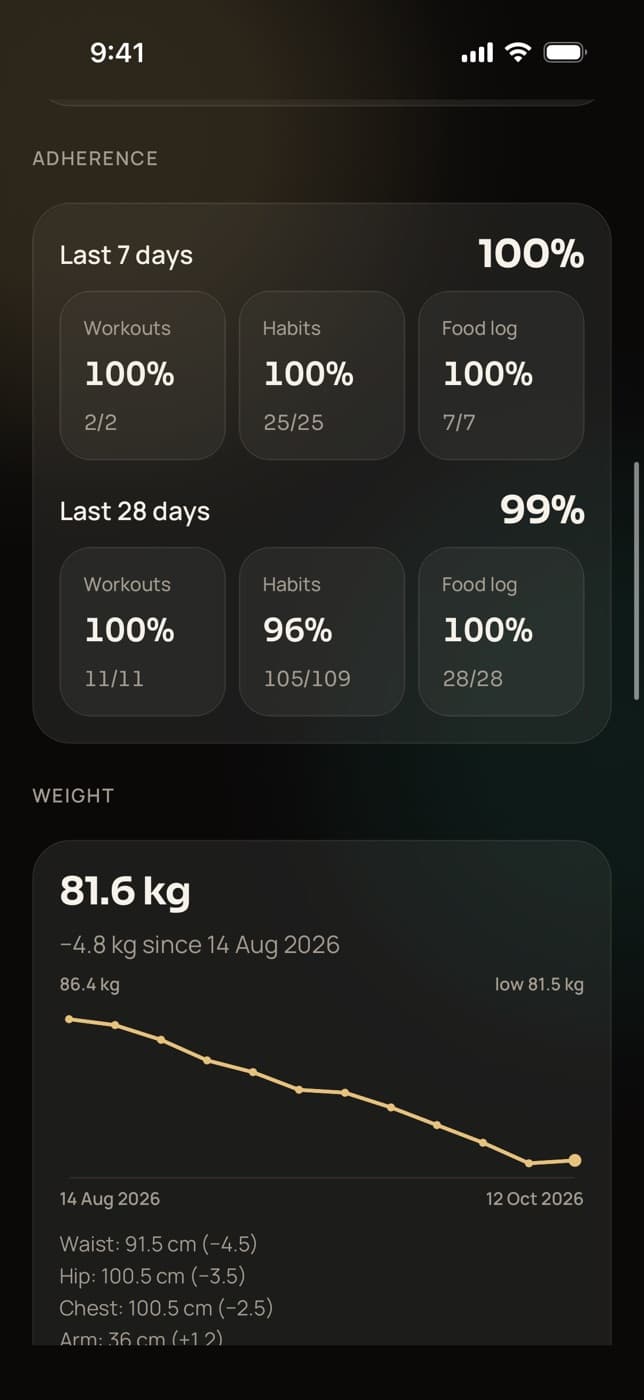
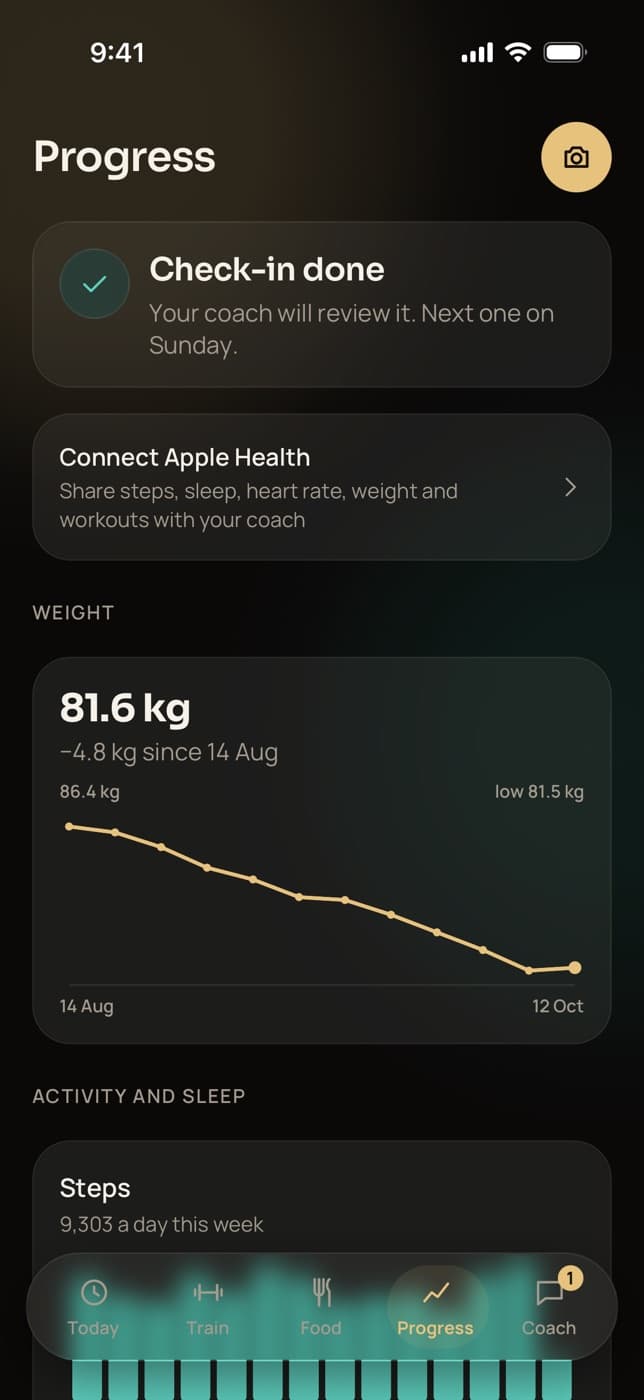
Trainaq is a body measurement tracker and progress view in one: weight trend, measurements, private progress photos, lifts and PRs, adherence over 7 and 28 days, and Apple Health or Health Connect data, for you in Trainaq Coach and for clients in their app.
- Trainaq Coach · iPhone and Android
- Web dashboard
- Clients see their progress in the free Trainaq app
What does Trainaq track for each client?
Weight from the intake, check-ins and health apps; nine body measurements; private progress photos by pose; estimated 1RM and personal records from logged sets; adherence to workouts, habits and food logging over 7 and 28 days; and steps, sleep and heart rate from Apple Health or Health Connect. You and the client each get a view.
- Progress photos and measurements are on every plan. Every plan starts with a 7-day free trial, and no card is needed.
- Apple Health and Health Connect sync is on Pro and Studio
- Measurements in kg and cm or lb and in, by country
- Photos by pose: front, side, back and other
Why coaches switch
Why is client progress hard to follow?
Because it is spread out. Weights sit in a spreadsheet, photos in the client’s camera roll, lifts in a notebook and steps in a phone app you can’t see. By the time you put them together, the call is over. One view that fills itself from what clients already log shows the trend at a glance.
Data everywhere
Spreadsheets, camera rolls, notebooks and health apps, none of them yours.
Photos you can’t compare
Progress photos mixed in with everything else, in a different pose every time.
Effort you can’t see
A stalled scale looks the same whether the client trained all week or not at all.
How it works
How does progress tracking work in Trainaq?
Clients log as they go: sets in the workout player, meals and habits on Today, a weekly check-in with weight and photos and, if they connect it, Apple Health or Health Connect. Trainaq turns that into trends on the client’s Progress screen and on yours, with nothing for you to type.
Weight and measurements
The intake sets the starting point. Each check-in adds weight and any measurements you ask for, and a synced health app adds weight in between. Trainaq keeps one weight per day and charts the trend.
- Weight, height, body fat, waist, hip, chest, arm, thigh and neck
- kg and cm, or lb and in, by country
- The latest of each measurement on your view
Progress photos
Clients add front, side, back or other photos from their Progress screen, the intake or a check-in. Photos are grouped by day and shown only to the client and their coaches, through links that expire.
- The app drops location data before upload
- Clients can delete a photo they added
- Same pose, light and time of day is the advice in the app
Lifts, PRs and adherence
From logged sets, Trainaq charts the best estimated 1RM per day for the lifts a client trains most and lists recent PRs. Adherence shows the share of scheduled workouts, due habit days and food-log days they managed in the last 7 and 28 days.
- PRs for weight, estimated 1RM, reps and duration
- Adherence for workouts, habits and food logging
- Check-in history with your replies
Health app data
Clients connect Apple Health on iPhone or Health Connect on Android. Trainaq reads the last 30 days first, then syncs when they open Today, at most every 30 minutes, or when they tap Sync now.
- Steps, sleep, resting and average heart rate, weight, active calories and workouts
- Samsung Health and Fitbit data through Health Connect
- Clients can stop syncing and delete what was synced
Everything you can track
What can you track for each client in Trainaq?
Weight and nine body measurements, private photos by pose, estimated 1RM and personal records, adherence over 7 and 28 days, check-in history, and steps, sleep and heart rate from health apps. You see it in Trainaq Coach and on the web; the client sees their own charts, photos and past check-ins.
Weight trend
One weight a day from check-ins, the intake and health apps, charted.
Nine measurements
Weight, height, body fat, waist, hip, chest, arm, thigh and neck.
Photos by pose
Front, side, back and other, grouped by day and private.
Estimated 1RM
The best of each day for the lifts a client trains most.
Recent PRs
Weight, estimated 1RM, reps and duration records from logged sets.
Adherence, 7 and 28 days
Scheduled workouts, due habits and days with a food log.
Check-in history
Every check-in with its answers, photos and your reply.
Apple Health
Steps, sleep, heart rate, weight and workouts from iPhone.
Pro and StudioHealth Connect
The same on Android, including Samsung Health and Fitbit data.
Pro and StudioThe client’s own view
Their weight chart, photos and past check-ins, plus steps and sleep from a health app.
Who’s slipping, on the web
The web dashboard marks clients on track, slipping or quiet from their last 7 days.
Not yet: side-by-side photo comparison, progress reports sent to clients, or data export. Photos are grouped by day, so you can scroll back through them.
Who uses it
How do coaches use progress tracking?
Online coaches open the progress view before every check-in reply. Personal trainers show clients their strength numbers. Nutritionists watch weight, waist and food-log adherence together, and studios give every coach the same view of the clients they lead. Clients see their own progress in the free Trainaq app.
Context for every check-in reply
Before you answer a check-in, see whether the client trained, logged food and kept their habits, and how their weight moved. Your reply starts from the numbers.
Trainaq for online coaches →- Adherence over 7 and 28 days
- Weight trend from check-ins and health apps
- Steps and sleep from the phone
Strength they can see
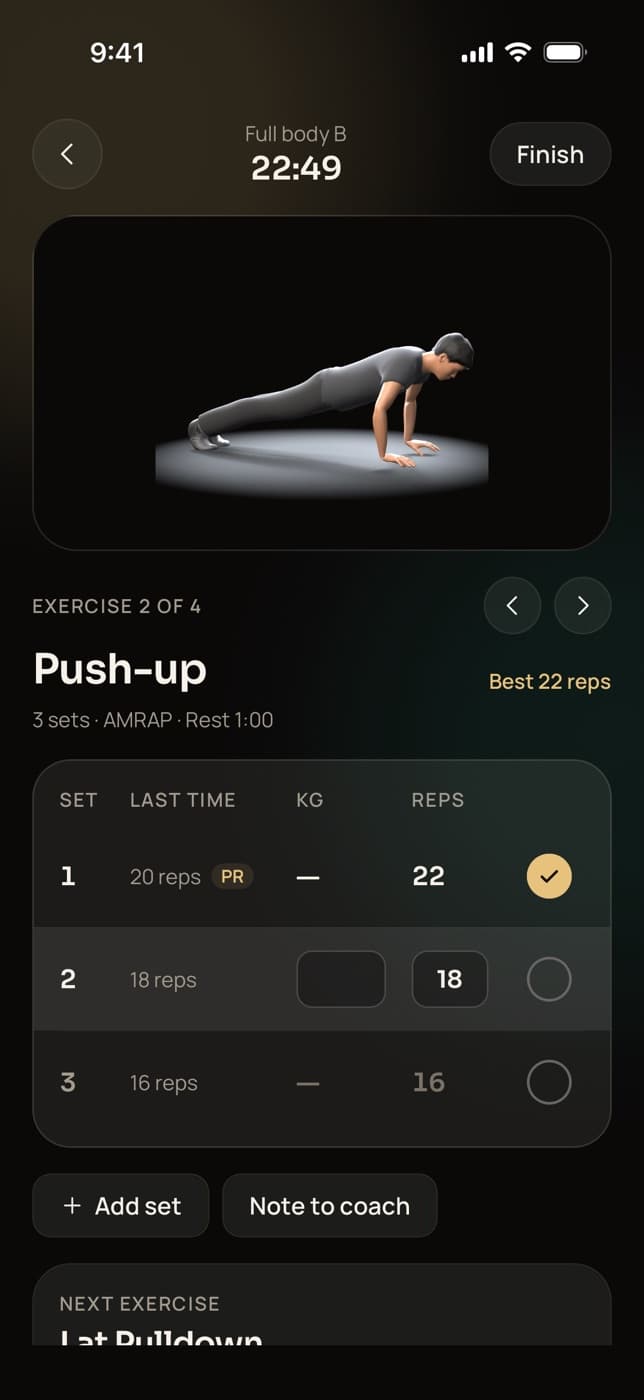
Logged sets turn into estimated 1RM charts and PRs, so you can show a client how far their lifts have come, and they see each PR the moment they hit it.
Trainaq Coach, the app →- Best estimated 1RM per day
- PR alerts in the workout player
- Recent PRs on the progress view
Weight, waist and the food log together
Watch the weight trend and waist from weekly check-ins next to how many days the client logged food, so a stalled week has an explanation.
Nutrition coaching →- Waist and weight every week
- Food logging adherence
- Photos by pose, private
The same view for every coach
Each coach sees progress for the clients they lead, and the owner sees everyone. On the web dashboard, the Home page flags clients who have gone quiet.
Trainaq for gyms →- On track, slipping or quiet at a glance
- Progress on the web and in the app
- Each client’s lead coach set by the owner
Health apps
Which Apple Health and Health Connect data does Trainaq read?
Daily steps, sleep, resting and average heart rate, weight, active calories, and workout count and minutes. Trainaq only reads, never writes back. Clients choose what to share in the phone’s own permission screen, and synced steps and sleep fill in their habits. Health app sync is on Pro and Studio.
- Apple Health on iPhone, Health Connect on Android
- Samsung Health and Fitbit data reach Trainaq through Health Connect
- First sync covers 30 days; Sync now any time after
- Stop syncing and delete synced data from the app
Privacy
Who can see a client’s progress photos?
Only the client and the coaches who manage them. Photos sit in a private store and open through links that expire after an hour, never public addresses. The app drops location data from each photo before upload, and clients can delete photos they added. The privacy line “Only your coach can see your photos” appears wherever they add one.
FAQ
Progress tracking FAQ
How do coaches track client progress in Trainaq?
Mostly without typing anything. Weight and measurements come from the intake and weekly check-ins, photos from the client’s app, lifts and PRs from logged sets, and steps and sleep from health apps. The progress view puts them together with adherence over 7 and 28 days, in Trainaq Coach and on the web.
Can clients see their own progress?
Yes. The Progress screen in the free Trainaq app shows their weight trend, steps and sleep for the last 14 days from a connected health app, their progress photos and their past check-ins with your replies. They also see PRs as they hit them in the workout player, and streaks on their Today screen.
Does Trainaq work with Apple Health and Health Connect?
Yes, on Pro and Studio. Clients connect Apple Health on iPhone or Health Connect on Android from the Trainaq app. Trainaq reads 30 days first, then syncs when they open the app’s Today screen or tap Sync now. You see steps, sleep, resting heart rate and workouts on their progress.
Does Trainaq connect to Samsung Health or Fitbit?
Through Health Connect on Android. When Samsung Health or Fitbit shares its data with Health Connect, Trainaq reads it from there, along with any other app that writes to it. There is no direct Fitbit or Samsung connection, and on iPhone Trainaq reads Apple Health.
Can I compare progress photos side by side?
Not yet. Photos are grouped by day with their pose, front, side, back or other, so you can scroll back to the same pose from earlier weeks, in Trainaq Coach or on the web. Ask clients for the same pose, light and time of day each week to make that easier.
How is estimated 1RM worked out?
From the client’s logged sets, using the Epley formula on sets of 1 to 12 reps with a weight. Trainaq keeps the best estimate of each day for the lifts the client trains most and charts them, and the same formula drives the estimated 1RM personal records in the workout player.
Which plans include progress tracking?
Progress photos, measurements, adherence and PRs are on every plan. Apple Health and Health Connect sync is on Pro and Studio. Plans differ by how many active clients you coach and how many coach accounts you need. Every plan starts with a 7-day free trial, and no card is needed.