Nutritionist and dietitian software
Dietitian and nutritionist software for clients you coach week to week.
Trainaq is software for dietitians and nutritionists in private practice: intake forms, calorie and macro targets, meal plans your clients follow in the free Trainaq app, food logs with AI photos, check-ins, online consultations and payments, with each client in one place.
- Trainaq Coach · Android, iPhone coming soon
- Web dashboard
- Free Trainaq app for clients
Updated 20 Nov 2026
What is dietitian software?
Dietitian software is where a dietitian or nutritionist keeps each client’s intake, calorie and macro targets, diet plan, food log, follow-ups and payments. In Trainaq, clients follow the plan and log meals in a free app, and you review everything in Trainaq Coach or on the web dashboard. It isn’t clinical software or a medical record.
- Starter covers up to 10 active clients, Pro up to 50 and Studio up to 200.
- Every paid plan starts with a 7-day free trial, and no card is needed.
- Clients follow the plan and log meals in the free Trainaq app on iPhone and Android
- Online payments through your own Stripe or PayPal on Pro and Studio; record the rest
Why nutritionists switch
Why do nutritionists outgrow meal plans sent as PDFs?
Because the plan is only half the job. A PDF or image goes out on WhatsApp, the client screenshots it and loses it, and at the follow-up you rebuild their week from memory. Coaching works when the plan, the food log and the check-in live in one place.
The plan gets buried
A meal plan sent as a file sinks under the day’s messages, and every change means sending a new one.
Food recall from memory
“Mostly stuck to it” tells you little. Without a daily log you find out on the call that the week went off track.
Renewals in your head
Three-month packages end on different dates, and who has paid for this month lives in a notebook.
A week with Trainaq
What does a week with Trainaq look like for a dietitian?
New clients answer your intake before the first call. You set their targets and build or draft a meal plan, they follow it in the free Trainaq app and log what they eat, and their weekly check-ins land in one queue. Chat, consultation calls and payments sit beside each client.
Start with an intake that asks the right questions
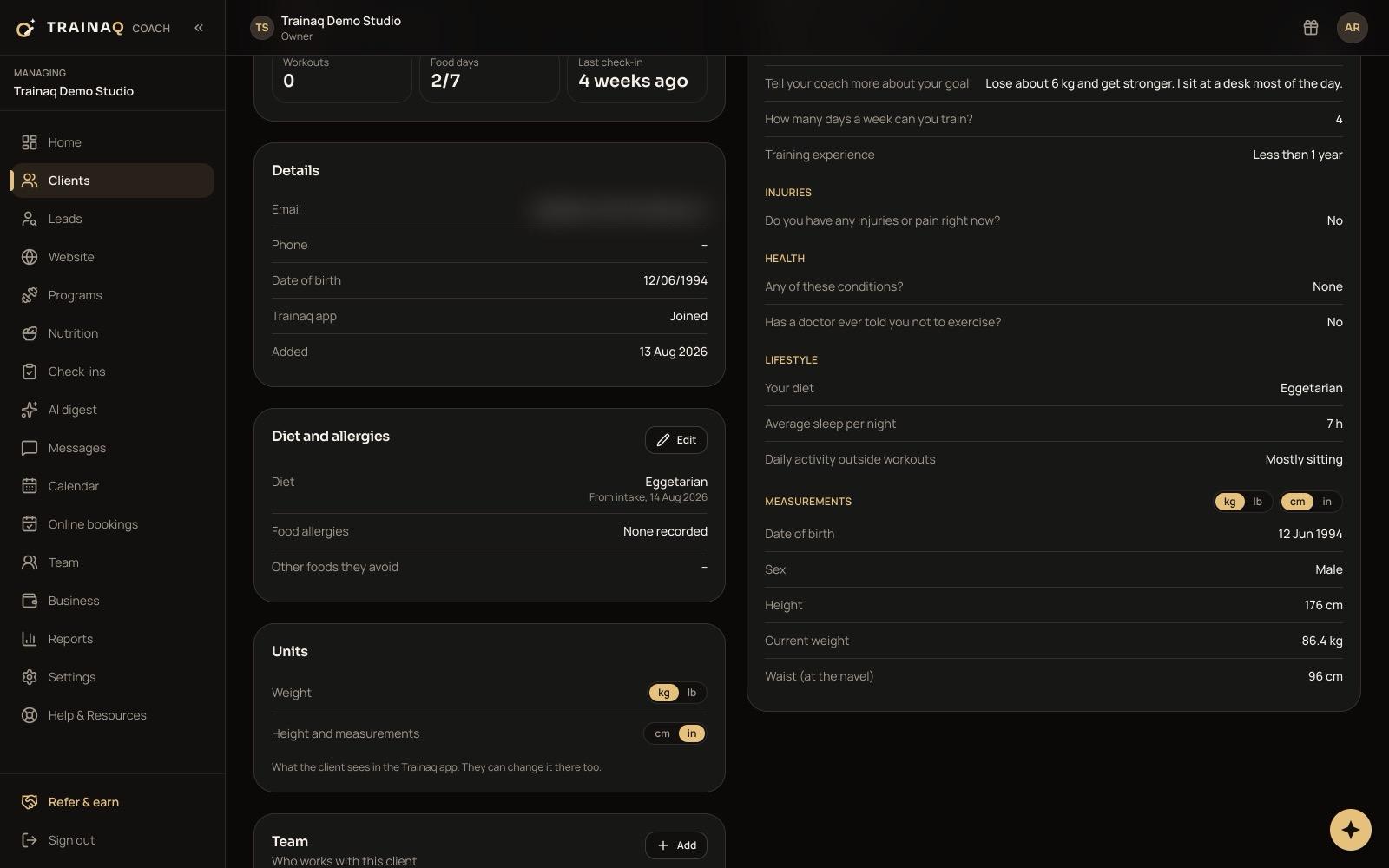
Each new client answers your intake form in the free Trainaq app before you meet: goals, conditions such as diabetes, thyroid or PCOS/PCOD, medicines, pregnancy, diet type, food allergies, sleep, activity, measurements and front, side and back photos.
- Share the invite by WhatsApp, the share sheet or a copied link
- Their diet type and food allergies fill the client’s Diet and allergies card
- Send the intake again when something changes
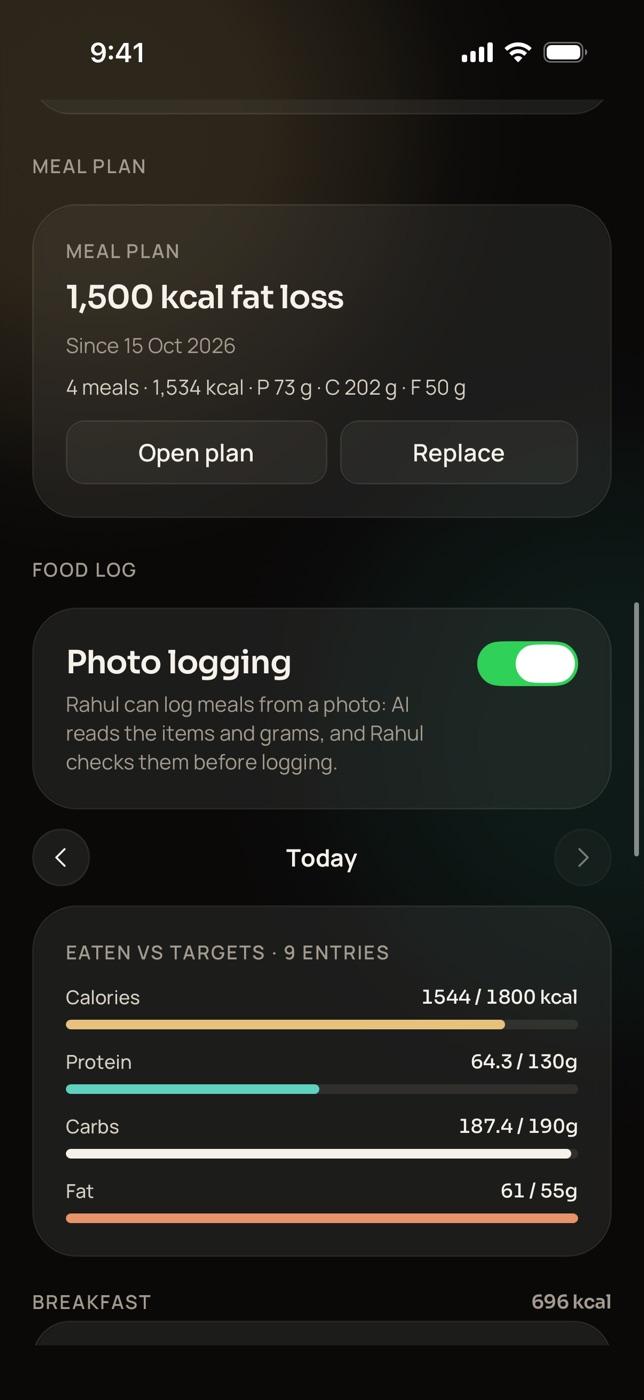
Set targets and build the meal plan
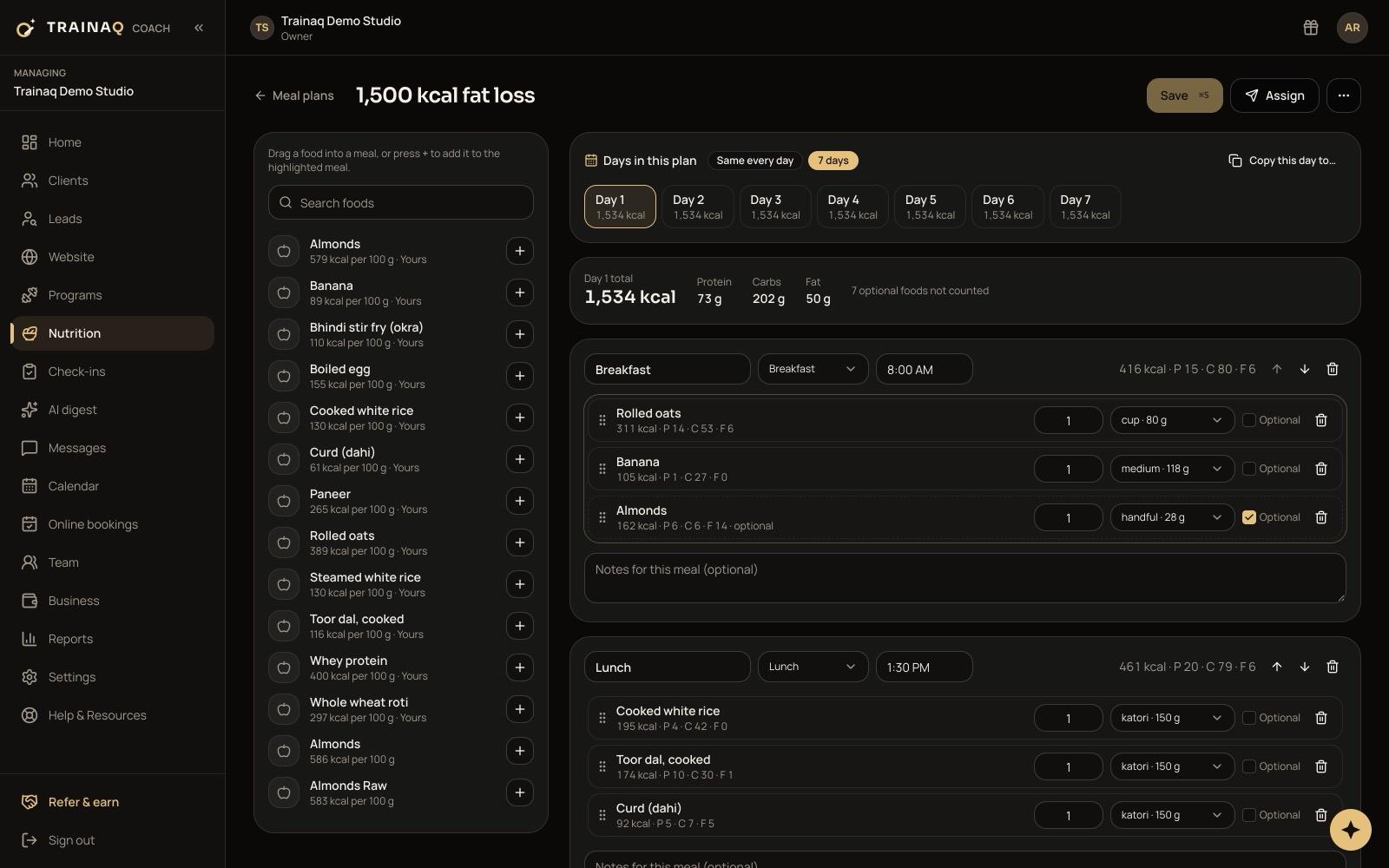
Set calories, protein, carbs, fat and fibre from the date you choose, with a note the client reads as “From your coach”; earlier targets stay as history. Then build the meal plan from the food library and your own foods, and watch each day’s totals against the plan’s targets as you go.
- Grams, servings or household measures such as 1 katori or 1 roti
- The same every day or seven different days, from a Trainaq plan or your own template
- On the web dashboard, a warning when a food clashes with the client’s diet type or allergies
Or let AI draft the week
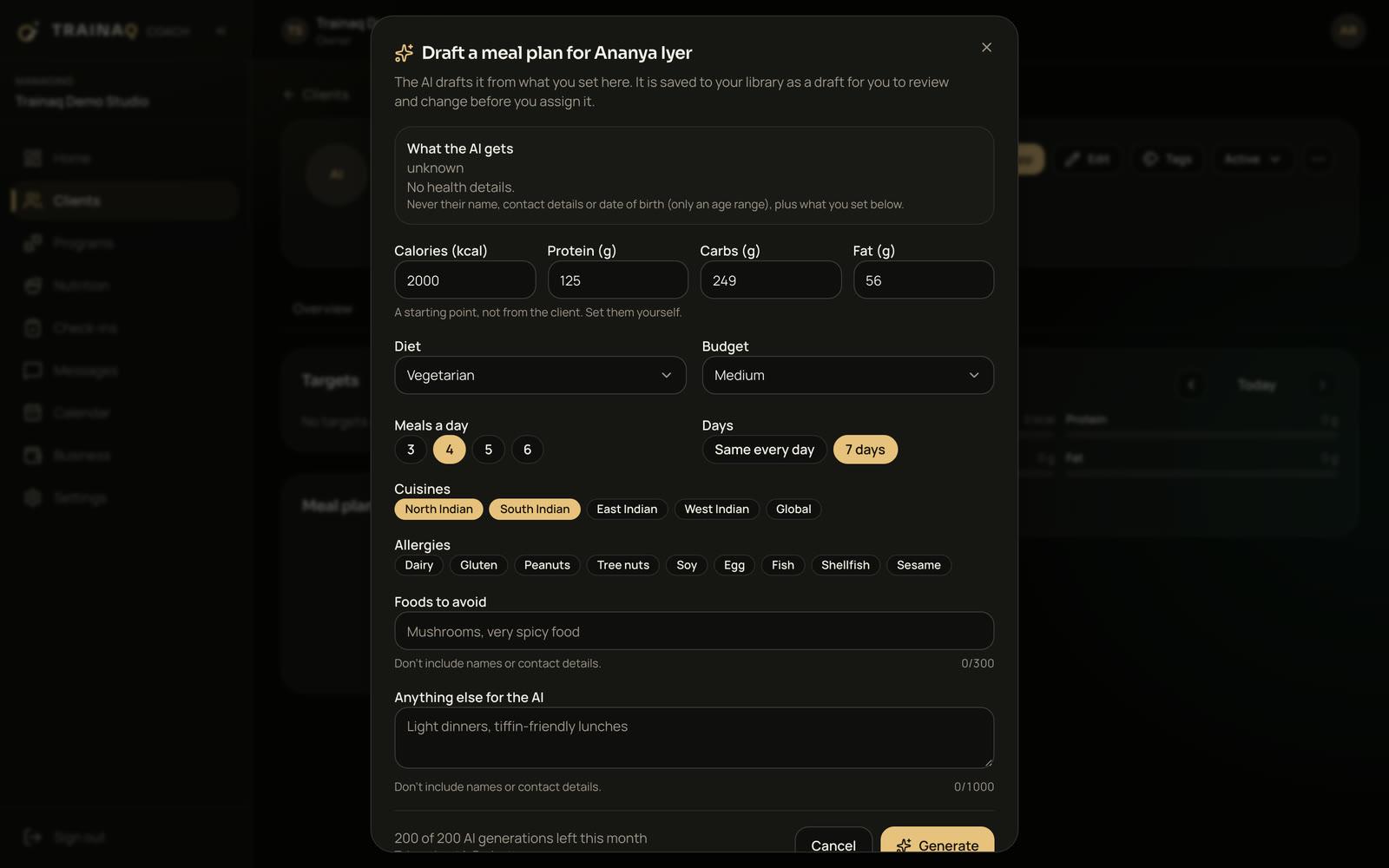
On the web dashboard and in Trainaq Coach, AI drafts one day or a week of meals from the client’s intake and targets, in the diet, regional cuisines and budget you pick, leaving out allergens and the foods you list. Each day lands within 5% of the calories and macros you set, added up from our food library.
- AI drafts are on Pro and Studio
- Health details are sent only after you confirm the client agreed, once per client, and you can withdraw that consent on the web dashboard
- Every draft says it is not medical advice; you edit and review it before assigning
Clients follow the plan in the Trainaq app
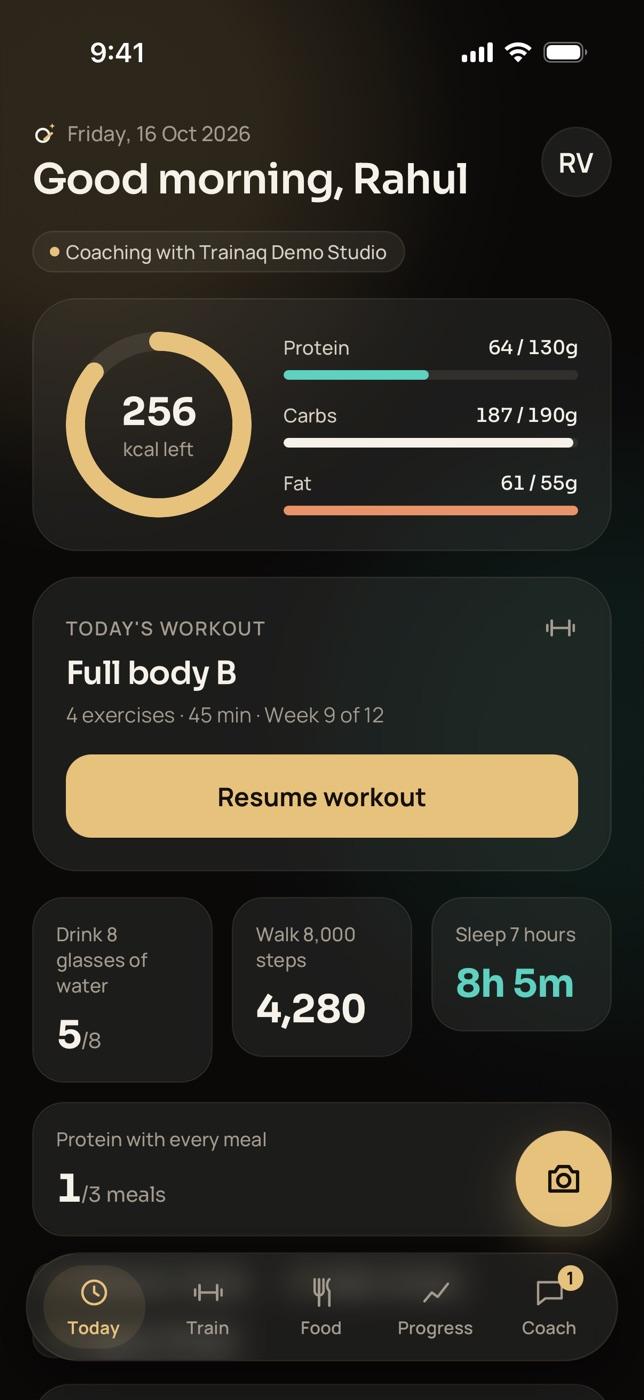
Assign the plan to one client, or to up to 100 from a start date; each gets their own copy, with targets set from it unless you switch that off. In the free Trainaq app, “Your meal plan” opens on today’s day, with each meal’s time, foods, portions and your notes. Tapping a food opens it in the food log with the planned portion.
- Other days in tabs by weekday; a one-day plan reads “Every day”
- The day’s total next to their targets, with optional foods left out
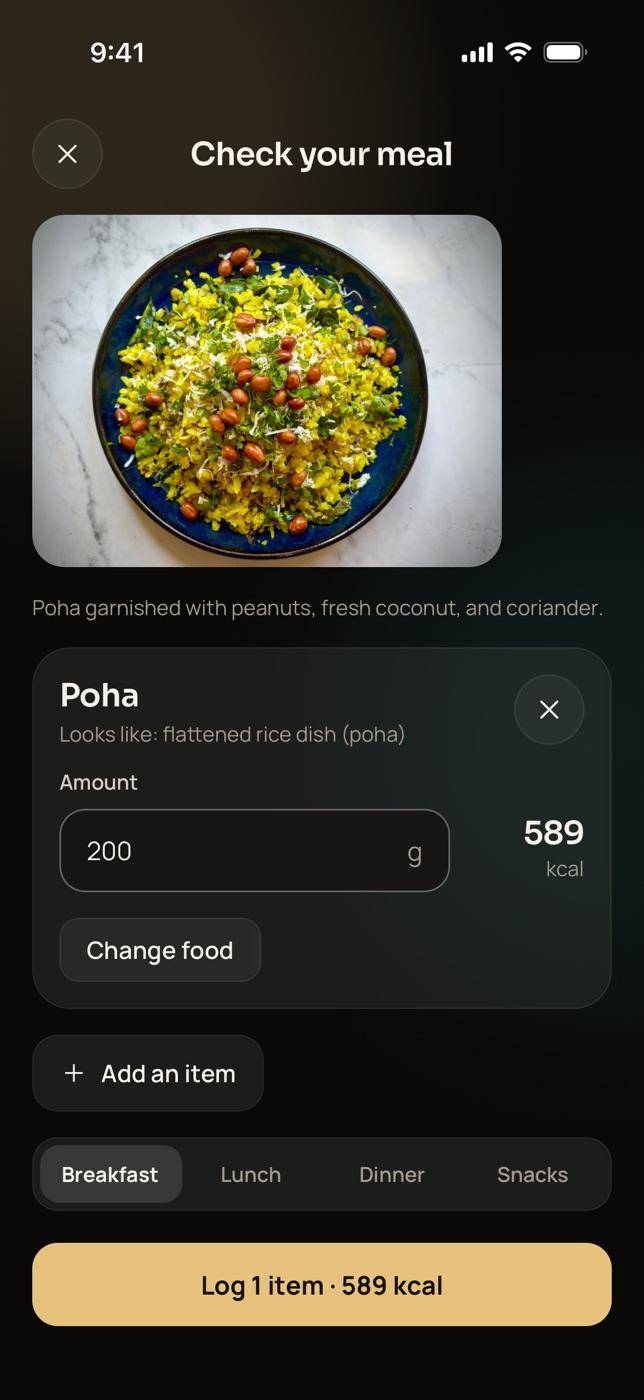
- Meals logged by search, barcode, AI photo or quick add, even offline
Review food logs and weekly check-ins
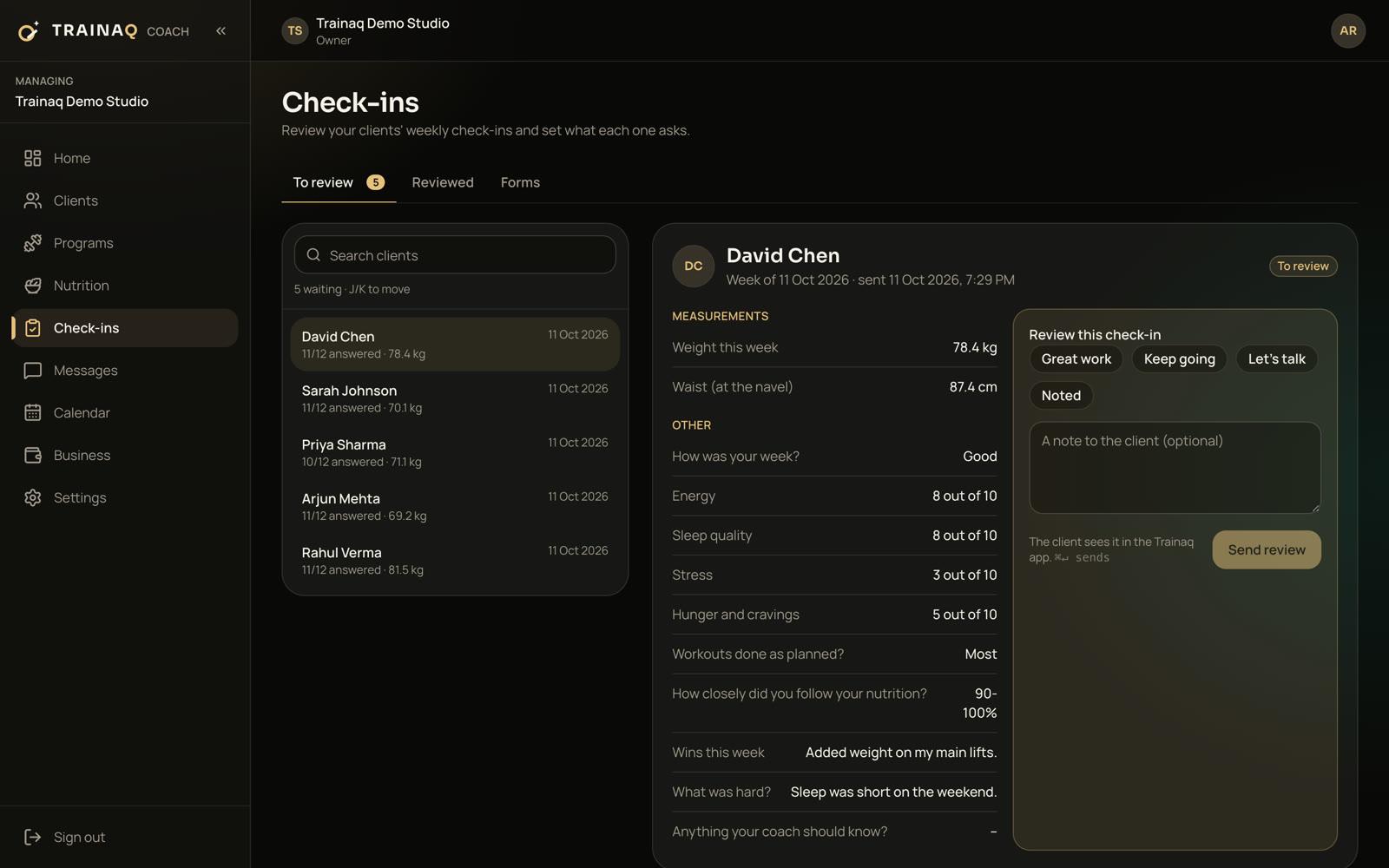
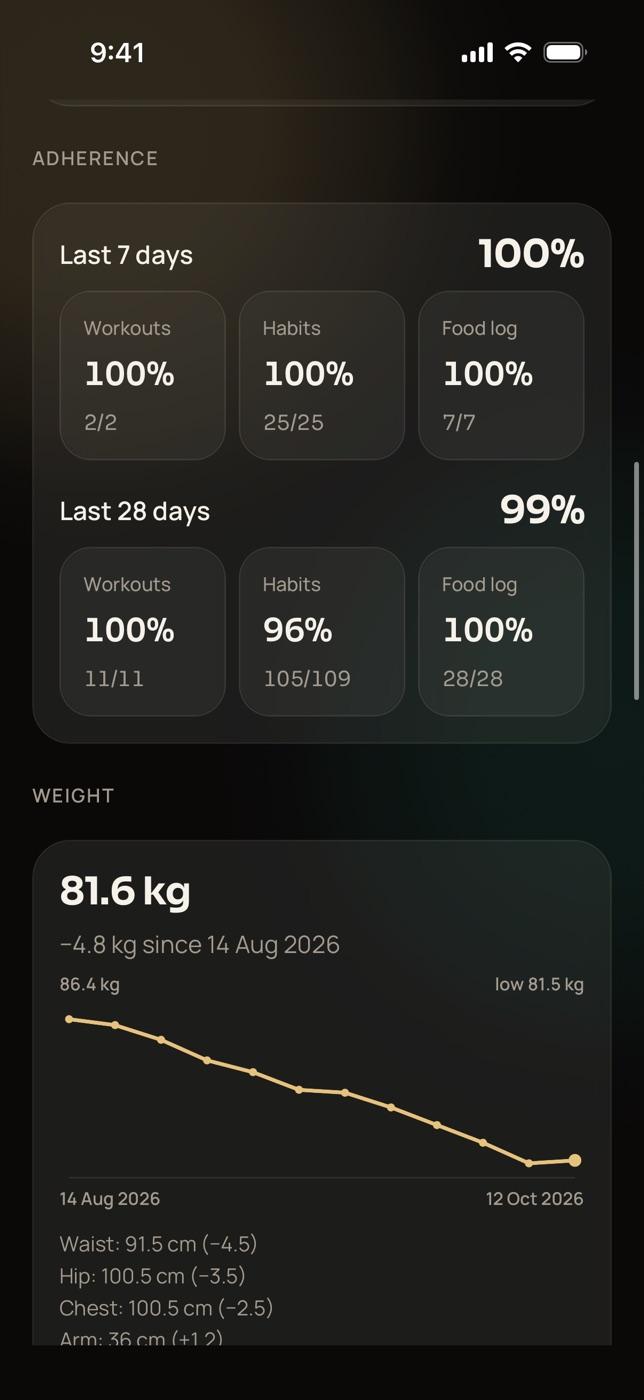
See each client’s food log by meal against the targets in force that day, in Trainaq Coach or on the web dashboard, where one screen lists every active client’s day. Weekly check-ins bring weight, measurements, answers and front, side and back photos into one queue: react in one tap and add a note.
- Move the targets from a date when the check-in says so
- Chat with text, photos, voice notes and video between check-ins
- A weekly digest every Monday morning, by email and on the web dashboard’s Home: last week’s workouts, check-ins, food logs and weight for each client, and an AI-suggested action for anyone who needs attention, to check before you act
Get paid and renew
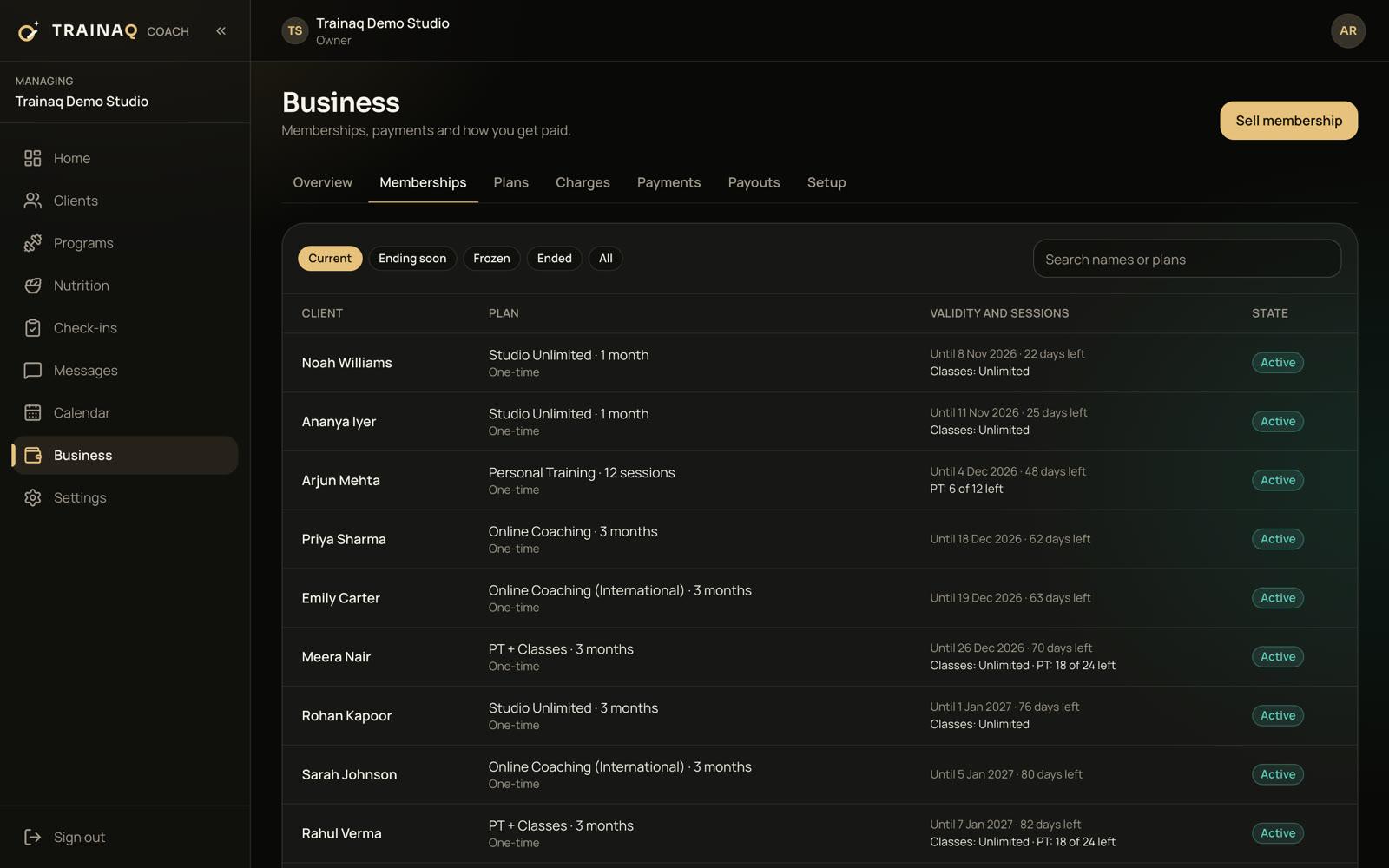
Sell monthly or three-month coaching packages as memberships, with a set number of 1:1 consultation calls if you offer them. On Pro and Studio, clients pay online through your own Stripe or PayPal, or you record payments, with dues by date, and clients book calls in your open slots.
- Client reminders 7, 3 and 1 days before a membership ends, by push and email
- Freeze, extend or upgrade a membership when a client travels or wants more
- A receipt for every payment, in the client’s app
Your practice
How does Trainaq help run a dietitian practice day to day?
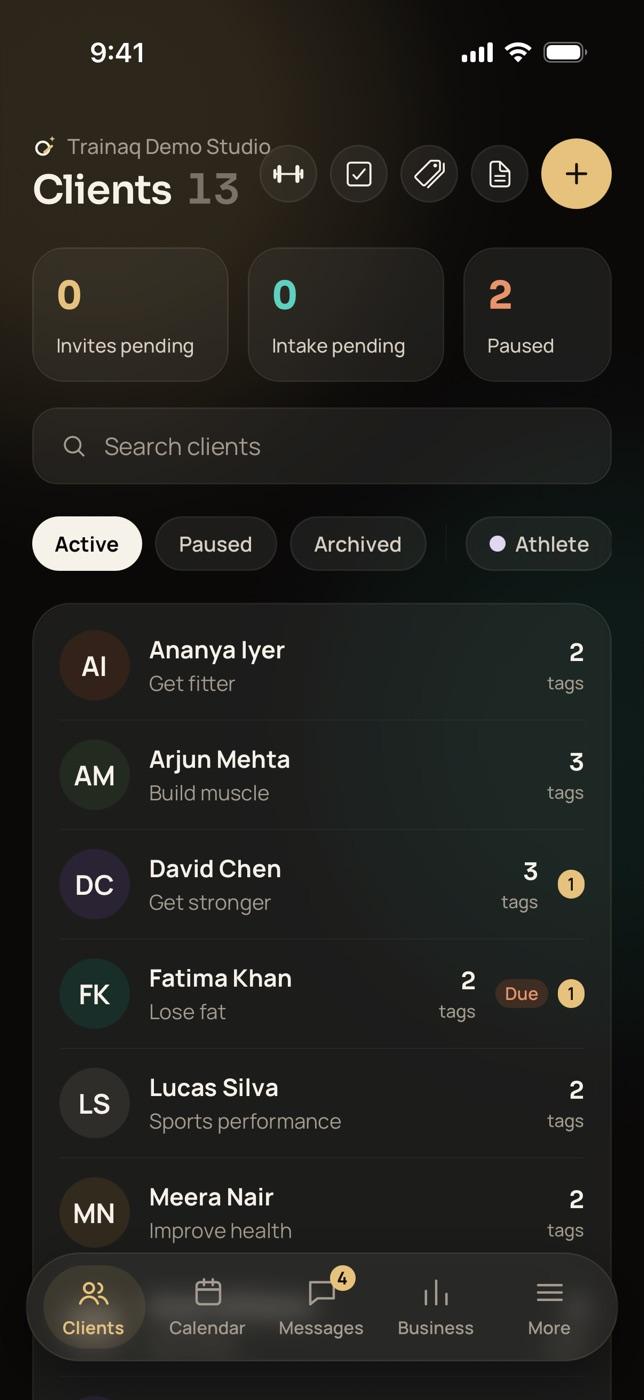
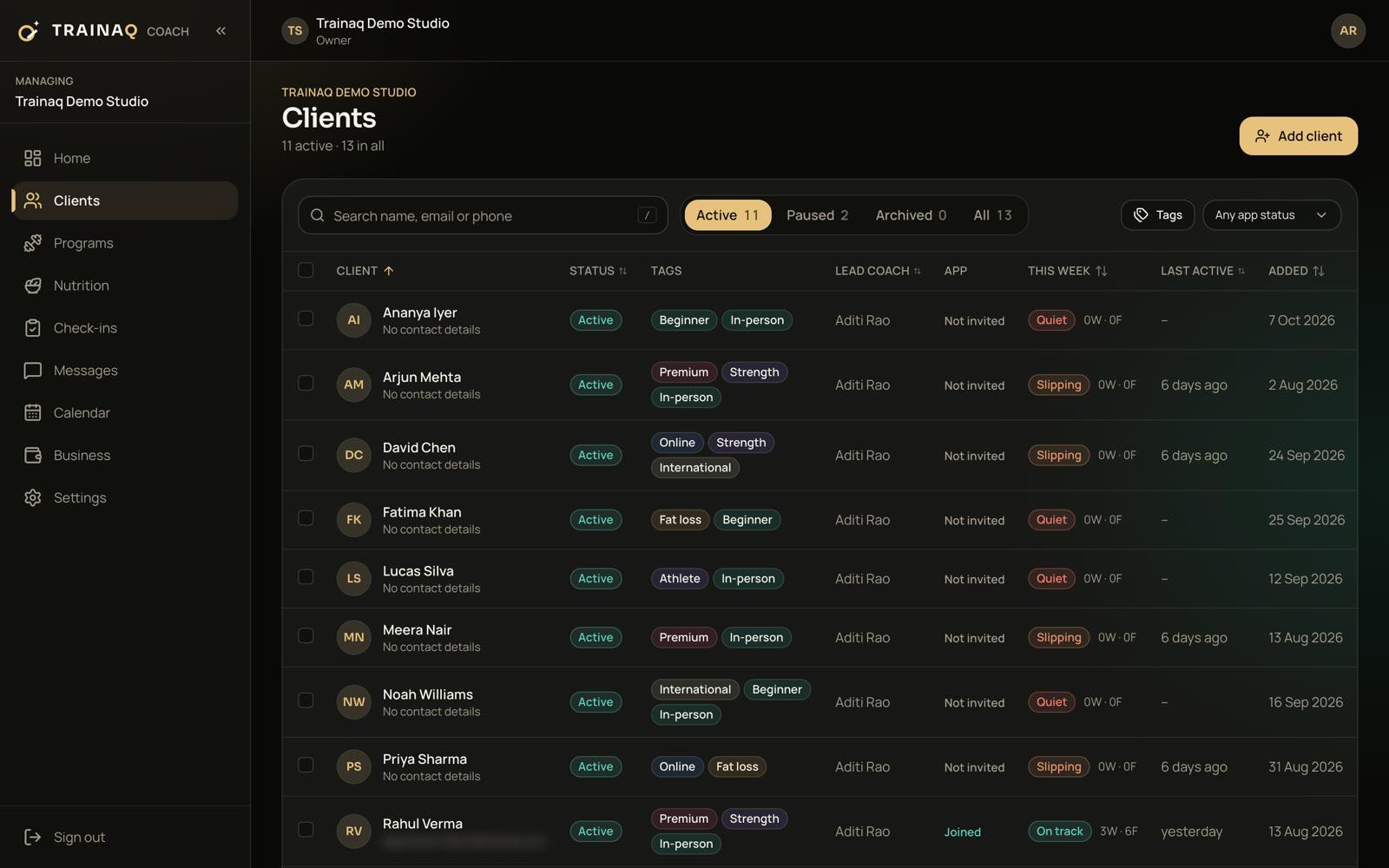
One client list shows each client’s status, tags and this week’s activity, so you see who needs a follow-up. Enquiries become leads with follow-up dates on Pro and Studio, the intake and signed consent come in before the first call, and consultation notes stay private to your team on the web dashboard.
- Join links and an enquiry form to share on Instagram, WhatsApp or your website
- The Health screen, a liability waiver and your terms, signed in the client’s app
- Archive clients who finish, so they don’t count toward your plan’s limit
- Add an assistant or a second dietitian as a coach account, each seeing the clients they coach
Online consultations
Can I run online diet consultations on Trainaq?
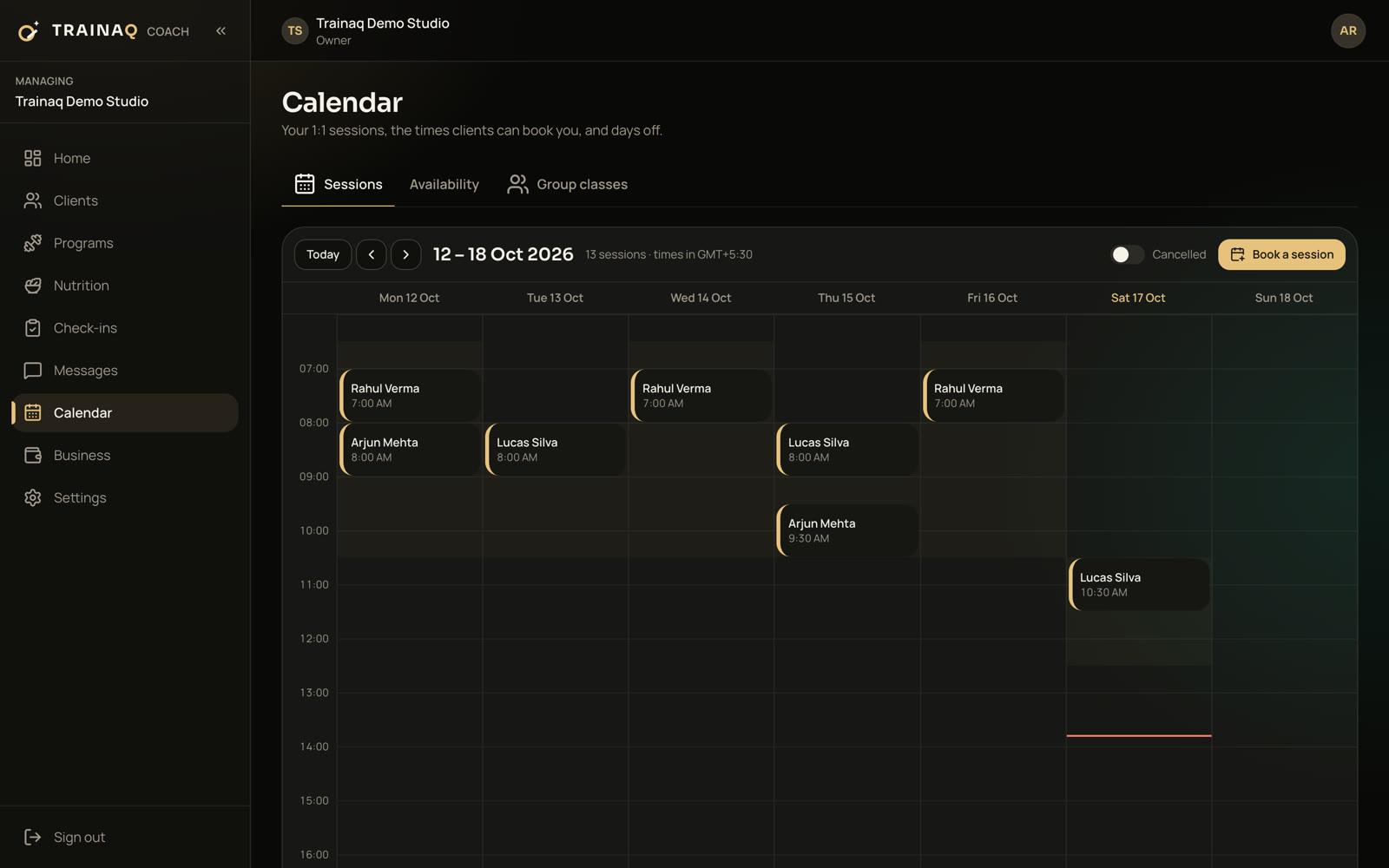
Yes. Set your hours, session lengths, notice and buffer, and clients book 1:1 consultation calls in your open slots, in their own time zone, with reminders. With Zoom or Google connected, on Pro and Studio, Trainaq makes the meeting link, or paste your own; clients tap Join. Each call can come from their package.
- Sessions on a weekly calendar in Trainaq Coach and on the web dashboard
- A package can carry a set number of consultation calls, counted as they are used
- Chat between calls, with photos and voice notes
What you use most
Which Trainaq features do dietitians and nutritionists use most?
The meal plan builder and food logs carry the work, and AI food photos make logging quick enough that clients keep at it. The AI builder drafts a first week, intake forms and check-ins frame each client, and progress tracking shows the trend. Consultation calls run on 1:1 booking.
Meal plan builder
Household measures, seven-day plans, templates, allergy warnings and a copy for each client.
Nutrition coaching
Targets with history, food logs, and every client’s day on one screen.
AI meal plan drafts
Pro and StudioA week of meals from a client’s intake, within 5% of your targets, on the web dashboard and in Trainaq Coach.
AI food photo logging
Clients snap a meal; AI names the foods and portions for them to check and log.
Intake forms
Goals, conditions, medicines, diet type, allergies and measurements before the first call.
Check-ins
A weekly form per client, with measurements and photos, reviewed in one queue.
Progress tracking
Weight trend, measurements, photos and food-log adherence over 7 and 28 days.
1:1 session booking
Consultation calls in your open slots, with reminders and your Zoom or Meet link.
Payments
How do my nutrition clients pay me?
On Pro and Studio, your clients pay online through your own Stripe or PayPal, from a payment link or the Trainaq app, in your currency and straight to you, with no Trainaq fee; monthly plans renew automatically. You also record cash, bank transfers and part payments, with dues tracked. Your own plan is billed in US dollars.
- Membership prices in US dollars or rupees
- Part payments, with the rest due on a date you set
Plans
Which Trainaq plan fits a dietitian or nutritionist?
Plans differ by how many active clients you coach and how many coach accounts you need. Targets, meal plans, food logs, AI food photos and check-ins are on every paid plan, and AI meal plan drafts are on Pro and Studio. Every paid plan starts with a 7-day free trial, and no card is needed.
Most dietitians and nutritionists start on Pro: $39 a month for up to 50 active clients, with 5 coach accounts.
| Plan | Price | Active clients | Coach accounts |
|---|---|---|---|
| Starter | $19 a month | Up to 10 | 1 coach account + 1 assistant |
| ProFits most | $39 a month | Up to 50 | 5 coach accounts |
| Studio | $79 a month | Up to 200 | 25 coach accounts |
Prices are in US dollars, with no tax added. Every paid plan starts with a 7-day free trial, and no card is needed. Every feature by plan →
Honest gaps
What doesn’t Trainaq do for dietitians and nutritionists yet?
A few things dietitians ask about are not built yet: a PDF or printable diet chart to send, a library of handouts to share with clients, grocery lists, and targets for vitamins, minerals or sodium. There are no lab reports, clinical records or insurance billing, and a meal plan repeats over one day or seven.
- Clients follow the plan in the Trainaq app instead of a PDF
- Add a home recipe as your own food with its nutrients per serving and, on the web dashboard, a YouTube link to how it’s made
- Keep consultation notes as private notes on the web dashboard
- Consultation calls count as PT sessions on a client’s membership
- AI drafts use Trainaq’s food library, not your own foods yet
- Online payments through your own Stripe or PayPal are on Pro and Studio; on other plans you record each payment
Getting started
How do I move my clients over to Trainaq?
Import your clients from Excel or CSV in Settings → Import Data on the web dashboard, with their plans, payment history and freezes. Nothing is sent to anyone during an import, and you can undo it within 7 days. Then send each of them your invite link by WhatsApp, SMS or email to join in the Trainaq app.
FAQ
Nutritionists FAQ
Is Trainaq right for a dietitian or nutritionist in private practice?
Yes, if you coach clients over weeks and months, in person or online. Trainaq keeps the intake, calorie and macro targets, meal plan, food log, weekly check-ins, chat, consultation calls and payments for each client. It isn’t clinical software: there are no lab reports, medical records or insurance billing.
Can my clients see their meal plan in the app?
Yes. A “Your meal plan” row on the client’s Today and Food screens shows the plan day, its meals and calories. It opens the full plan: your note, a tab for each day of a seven-day plan, and every meal with its foods and portions. A plan starting later says when, and clients can’t edit it.
How do I build a meal plan for a client?
In Trainaq Coach or on the web dashboard, set the plan’s calorie and macro targets, then add meals such as breakfast and lunch. Pick foods from the library or your own, with each portion in grams, servings or a household measure such as 1 katori or 1 roti. Save it as a template for the next client.
Can AI write diet plans for my clients?
Yes, as drafts you review, on the web dashboard and in Trainaq Coach. AI drafts one day or a week of meals from the client’s intake and our food library, each day within 5% of your targets. Nothing reaches the client until you assign it. AI drafts are on Pro and Studio.
Is Trainaq clinical dietetics software or an EHR?
No. Trainaq is coaching software, not a medical record. The intake can ask about conditions such as diabetes, thyroid or PCOS/PCOD, medicines and pregnancy, and you can keep private notes on the web dashboard, but there are no lab reports, clinical assessments, prescriptions or insurance billing. AI meal plan drafts say they are not medical advice.
How much does Trainaq cost for a dietitian?
Starter costs $19 a month for up to 10 clients, Pro $39 for up to 50 and Studio $79 for up to 200. Meal plans and food logs are on every paid plan, and AI drafts on Pro and Studio. Every paid plan starts with a 7-day free trial, and no card is needed.
How many clients can I coach on Trainaq?
Starter covers up to 10 active clients, Pro up to 50 and Studio up to 200. Archived clients don’t count toward the limit, so archive those who finish coaching. If you reach the limit, only adding new clients is blocked, and your current clients keep their plans. Move up a plan whenever your list grows.
Is there a free trial?
Yes. Every paid plan starts with a 7-day free trial, no card needed, so clients can join, fill in your intake and log meals before you pay. If it ends without a paid plan, your business moves to Free if it has 2 clients or fewer, else becomes read-only; nothing is deleted. The Free plan has no meal plans.